

In the age of petabyte-scale analytics and generative artificial intelligence, modern enterprises generate more data in a single day than they used to collect over an entire decade. However, collecting data is fundamentally different from extracting value from it.
Traditional relational databases and legacy data warehouses frequently collapse under the weight of concurrent analytical workloads, requiring complex infrastructure provisioning, continuous index tuning, manual vacuuming, and expensive server hardware management.
Google BigQuery has been solving these structural bottlenecks with its serverless, AI-ready cloud enterprise data warehouse. Designed to execute SQL across petabyte-scale datasets using massively parallel processing, BigQuery fundamentally redefines data analytics through a completely decoupled storage and compute architecture.
This architectural guide breaks down how Google BigQuery works under the hood, how it integrates with modern enterprise data lakehouses, how its embedded machine learning and generative AI engines function, and how enterprise tech leaders can leverage its scalability and cost optimization models.
Architectural Deep Dive: Under the Hood of BigQuery
To understand BigQuery's sub-second performance on petabyte datasets, one must look past the familiar SQL console and explore the global distributed infrastructure that powers it. BigQuery's serverless model relies on five foundational infrastructure components that separate compute from storage and connect them over an ultra-high-speed network fabric.
Dremel: The Multi-Tenant Query Execution Engine
At the heart of BigQuery lies Dremel, a massive multi-tenant query execution engine first detailed in Google's landmark 2010 research paper. Dremel converts standard SQL queries into an execution tree:
- Root Node: Receives the incoming SQL request from the user interface or API, evaluates the execution plan, and breaks the query down into smaller parallel tasks.
- Mixer Nodes (Intermediate Tier): Act as aggregation layers. They modify and fan out query sub-tasks to downstream nodes and perform intermediate aggregations on data flowing back up the tree.
- Leaf Nodes / Slots (Execution Tier): Represent the virtual compute units assigned to execute actual data-scanning tasks. Leaf nodes read raw column shards directly from Colossus storage, evaluate SQL predicates, compute transformations, and stream partial results upward.
Colossus: Distributed Storage System
Colossus is Google's global distributed file system and the direct successor to the Google File System (GFS). Colossus manages cluster-wide file replication, durability, automated recovery, and drive sharding across Google data centers.
Because storage is entirely external to compute nodes in BigQuery, local disk failures never cause query loss or storage downtime. Data is automatically replicated across multiple availability zones within a region to ensure enterprise-grade durability.
Capacitor: The Columnar Storage Format
BigQuery stores physical table data using a proprietary columnar file format named Capacitor. Capacitor replaced BigQuery's legacy ColumnIO engine, introducing advanced data compression algorithms tailored specifically to analytics:
- Column Pruning: Unlike row-oriented systems (such as PostgreSQL) that read full rows off disk, Capacitor allows leaf slots to read only the specific columns referenced in a SELECT statement, dramatically reducing I/O.
- Advanced Encoding Schemes: Capacitor dynamically selects optimal compression algorithms based on column data statistics collected during ingestion, such as Run-Length Encoding (RLE), Bit-Packing, Frame-of-Reference, and Dictionary Encoding.
- Nested and Repeated Structure Support: By extending Dremel's Definition and Repetition levels framework, Capacitor natively stores complex JSON-like nested arrays and structs without requiring denormalization or costly runtime table joins.
Jupiter Network: Petabit-Scale Network Interconnect
Decoupling compute from storage introduces a critical hardware challenge: transferring terabytes of uncompressed data between separate servers within milliseconds. BigQuery overcomes this physical boundary through Google's Jupiter Network fabric.
Jupiter allows thousands of Dremel leaf slots to stream data blocks from Colossus disks simultaneously at speeds equal to or exceeding local NVMe drives.
Borg: Massive Cluster Orchestration
Allocation of all compute resources in BigQuery is managed by Borg, Google's precursor to Kubernetes. Borg provisions containers, coordinates multi-tenant hardware workloads, handles machine failures automatically, and balances CPU and RAM allocation across tens of thousands of physical nodes without disrupting active user queries.
BigQuery Storage and Ingestion Mechanics
Building an efficient data warehouse requires selecting appropriate data ingestion strategies and physical table layouts.
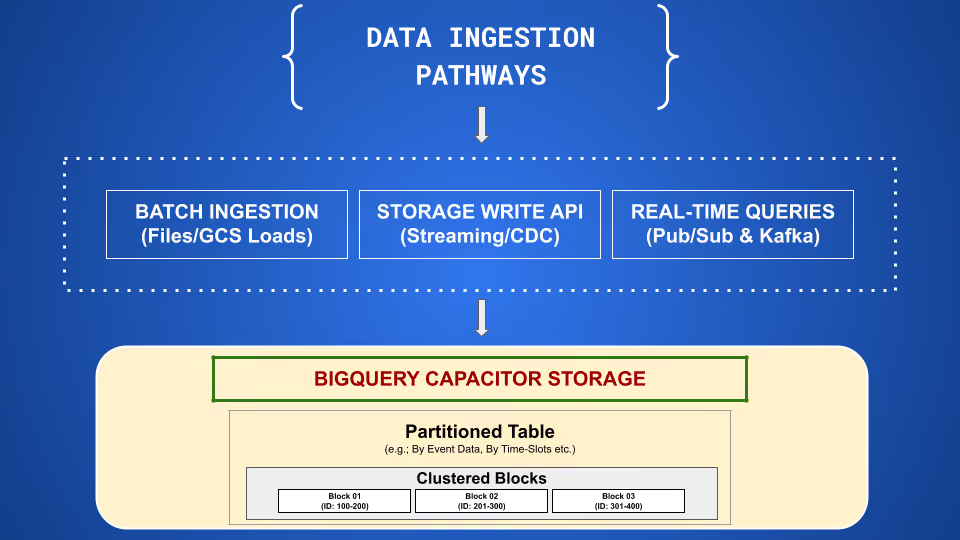
BigQuery offers three primary ingestion paths depending on latency and operational requirements:
- Batch Loading (Free Ingestion): Imports structured data files (Parquet, ORC, AVRO, CSV, JSON) directly from Google Cloud Storage or local systems. Batch loads do not incur BigQuery data processing fees and convert data into Capacitor storage blocks asynchronously.
- BigQuery Storage Write API (Streaming): The Storage Write API supports column-level upserts and CDC, while offering exactly-once processing when using custom streams with offset management. Default streams operate on at-least-once semantics.
- Change Data Capture (CDC): Uses Datastream or third-party replication platforms (Fivetran, Airbyte) to stream database logs such as PostgreSQL WAL and MySQL Binlog directly into BigQuery tables, merging continuous mutations (INSERT, UPDATE, DELETE) efficiently.
Partitioning Strategies
Partitioning divides large BigQuery tables into smaller segments, reducing total data scanned during query execution:
- Ingestion-Time Partitioning: Tables are automatically partitioned based on the date data arrives in BigQuery.
- Time-Unit Column Partitioning: Tables are partitioned based on an explicit TIMESTAMP, DATE, or DATETIME column in the data schema.
- Integer-Range Partitioning: Tables are partitioned according to integer ranges on specific numeric identifier columns, for example customer_id grouped into ranges of 1,000.
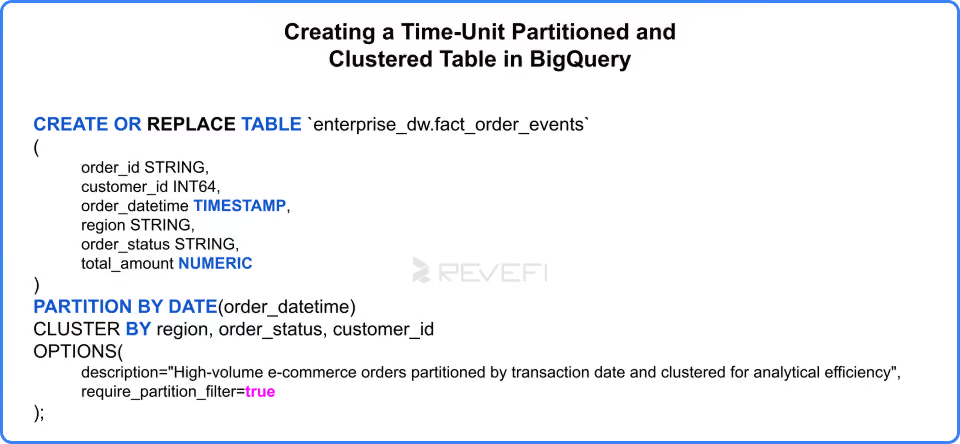
Clustering Mechanics and Block-Level Pruning
BigQuery table optimization relies on partitioning and clustering. Partitioning divides a table into distinct physical segments based on ingestion time or column values, reducing scan costs. Clustering organizes and sorts data within those segments by selected columns, allowing BigQuery to skip non-matching storage blocks for faster, lower-cost query performance.
When data is written to a clustered table, BigQuery automatically sorts Capacitor data blocks based on those clustered keys. During query execution, Dremel uses metadata block indexes to skip reading blocks that fall outside the query's WHERE clauses, a technique known as block-level pruning.
Storage Lifecycle Management and Cost Tiers
BigQuery automatically reduces storage costs based on data access frequency without requiring manual data archiving or data movement workflows:
- Active Storage: Applies to tables or partitions modified or queried within the last 90 days. Billed at standard active storage rates ($0.02 per GB per month in standard regions).
- Long-Term Storage: Applies to tables or partitions that have not been modified for 90 consecutive days. BigQuery automatically drops the storage price by 50% ($0.01 per GB per month) while retaining full SQL queryability and operational SLAs.
Data Lakehouse Architecture: BigLake and Apache Iceberg
Modern architectures often mandate a lakehouse approach, combining the open file formats of data lakes with the strong transactional guarantees, security, and performance of traditional data warehouses.
BigLake: Open Storage Governance
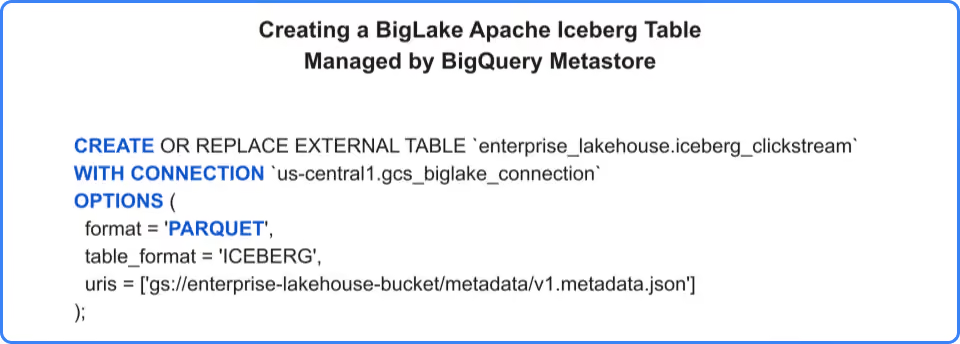
BigLake is an abstraction layer that extends BigQuery's storage engine, access control models, and governance to external files stored in Google Cloud Storage, Amazon S3, or Azure Blob Storage. BigLake allows organizations to query open formats (including Apache Iceberg, Apache Parquet, ORC, AVRO, and JSON) using BigQuery's Dremel compute engine while maintaining strict security policies.
Apache Iceberg Native Integration
BigQuery offers native read and write support for Apache Iceberg, an open table format designed for large-scale analytical datasets:
- ACID Transactions: Ensures concurrent operations such as appends, deletes, and updates maintain strict consistency across lakehouse tables.
- Schema Evolution: Allows teams to add, drop, rename, or update columns in Iceberg tables without requiring full table rewrites or pipeline rebuilds.
- Hidden Partitioning: Prevents users from writing complex partition transformation logic in SQL queries; Iceberg handles temporal partition transformations automatically under the hood.
Multi-Cloud Federation via Google BigQuery Omni
Enterprise data often spans multiple cloud providers. Google BigQuery Omni enables multi-cloud analytics without requiring expensive cross-cloud data movement:
- Local Execution: Runs BigQuery's Dremel execution engine natively on clusters inside Amazon Web Services (AWS) or Microsoft Azure.
- Reduced Egress: Queries execute directly where the data resides, for example inside AWS S3. Only the final query aggregate result set is returned to the user console, avoiding most egress costs.
Advanced Analytics and AI Capabilities
BigQuery integrates analytical processing, embedded machine learning, vector embeddings, and generative AI directly into the SQL layer.
BigQuery ML (BQML): Predictive Modeling in SQL
BigQuery ML empowers data engineers and analysts to train, evaluate, and deploy machine learning models directly inside BigQuery using standard ANSI SQL statements:
- Supported Algorithms: Linear Regression, Logistic Regression, XGBoost, Random Forests, K-Means Clustering, Matrix Factorization (recommendation systems), and Time-Series Forecasting (ARIMA+).
- Remote Model Integration: Connects seamlessly to pretrained models in Vertex AI or external endpoints such as PaLM 2, Gemini models, and Hugging Face endpoints.
Native Vector Search and RAG Workloads
BigQuery supports vector database operations, enabling similarity search and Retrieval-Augmented Generation (RAG) directly on enterprise datasets:
- Embedding Generation: Uses ML.GENERATE_TEXT_EMBEDDING to call Vertex AI embedding models and convert unstructured text such as customer reviews, support tickets, and product docs into dense numeric vector arrays.
- Vector Indexing: Builds VECTOR INDEX structures using approximate nearest neighbor algorithms (for example IVF) to search millions of high-dimensional vectors in sub-second runtimes.
- Vector Search Function: VECTOR_SEARCH pairs structured table data with semantic query embeddings, driving multi-modal enterprise applications.
Gemini in BigQuery: Conversational and Assisted Analytics
Gemini in BigQuery embeds Google's generative AI models directly into the data lifecycle:
- SQL and Python Code Assistance: Generates complex analytical SQL queries, completes code snippets, and translates legacy SQL dialects (Oracle, Teradata, Snowflake) into standard BigQuery GoogleSQL.
- BigQuery Data Canvas: An interactive, visual workspace where teams can discover datasets, construct data flow DAGs, perform joins using natural language, and build visualization charts using conversational prompts.
- Automated Data Insights: Generates summary statistics, detects anomalies, and explains complex queries in plain language.
Continuous Queries: Real-Time Stream Analytics
Continuous Queries turn Google Cloud BigQuery into a powerful streaming analytics engine by using standard SQL to evaluate incoming data in real time. Rather than running static, one-off queries against fixed tables, these continuous operations process new records as they arrive, enabling instant metric aggregations and real-time event alerts.
By processing fresh streaming data directly inside BigQuery, Continuous Queries eliminate the need for dedicated external stream-processing frameworks. Once computed, the system automatically exports the results and event outputs downstream to keep external application integrations, operational databases, and dashboards fully synchronized.
Granular Access Control Mechanisms
BigQuery implements security at three levels of precision:
- Table and View Permissions: Enforced via Google Cloud Identity and Access Management (IAM) roles such as roles/bigquery.dataViewer and roles/bigquery.admin.
- Column-Level Security: Integrates with Dataplex policy tags to restrict column access based on classification taxonomy, for example PII_High or Financial_Confidential. Users without explicit policy tag permissions cannot read or select those specific columns.
- Row-Level Security (RLS): Applies filter predicates dynamically based on the identity of the user running the query.
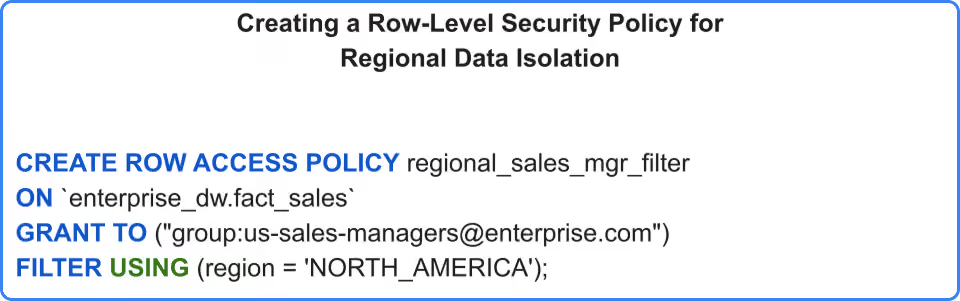
Security Architecture and Governance Controls
- Customer-Managed Encryption Keys (CMEK): While BigQuery encrypts all data at rest and in transit by default, CMEK allows enterprises to manage encryption keys inside Cloud KMS or Cloud HSM, giving teams instantaneous remote revocation control.
- Dataplex Knowledge Catalog: Automatically scans datasets, extracts schemas, catalogs operational metadata, tracks data lineage from source ingestion through transformation to dashboard ingestion, and enforces automated data quality checks.
- Assured Workloads: Provides strict compliance boundary guardrails for regulated industries such as FedRAMP High, CJIS, IL4, and HIPAA. Assured Workloads helps organizations apply compliance controls and data-residency restrictions for regulated workloads.
Core BigQuery Cost Optimization Strategies
While Google BigQuery's decoupled, serverless architecture enables petabyte-scale query processing, its auto-scaling compute and variable storage models can quickly lead to unexpected spend if left unmanaged.
Optimizing BigQuery requires combining structural data modeling, query refinement, capacity management, and automated FinOps platforms. Reducing BigQuery costs involves controlling data scan volumes and managing slot utilization efficiently.
Minimizing Query Scan Volumes
- Partition Pruning and Clustering: Partitioning tables by date or integer ranges ensures queries scan only relevant data segments. Clustering sorts data blocks based on high-cardinality keys such as customer_id, allowing BigQuery to perform block pruning and skip unneeded data.
- Avoiding Unnecessary Scans: Running SELECT * forces BigQuery to read every column in a table. Specifying only required columns reduces scanned bytes, and cost, on wide datasets.
- Filtering Before Joining: Applying WHERE filters before performing table joins prevents unnecessary processing of large intermediate datasets.
Strategic Capacity and Storage Management
- BigQuery Editions and Slot Autoscaling: Transitioning from On-Demand pricing to Google BigQuery Editions allows organizations to set slot caps. Autoscaling dynamically provisions processing units during usage spikes and drops back to baseline when idle.
- Automated Storage Lifecycles: Unmodified tables or partitions automatically transition to long-term storage after 90 days, dropping storage fees while retaining full query availability.
- Materialized Views and BI Engine: Caching frequent analytical queries in BI Engine memory or using materialized views reduces repeated table scans, slashing compute costs for BI dashboards.
Autonomous Optimization with Revefi
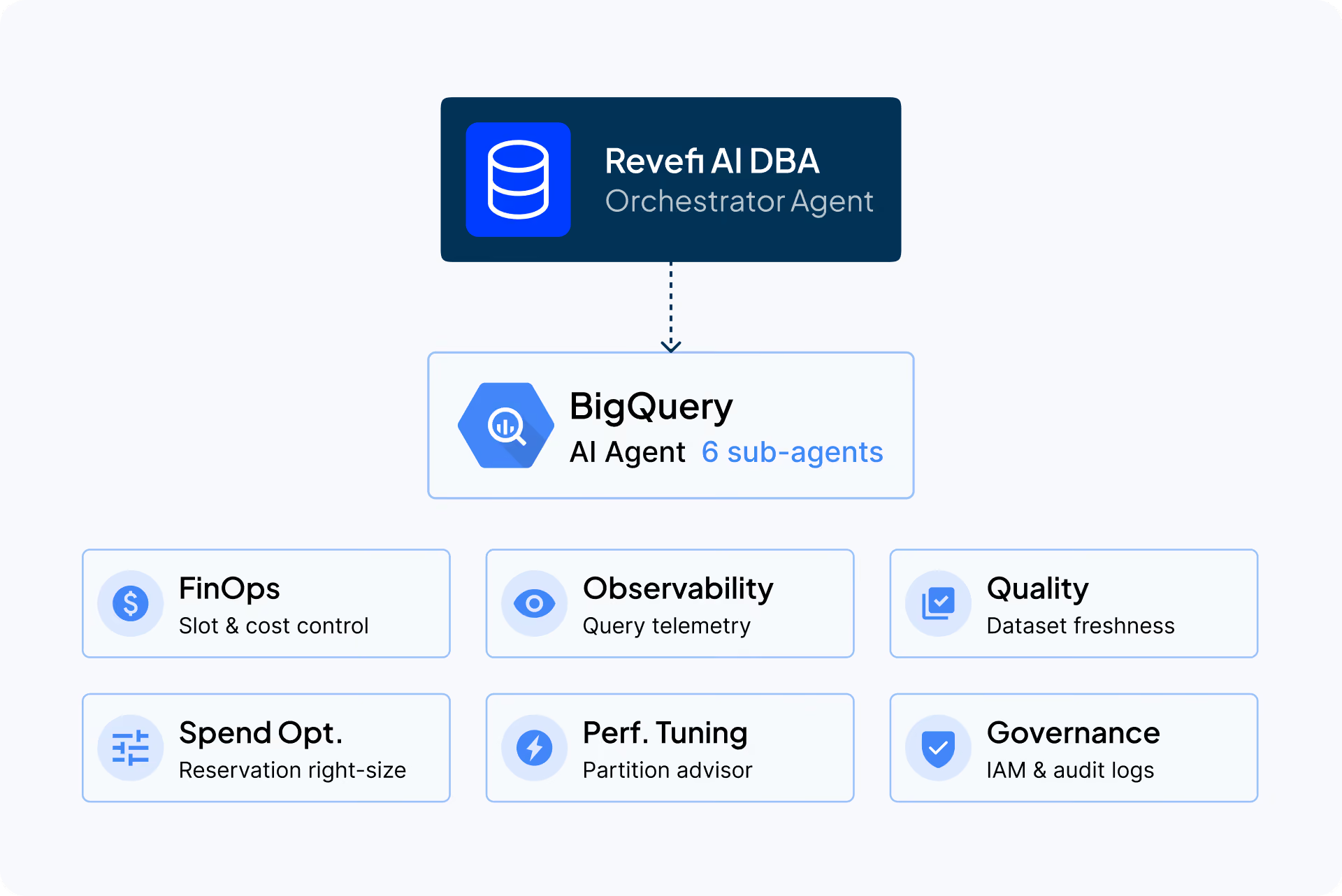
While manual optimization techniques work, monitoring complex enterprise environments across thousands of queries, pipelines, and users manually is nearly impossible. Revefi, an AI-driven Data Operations and FinOps platform, automates BigQuery cost, performance, and quality management.
Key Capabilities Revefi Brings to BigQuery
- Automated Spend and Waste Identification: Revefi continuously monitors query logs to identify costly, inefficient, or repeated queries. It surfaces unused, cold, or duplicate tables, helping teams purge unnecessary storage footprint.
- Slot Utilization Right-Sizing: The platform analyzes real-time and historical compute workloads to right-size BigQuery slot reservations, ensuring organizations pay only for required capacity without hitting performance throttles.
- Attribution and Lineage Tracking: Revefi traces costs directly to specific BI tools such as Looker or Tableau, pipelines, or user groups. This provides clear chargeback visibility and eliminates guesswork in budget allocation.
- Proactive Anomaly Detection: By combining data observability with FinOps, Revefi detects bad query patterns, runaway join loops, or schema errors before they result in massive cloud bill spikes.
Integrating native BigQuery practices such as partitioning, clustering, and slot management with Revefi's zero-touch AI automation allows enterprises to cut cloud data warehouse spend.
To learn more about how Revefi is helping organizations take control of their Google BigQuery and other cloud data platform costs, check out some of our case studies.