

BigQuery Pricing Fundamentals:
From Fixed Infrastructure to Serverless Economics
The evolution of enterprise data warehousing has been driven by a decisive shift away from rigid, capital-intensive infrastructure toward elastic, consumption-based cloud services. In traditional on-premises data warehouses, organizations were forced to size hardware for peak demand.
This created a structural inefficiency: systems were either underutilized during off-peak periods (wasting capital investment), or overwhelmed during peak workloads (leading to degraded query performance and missed SLAs).
Google BigQuery fundamentally redefined this model by pioneering the serverless data warehouse. Unlike legacy architectures, BigQuery decouples compute processing from storage persistence, allowing each to scale independently.
By treating compute and storage as independent utilities, Google Cloud enables organizations to pay separately for:
- Data storage (how much data is retained and for how long)
- Query execution (how much data is processed during analysis)
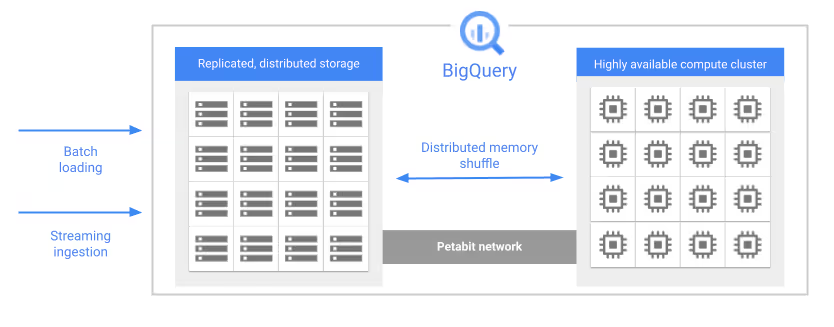
This flexibility introduces powerful economic advantages, but it also adds pricing complexity. Modern data architects and FinOps teams must navigate a multidimensional cost structure that includes:
- On-Demand vs. Capacity (Editions) pricing models
- Logical vs. Physical storage billing
- Streaming ingestion and data loading costs
- Query execution patterns and slot utilization
The difference between an optimized BigQuery configuration and a default deployment can easily lead to 10x cost disparities, often with little to no visible impact on end-user query performance.
This guide is an analysis of the BigQuery pricing model, breaking down how billing works across compute, storage, and ingestion. It explores the mechanics of storage compression, query processing economics, and the strategic levers available to control spend. Designed for engineering leaders, data platform owners, and FinOps practitioners, this report serves as a reference for maximizing ROI from BigQuery while minimizing the financial risks inherent in cloud-scale platforms.
BigQuery Compute Pricing:
On-Demand vs. Capacity Editions
In the BigQuery ecosystem, compute represents the transient processing resources used to execute SQL queries, evaluate user-defined functions (UDFs), and perform data manipulation (DML) and data definition (DDL) operations. Unlike traditional data warehouses that charge for cluster uptime, BigQuery follows an execution-based billing model, making compute resource consumption the single largest contributor to most BigQuery invoices.
Google Cloud offers two distinct frameworks for BigQuery compute pricing:
- On-Demand pricing, based on data processed per query
- Capacity pricing (Editions), based on reserved and autoscaled compute capacity over time
Understanding how these models work is essential for controlling analytics expenditures at scale.
On-Demand Pricing: The Analysis-Based Compute Model
The On-Demand pricing model is the default option for new BigQuery projects and represents the purest implementation of serverless analytics. Instead of charging for execution time or infrastructure, BigQuery bills strictly on the volume of data scanned by a query.
BigQuery’s columnar storage engine, Capacitor, plays a critical role in determining query cost:
- Column pruning: Only the columns explicitly referenced in a query are scanned. Selecting three columns from a 100-column table incurs charges only for those three columns.
- SELECT* anti-pattern: Queries that select all columns force a full-width table scan and dramatically increase costs.
- Data type determinism: Billing is based on logical data size, not compressed storage size. For example, an INT64 column always counts as 8 bytes per row.
- Minimum billing increment: BigQuery enforces a 10 MB minimum charge per table referenced, discouraging excessive micro-queries and favoring batch-style analytics.
Concurrency and Slot Allocation in On-Demand Queries
Although On-Demand pricing appears infinitely elastic, real-world throughput is governed by slot availability. A slot is Google’s internal unit of compute capacity, roughly equivalent to a virtual CPU with memory and network bandwidth.
- Shared slot pool:
On-Demand workloads draw from a global, multi-tenant slot pool, with projects typically capped at ~2,000 concurrent slots. - Bursting behavior:
BigQuery may temporarily allocate additional slots to accelerate short or lightweight queries, but this is best-effort and not guaranteed. - Resource contention risk:
During periods of high regional demand, On-Demand workloads may experience queuing or reduced concurrency, since no capacity is reserved.
Capacity Pricing: The BigQuery Editions Model
For organizations with predictable workloads, sustained query volumes, or strict budget controls, the variability of On-Demand pricing can become a financial risk. BigQuery Capacity Pricing, delivered through Editions, shifts the billing unit from bytes processed to slot-hours, providing dedicated compute capacity over time.
BigQuery Editions Overview
BigQuery Editions are available in three tiers:
- Standard
- Enterprise
- Enterprise Plus
Each designed for different workload profiles and operational requirements.
Autoscaling and Baseline Slots Explained
BigQuery Editions use an intelligent autoscaling engine to dynamically match compute capacity with demand.
- Baseline slots:
Always-on capacity billed continuously, ideal for BI dashboards and interactive workloads requiring consistent low latency. - Autoscaling slots:
Elastic capacity added during demand spikes and billed per second (with a one-minute minimum). - Idle slot sharing:
In Enterprise and Enterprise Plus, unused baseline slots can be temporarily borrowed by other reservations within the same organization, maximizing utilization and minimizing waste.
This internal fairness model ensures that purchased capacity is rarely idle while other workloads are waiting.
BigQuery Storage Pricing Explained:
Logical vs. Physical Storage
While compute costs often receive the most attention in BigQuery cost management, storage pricing plays an equally important role, especially as data volumes scale into terabytes and petabytes. BigQuery has evolved from a single flat storage model into a dual-pricing framework, allowing organizations to choose between:
- Logical storage (uncompressed bytes)
- Physical storage (compressed bytes).
This flexibility enables FinOps and data platform teams to align storage costs with the compressibility characteristics of their datasets, rather than relying on a one-size-fits-all model.
Logical Storage: The Default BigQuery Storage Model
Logical storage is the standard billing option for most BigQuery projects. Under this model, storage charges are based on the uncompressed size of the data, as defined by column data types.
- Active storage:
Data modified within the last 90 days is billed at $0.02 per GiB per month (US multi-region). - Long-term storage:
If a table (or an individual partition) remains unmodified for 90 consecutive days, BigQuery automatically applies a 50% discount, reducing the rate to $0.01 per GiB per month.
What Triggers Long-Term Storage Discounts? Only data modification operations (such as INSERT, UPDATE, DELETE, or MERGE) reset the 90-day timer. Querying data does not affect the discount window, which strongly incentivizes retaining historical datasets for analysis, audits, or compliance.
In the Logical storage model, the cost of (i) Time Travel (7 days of historical versioning), and (ii) Fail-safe storage (an additional 7 days for disaster recovery) is included in the base storage price, with no separate billing line item. This makes Logical storage both predictable and operationally simple.
Physical Storage: The Compressed Storage Model
Physical storage bills based on the actual bytes written to disk after compression. BigQuery applies aggressive columnar compression using its Capacitor storage format, leveraging techniques such as run-length encoding, delta encoding, and dictionary compression.
- Active storage:
$0.04 per GiB per month - Long-term storage:
$0.02 per GiB per month
(US multi-region)
Although the per-GiB rate is higher, the total cost can be significantly lower if the data compresses well.
Compression Economics: When Physical Storage Saves Money
The financial viability of Physical storage depends entirely on the compression ratio. Because Physical storage costs exactly 2× more per GiB, users break even at a 2:1 compression ratio.
Hidden Costs of Physical Storage: Time Travel and Fail-safe
A critical consideration with Physical storage is that Time Travel and Fail-safe retention are billed separately. For tables with (i) Frequent updates or deletes, and (ii) High data churn rates, the physical bytes retained for historical versions can grow rapidly, offsetting or even exceeding compression savings. This makes Physical storage less attractive for mutable datasets with heavy write activity.
Partitioning: A Storage Cost Optimization Lever
Partitioning is often viewed purely as a query performance optimization, but it also has a direct impact on storage economics.
Because BigQuery applies long-term storage discounts at the partition level, date-based partitioning enables:
- Older partitions to automatically age into the lower-cost tier
- Continued ingestion of new data without resetting discounts on historical partitions
This granular aging model is especially effective for time-series data, such as logs, events, and telemetry, delivering long-term storage savings without complex archival workflows. Logical storage offers simplicity and predictable pricing, while Physical storage rewards teams that understand their data’s compression behavior. When combined with smart partitioning strategies, storage pricing becomes a powerful lever for reducing total BigQuery spend at scale.
Data Mobility Costs in BigQuery:
Ingestion, Extraction, and Egress
Data does not remain static within a warehouse. It is continuously ingested, processed, and exported to downstream systems. Each of these mobility paths introduces its own pricing mechanics, which are frequently underestimated during architectural planning. In large-scale analytics environments, data movement costs can rival compute spend if left unmanaged.
Data Ingestion Pricing
Data ingestion covers the process of loading data into BigQuery. Google Cloud offers multiple ingestion mechanisms, each optimized for different throughput and latency requirements.
Batch Loading
Batch loading (Load Jobs) is the most cost-efficient ingestion method and is ideal for bulk or scheduled data transfers.
- Cost: Free
- Sources: Google Cloud Storage (GCS) or local files
- Supported formats: CSV, JSON, Avro, Parquet, ORC
Because batch loads incur no BigQuery ingestion charges, this model strongly encourages lakehouse-style architectures where raw data is landed cheaply and transformed later.
BigQuery Storage Write API (Modern Streaming)
For near–real-time analytics and high-throughput streaming pipelines, the Storage Write API is the recommended approach.
- Cost: $0.025 per GiB ingested
- Free tier: First 2 TiB per month
- Delivery semantics:
- Default Stream: At-least-once delivery (ideal for logs and telemetry)
- Committed Stream: Exactly-once delivery, required for financial or transactional workloads
Both stream types share the same per-GiB pricing, allowing teams to prioritize correctness without a cost penalty.
Legacy Streaming API (tabledata.insertAll)
The older streaming mechanism remains supported but is significantly less efficient.
- Cost: Approximately $0.05 per GiB
- Implication: Roughly 2× more expensive than the Storage Write API
From a FinOps perspective, migrating legacy streaming pipelines is one of the simplest ways to reduce ingestion costs without architectural change.
Data Extraction Pricing
Extracting data from BigQuery to external systems (such as machine learning pipelines, operational databases, or downstream analytics platforms) can generate meaningful costs depending on the method used.
BigQuery Storage Read API
The Storage Read API underpins high-performance connectors such as:
- Spark–BigQuery
- Dataflow
- Custom parallel extract jobs
- Cost: $1.10 per TiB read
- Design intent: Optimized for high-throughput, parallelized reads
This pricing reflects the intensive I/O and serialization overhead required to stream data out of BigQuery’s storage layer.
Batch Export to Cloud Storage
Exporting tables or partitions to Google Cloud Storage is free from the BigQuery billing perspective.
- BigQuery cost: $0
- Downstream costs: Standard GCS storage and operations charges apply
This makes batch exports the most economical option for large-scale data extraction when latency is not critical.
Network Transfer and Egress Costs
Network egress charges apply when data moves across regions or out of Google Cloud.
Inter-Region Transfers:
- Same multi-region (e.g., US multi-region to us-east1)
Often free
- Cross-continent transfers (e.g., North America to Europe or Asia)
Typically $0.08–$0.14 per GiB, depending on destination
For disaster recovery or geo-replication strategies, these costs can accumulate quickly. Architects must carefully evaluate whether multi-region replication is worth the recurring egress expense.
Advanced BigQuery Services and Their Pricing Impact
BigQuery now supports advanced analytical workloads beyond traditional SQL, including machine learning, vector similarity search, and BI acceleration. Each introduces distinct pricing considerations.
BigQuery ML (Machine Learning)
BigQuery ML enables model training and inference directly inside the warehouse, reducing data movement but shifting costs into compute.
Model Training Costs
- On-Demand pricing:
- Simple models (e.g., linear or logistic regression) follow standard scan-based pricing
- Complex models (e.g., deep neural networks, matrix factorization) incur significant surcharges, reaching hundreds of dollars per TiB scanned
- Editions (Capacity model):
- Training consumes slots directly
- CPU-intensive workloads can monopolize slot reservations for extended periods
In production environments, ML training often requires dedicated slot reservations to avoid starving analytical workloads.
Prediction (Inference)
- Batch inference is billed like a standard query
- Cost scales with the volume of data passed into ML.PREDICT
Inference costs are usually modest compared to training but can grow rapidly for large batch predictions.
Vector Search and Indexing
To support Generative AI and Retrieval-Augmented Generation (RAG) architectures, BigQuery provides native Vector Search capabilities.
Vector Index Creation
- On-Demand: Charged based on bytes scanned from the base table
- Editions: Index creation consumes slots
Index creation is compute-intensive, especially for high-dimensional embeddings.
Vector Index Storage Costs
A critical nuance: vector indexes are always billed as Active Storage.
- Even if the underlying table partitions qualify for Long-Term Storage discounts
- Vector index artifacts remain at the higher active storage rate
This can materially impact storage costs for large embedding datasets.
Vector Search Query Costs
- The VECTOR_SEARCH function performs distance calculations (cosine, Euclidean)
- High-dimensional vectors (e.g., 768 or 1536 dimensions) consume significantly more compute
- In the Editions model, this translates directly into higher slot usage
BigQuery BI Engine
BI Engine is an in-memory acceleration layer designed for interactive dashboards and BI tools.
Pricing Model
- Capacity-based reservation
- Cost: Approximately $0.0416 per GiB-hour (region-dependent)
- Billed continuously, regardless of query activity
Economic Trade-Off
While BI Engine adds a fixed cost, it can:
- Dramatically reduce slot consumption
- Eliminate repeated on-demand scans for dashboards
- Enable smaller slot reservations for the same user experience
For organizations with heavy BI workloads, BI Engine often lowers total platform cost, not increases it.
BigQuery’s data mobility and advanced service pricing reinforces a core principle of cloud analytics economics: data movement is never free at scale. Ingestion method selection, extraction strategy, network topology, and advanced feature adoption all have direct and compounding cost implications.
The Hidden Costs: Slot Contention and Inefficiency
Beyond the explicit charges listed on a BigQuery invoice, many organizations incur hidden costs driven by inefficient query design, poor workload isolation, and resource contention. These costs may not always appear as separate billing line items, but they directly impact total cost of ownership (TCO), productivity, and time-to-insight.
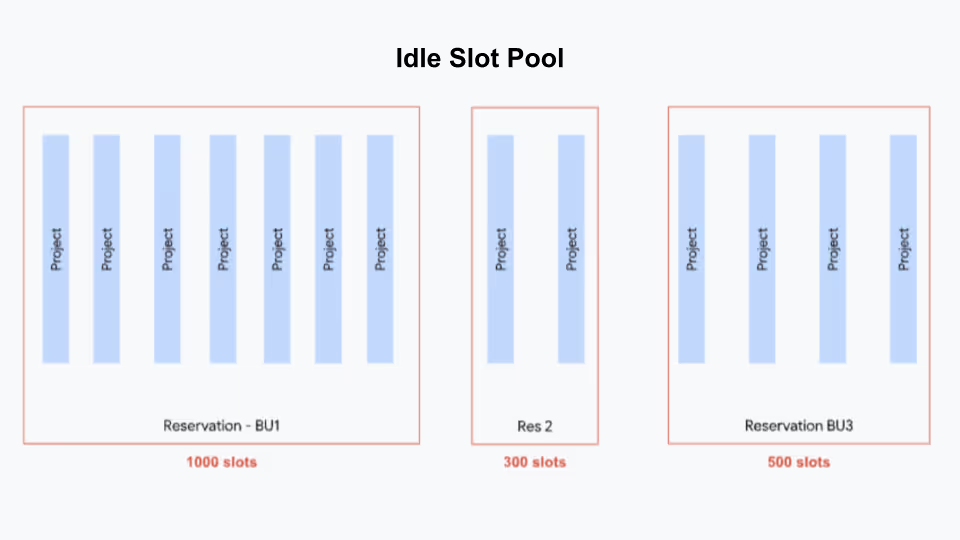
The Economics of Slot Contention
Slot contention occurs when query demand exceeds the available compute capacity (slots), creating a bottleneck in query execution.
The Cost of Queuing
When all slots are occupied, incoming queries are placed in a queue. While queued queries do not generate compute charges until execution begins, the business impact is substantial:
- Data pipelines miss SLAs
- Dashboards become stale
- Decision-making is delayed across the organization
These downstream effects often outweigh the direct infrastructure costs.
The “Retry” Multiplier Effect
A common reaction to slow or timed-out queries is manual re-submission. This behavior creates a negative feedback loop:
- Identical queries are re-queued multiple times
- Artificial demand inflates slot usage metrics
- Overall system throughput degrades without producing additional value
In capacity-based pricing models, this pattern increases total slot-hours consumed, quietly driving up costs.
Fair Scheduling and Workload Starvation
In the BigQuery Editions model, the Fair Scheduler attempts to distribute slots evenly across active projects. However, without proper workload isolation:
- Large batch ETL jobs can monopolize the slot pool
- Interactive BI users experience long wait times for simple queries
The hidden cost here is lost productivity, which is analysts and stakeholders waiting minutes for results that should return in seconds.
Inefficient Transformations and Slot Waste
A major contributor to elevated BigQuery costs is inefficient SQL that consumes slots without proportional analytical value.
Shuffle-Heavy Operations
Certain operations require extensive data redistribution across workers, a process known as shuffle. Common examples include:
- Large JOINs
- GROUP BY aggregations
- DISTINCT operations
Shuffle is computationally expensive. During peak workloads, up to 60% of available slots in a reservation can be consumed by shuffle alone, significantly slowing query progress and increasing slot consumption.
Over-Scanning and Partition Blindness
Scanning more data than necessary is one of the most expensive BigQuery anti-patterns.
- In the On-Demand model, scanning:
- 1 PB of data costs approximately $6,250
- A single partition of that same table may cost $6
Failing to leverage partitioning and clustering effectively is equivalent to paying for peak infrastructure while using only a fraction of its value. Understanding and controlling scan scope is one of the most impactful levers in BigQuery cost optimization.
Hidden BigQuery costs are rarely caused by pricing alone as they are the result of behavioral and architectural inefficiencies.
Slot contention, query retries, shuffle-heavy transformations, and uncontrolled scans silently inflate spend while degrading performance. Organizations that treat performance optimization and workload governance as FinOps disciplines can dramatically reduce these invisible costs while improving user experience and platform reliability.
Observability: The FinOps Toolkit
To manage these complex costs, visibility is paramount. Google Cloud provides a powerful toolset within BigQuery itself: the INFORMATION_SCHEMA. This is a set of metadata views that allow users to query their own usage metrics using standard SQL.
Analyzing Query Costs
The INFORMATION_SCHEMA.JOBS view is the definitive source of truth for query-level cost analysis. By querying this view, FinOps teams can identify the specific users, service accounts, and queries driving the bulk of the spend.
SQL Pattern: Identifying the Most Expensive Queries
The following SQL pattern helps identify queries that are consuming the most resources. For On-Demand users, total_bytes_billed is the key metric. For Editions users, total_slot_ms is the proxy for cost.
SQL Pattern
SELECT
  job_id,
  user_email,
  creation_time,
  -- For On-Demand: Calculate Cost based on Bytes
  total_bytes_billed,
  (total_bytes_billed / POW(1024, 4)) * 6.25 AS estimated_cost_usd,
  -- For Editions: Analyze Slot Consumption
  total_slot_ms,
  SAFE_DIVIDE(total_slot_ms, TIMESTAMP_DIFF(end_time, start_time, MILLISECOND)) AS avg_slots_used
FROM
  `region-us`.INFORMATION_SCHEMA.JOBS
WHERE
  creation_time > TIMESTAMP_SUB(CURRENT_TIMESTAMP(), INTERVAL 7 DAY)
  -- Filter out internal script jobs to avoid double counting
  AND statement_type!= 'SCRIPT'
ORDER BY
  estimated_cost_usd DESC
LIMIT 10;
Note: This query assumes the us multi-region and the standard on-demand rate. Adjust the region and rate variables as needed.
7.2. Analyzing Slot Utilization
For users on the Editions model, monitoring slot utilization is critical to prevent paying for idle capacity or suffering from under-provisioning. The INFORMATION_SCHEMA.JOBS_TIMELINE view provides millisecond-level granularity on slot usage.
SQL Pattern
Slot Contention Analysis
SELECT
  period_start,
  SUM(period_slot_ms) / 1000 AS total_slot_seconds,
  -- Compare against purchased capacity (e.g., 1000 slots)
  1000 AS purchased_slots_limit
FROM
  `region-us`.INFORMATION_SCHEMA.JOBS_TIMELINE_BY_PROJECT
WHERE
  job_creation_time > TIMESTAMP_SUB(CURRENT_TIMESTAMP(), INTERVAL 1 DAY)
GROUP BY
  1
ORDER BY
  1 DESC;
High peaks where total_slot_seconds approaches or exceeds the purchased limit indicate periods of contention where the autoscaler is fully engaged or where queuing is occurring.
Analyzing Storage Costs
Storage costs can be audited using INFORMATION_SCHEMA.TABLE_STORAGE. This view is essential for identifying "zombie data" (tables that are accumulating storage costs but are rarely accessed).
SQL Pattern
Storage Cost by Table
SELECT
  table_schema,
  table_name,
  -- Active Logical Bytes
  active_logical_bytes / POW(1024, 3) AS active_logical_gib,
  -- Long-Term Logical Bytes
  long_term_logical_bytes / POW(1024, 3) AS long_term_logical_gib,
  -- Physical Bytes (Comparison for Physical Billing)
  active_physical_bytes / POW(1024, 3) AS active_physical_gib,
  long_term_physical_bytes / POW(1024, 3) AS long_term_physical_gib
FROM
  `region-us`.INFORMATION_SCHEMA.TABLE_STORAGE
ORDER BY
  active_logical_bytes DESC;
Automated FinOps and Data Observability with Revefi
While native Google Cloud tools like INFORMATION_SCHEMA provide the raw telemetry for cost analysis, interpreting this data at scale often requires significant manual engineering effort. Third-party platforms like Revefi have emerged to automate this "Data FinOps" lifecycle using AI observability.
AI-Driven Slot Management with Revefi
Revefi utilizes an autonomous AI agent, (nicknamed RADEN) to continuously monitor slot utilization and contention. Unlike static dashboards, the agent actively correlates queuing events with specific query patterns, detects inefficient transformations, and manages storage/resource hygiene.
- Contention Root Cause Analysis:
The system distinguishes between queuing caused by legitimate capacity exhaustion (requiring more slots) and "artificial" queuing caused by a few inefficient "bully" queries monopolizing the reservation. - Reservation Optimization:
For Editions users, it identifies idle capacity, recommending reservation merges or idle-slot sharing configurations to maximize the utility of committed spend.
- Shuffle Analysis:
Revefi detects queries with excessive data shuffling (e.g., massive cross-joins or unoptimized GROUP BY operations), which often indicates a need for query rewriting or pre-computation via Materialized Views. - Anti-Pattern Detection:
It flags common inefficiencies such as repeated full-table scans on unpartitioned tables or redundant processing of the same data, guiding engineers toward incremental processing models.
- Unused Asset Identification:
The platform scans access logs to identify "zombie" tables—datasets that are incurring active storage costs but have not been queried in months. This automates the decision process for archiving or deletion. - Partitioning Recommendations:
By analyzing query filter patterns, the AI suggests optimal partitioning and clustering keys (e.g., clustering by customer_id for a SaaS platform), directly reducing the "bytes scanned" bill for downstream queries.
Conclusion
The BigQuery pricing model is flexible, granular, and capable of scale.
However, this power comes with the responsibility of active management.
The transition from simple flat-rate models to the nuanced world of Editions, physical storage, and vector search requires data teams to evolve into "financial engineers."
For the modern enterprise, the path to cost efficiency lies in understanding the decoupling of compute and storage. It involves making deliberate choices, such as selecting the Physical storage model for compressible logs, using the Write API for efficient ingestion, and leveraging INFORMATION_SCHEMA to ruthlessly identify and eliminate waste.
In other words, while FinOps is officially a business-critical mandate for data teams looking to scale their analytics, and insights machinery, it’s actual implementation requires:
- An end-to-end understanding of the problem at hand
- Accurate root-cause analysis (RCA)
- Identifying optimization opportunities based on what’s driving up cloud data platform costs
Put simply; data teams, and business leaders need to arrive at the actual crux behind ballooning costs. For example, did you know there are certain hidden costs associated with BigQuery queuing?
Sources
- BigQuery | Google Cloud https://cloud.google.com/bigquery/pricing
- BigQuery | AI data platform | Lakehouse | EDW
https://cloud.google.com/bigquery - Hidden costs of Google BigQuery Queuing | Revefi
https://www.revefi.com/blog/hidden-costs-of-google-bigquery-queuing - Understand BigQuery editions - Google Cloud Documentation
https://docs.cloud.google.com/bigquery/docs/editions-intro - Introducing new BigQuery pricing editions | Google Cloud Blog
https://cloud.google.com/blog/products/data-analytics/introducing-new-bigquery-pricing-editions - Understand reservations | BigQuery - Google Cloud Documentation
https://docs.cloud.google.com/bigquery/docs/reservations-workload-management - Understand slots | BigQuery - Google Cloud Documentation
https://docs.cloud.google.com/bigquery/docs/slots - Estimate and control costs
https://docs.cloud.google.com/bigquery/docs/best-practices-costs - Understanding updates to BigQuery workload management | Google Cloud Blog
https://cloud.google.com/blog/products/data-analytics/understanding-updates-to-bigquery-work - Google BigQuery Slot Contention and Utilization - Revefi https://www.revefi.com/videos/google-bigquery-slot-contention-and-utilization
- Maximize data ROI for Snowflake, Databricks, Redshift, and BigQuery - Revefi
https://www.revefi.com/solutions - Google BigQuery Effective Partitioning and Clustering - Revefi
https://www.revefi.com/videos/google-bigquery-effective-partitioning-and-clustering