Key takeaways
- AI in database management changes the division of work and effectiveness. Continuous systems cover routine monitoring, recurring alerts, and approved low-risk actions. DBAs stay responsible for architecture, access, policy, and production decisions.
- A traditional DBA model hits a ceiling when database growth outpaces human review. One DBA can cover around 30 to 40 databases before the queue grows faster than one person can clear it.
- An AI DBA reads workload signals continuously across Snowflake, Databricks, BigQuery, and Redshift. It tracks queries, jobs, resource use, failures, ownership, and spend across the estate.
- Autonomous database management needs guardrails. As a Copilot keep approval with the DBA. Autopilot runs approved actions inside the team's limits.
- The future of the DBA role favors DBAs who use AI and can direct automation. They know which tasks can run under guardrails, which changes need review, and how database decisions affect cost, reliability, and governance.
Many data teams now manage hundreds or thousands of databases, warehouses, jobs, and queries with an operating model built for a smaller estate. A traditional DBA tunes queries, plans recovery, controls access, and resolves incidents. Alerts fire after the problem starts. Tickets arrive after the spend has moved. A warehouse runs oversized for a week before anyone reads the bill. A query regresses, and the dashboard owner files a ticket three days later.
AI in database management changes how much of the work is monitored continuously. An AI DBA automatically reads workload patterns, flags anomalies earlier, recommends tuning actions, and applies approved fixes for known problems. Production changes, schema edits, access decisions, and incident trade-offs still need human judgment. The difference between an AI DBA and a traditional DBA is the division of work. AI handles repetitive monitoring, alerts, and approved fixes. Humans keep control over judgment, policy, and accountability.
What is a traditional DBA?
In cloud data platforms, the provider runs the software installation, patching, and backup machinery. A cloud DBA manages workload behavior. Performance monitoring and query tuning track how queries run and fix the ones that slow down, through a rewrite, an index, or a change to the execution plan. Warehouse and cluster sizing keep compute aligned with demand. Job monitoring catches failed runs and recurring delays. Recovery planning defines the targets business teams need when data or workloads fail. Security, access control, and compliance enforcement decide who reaches which data and produce the records an auditor asks for. Incident response starts when an alert, failed job, cost spike, or user ticket reaches the queue.
A DBA reviews changes that create risk before a ticket exists. Schema edits, indexing decisions, capacity plans, access changes, and recovery tests need production history. One query plan can look efficient until it hits a peak-hour workload. One index may speed up a dashboard and slow the write path behind it. A recovery plan can pass a basic check and still miss the recovery window the business needs.
Senior DBA judgment means seeing these patterns across years of incidents, migrations, audits, and workload changes. An execution plan gives the cost estimate and shows how the system behaves under pressure. Database administrator AI supports this work by reading more workload signals, finding repeated patterns earlier, and recommending the next action. The DBA makes the judgment call when a change affects production risk, customer impact, access, or compliance.
The operational ceiling of the traditional model
When database growth outpaces human review, the traditional model starts to break. One skilled DBA can manage around 30 to 40 databases effectively. Beyond that range, your team's queue grows faster than one person can review it.
A threshold breaks. A user notices a delay. A job fails. A warehouse spends more than expected. The DBA reads the logs, checks query history, traces the workload, and applies the fix. The operating loop is reactive.
A smaller estate keeps the loop manageable. A cloud estate across Snowflake, Databricks, BigQuery, and Redshift creates more signals than one review queue absorbs. Cost problems stay open longer. Tuning work gets pushed behind active incidents. The monthly bill is a clear sign of problems that monitoring should have caught earlier.
Database estates add platforms, jobs, users, and workloads faster than human review can follow. Your DBA team has the skill to solve each problem, but the queue depends on how many problems people can see, review, and fix in time.
What is an AI DBA and how does it work?
An AI DBA is a system that applies machine learning and analytics to database management. It reads workload signals a human DBA would review manually and acts on patterns it has permission to handle. The signal set includes query activity, warehouse usage, job runs, failed tasks, resource consumption, and spend across the estate.
The system learns normal behavior from historical patterns and compares current activity with the learned baseline. When a query regresses, or a warehouse uses more compute than expected, the system catches the change as it happens. It identifies the workload behind the change, explains the likely cause, and recommends the next action. If the action falls inside approved rules, it can apply the fix on its own.
Configuration decides how autonomous database management works. In copilot mode, the AI DBA shows the finding and recommended action and waits for DBA approval. In autopilot mode, the AI DBA executes approved actions within limits the DBA sets. Your team can use copilot for production changes and autopilot for repetitive, low-risk work such as idle resource suspension, recurring cost alerts, or known failed-job patterns.
An AI DBA works across the platforms a team already runs, including Snowflake, Databricks, BigQuery, and Redshift. It reads metadata, logs, workload history, and usage patterns without changing the platforms underneath. A database administrator AI adds continuous coverage above the existing environment, and DBAs control risk decisions, approvals, and policy.
What does an AI DBA do?
AI in database management handles your daily operational work and more. An AI DBA tracks query performance across every workload and finds slow patterns before a user files a ticket. It recommends query changes, rightsizes warehouses and clusters, detects cost anomalies, finds idle resources, and monitors failed jobs. For known failures, it starts approved fixes automatically. Across a multi-platform estate, database automation gives your team one way to watch performance, cost, and reliability signals across the whole environment.
AI DBA vs. traditional DBA: A side-by-side comparison
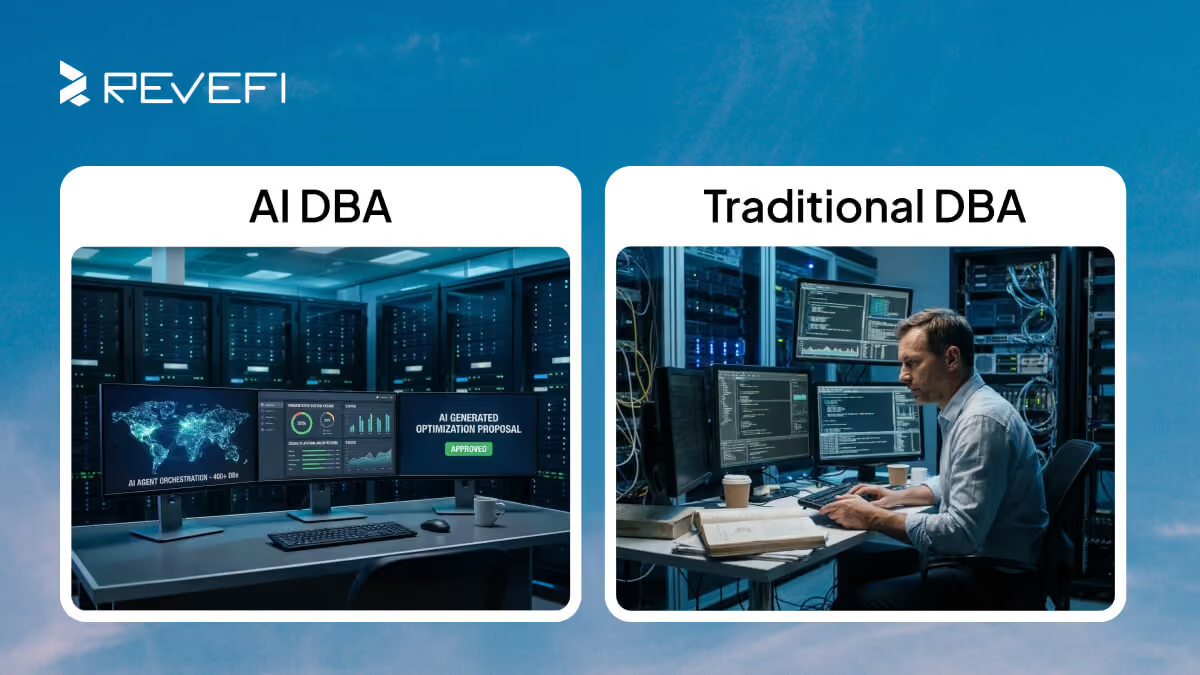
AI vs human DBA is a responsibility split. A traditional DBA reviews more of the operation manually after a signal arrives. An AI DBA monitors continuously, applies approved actions, and routes judgment calls to a human DBA.
- Reactive to Preventive. A traditional DBA acts after a signal, when an alert fires or a user reports a slow dashboard. An AI DBA reads execution plans and workload trends as they move and flags the regression while it is still small. A strong DBA sees a risky query before it creates an incident. An AI DBA reviews every workload continuously. It catches known patterns earlier and routes novel or risky cases to a human DBA.
- Limited Capacity to Massive Scale. Human review creates the ceiling in the traditional model. An AI DBA raises that ceiling by monitoring hundreds of workloads continuously. It acts as a force multiplier for the team. The DBA owns risk decisions. The AI absorbs the routine volume around them.
- Doing to Directing. The traditional DBA reviews and applies routine actions manually. With an AI DBA, you review system proposals, set operating limits, and approve production changes. The DBA spends more time on judgment and policy, and less time on repetitive execution.
- Siloed to Multi-Platform. Database expertise develops by platform. Your team has deep Snowflake, Databricks, BigQuery, and Redshift skills spread across different people. An AI DBA standardizes monitoring, cost, and reliability signals across those platforms, so the team governs the estate from one view. This is part of the future of the DBA role. Cross-platform governance takes a larger role in the job.
What tasks can an AI DBA automate?
The safe automation set is repetitive, measurable, and reversible work. Human DBAs set the policy, approval rules, and risk limits. An AI DBA focuses on the work that a team already reviews again and again.
Performance and query tuning
An AI DBA reads query activity for every workload. It reviews query history, execution details, resource use, and workload timing. It catches a query that starts scanning more data than it did last week and flags the regression while the cost is still small.
It recommends a query rewrite, execution-plan review, clustering change, indexing change, warehouse adjustment, or cluster adjustment. The action changes by platform and workload. Approved low-risk actions run automatically, such as idle compute suspension or recurring warehouse and cluster sizing changes. Higher-risk changes are routed to a DBA for review. Continuous query performance optimization gives the team broader coverage, so tuning work does not wait for a ticket.
Cost management and FinOps
Cost is one of the clearest use cases for AI in database management. The system monitors spend patterns in real time and alerts when usage moves outside the expected range. It attributes the spend to the query, user, job, or workload that caused it. A budget variance includes the reason behind the change.
An AI DBA reclaims idle resources, rightsizes warehouses against actual use, and forecasts spend from usage trends. Workload-level attribution gives FinOps for data platforms the context it needs. Cloud data cost optimization ties each cost to the workload behind it.
DataOps and incident response
An AI DBA monitors job runs, catches failures as they happen, and gathers root-cause clues. For known failure patterns with a tested fix, it applies the approved fix and logs the action. For a new or unclear failure pattern, it routes the case to a person.
It checks schema-change impact before production and watches for data quality anomalies. The on-call rotation stays. Known failures with approved fixes stop becoming repetitive 2 AM pages. Database automation cuts routine diagnosis from known failure paths. When judgment is needed, autonomous database management gives the DBA a cleaner handoff.
The future of the DBA role: Evolution, not elimination
When an AI DBA automates repetitive monitoring and approved fixes, DBAs stay responsible for design, oversight, and risk judgment. Architecture, governance, cost control, and production risk remain with the DBA team. The future of the DBA role is being reorganized around database reliability engineering, data platform architecture, and AI database administration.
New archetypes emerging
A Database Reliability Engineer applies a DevOps mindset to database operations through automation, testing, and version control. A Data Platform Architect leads cross-platform governance and multi-cloud design, deciding how platforms, workloads, and data domains are organized. An AI Database Administrator oversees AI-driven systems, sets guardrails and approval rules, and enforces automation policy.
These titles are appearing in job postings and role descriptions as database work expands beyond manual review. The work now focuses on oversight, governance, and automation control.
Skills DBAs need in the AI era
Four skills define the future of the DBA role in daily practice. FinOps fluency treats cost as a first-class infrastructure metric, alongside latency and uptime. AI tooling literacy includes system configuration, recommendation review, and the judgment to challenge weak outputs. Cross-platform fluency means governing Snowflake, Databricks, BigQuery, and Redshift together. DevOps integration brings database management into CI/CD pipelines, testing workflows, and release processes.
70% of database professionals expect AI to change their daily responsibilities within five years, and up to 45% of database-related tasks are expected to be automated by 2030. As database administrator AI automates routine work, DBAs stay closer to judgment, design, policy, and accountability.
How to evaluate an AI DBA solution for your organization
Evaluate an AI DBA against the workloads your team runs every day. Check whether it connects to your platforms, reads workload history, follows access rules, and keeps actions inside your approval path. AI in database management works at the workload level. The tool has to show what changed, why it changed, and which action is safe.
Key capabilities to look for
Setup time shows how much access the AI DBA needs and how quickly it starts working. A read-only, metadata-based integration connects in minutes without moving customer data. A long onboarding cycle or a request for access to the data itself adds cost and risk before the team sees value.
Platform support has to reach the workload level. Confirm coverage for Snowflake, Databricks, BigQuery, and Redshift. Then check if the AI DBA reads query behavior, job history, warehouse and cluster usage, failed tasks, ownership signals, and spend.
Autonomous database management has to be configurable. Copilot mode recommends an action and waits for approval. Autopilot mode executes approved actions inside the limits your team sets. You can set the mode by action type, workload, environment, and risk level.
Cost, performance, data quality, and observability meet in the same workload. A slow query uses more compute. A failed pipeline creates retries. A data quality issue creates reprocessing. The AI DBA connects these signals to the query, job, owner, and cost impact before recommending an action. For security and compliance, check SOC 2, ISO 27001, role-based access, audit logs, and controls for hundreds of databases.
Questions to ask vendors
What level of autonomy does the AI DBA operate at, and how are guardrails defined? Look for clear distinctions between copilot and autopilot modes, along with approval workflows, restricted actions, rollback mechanisms, and role-based control over policy changes.
How does the system handle edge cases or unfamiliar scenarios? It pauses or escalates to a human when it encounters unfamiliar patterns.
What is the actual time to the first value? Measure from the initial connection to the first useful finding.
How is cost attribution handled? It provides visibility down to the query, job, user, owner, warehouse, cluster, and cost driver level.
What changes in the human DBA's day after deployment? DBAs spend less time on repetitive tasks. They remain responsible for design, oversight, and risk judgment, and spend more time on architecture, governance, and policy.
See how Revefi's AI DBA manages Snowflake, Databricks, BigQuery, and Redshift through read-only metadata with no data movement. It runs in copilot or autopilot based on the actions your team approves.
Conclusion
An AI DBA changes how database teams handle scale and response time. Continuous monitoring, approved fixes, and cost alerts move into software. DBAs make the judgment calls. They own design, oversight, policy, access, and production risk.
The traditional model breaks when database growth outruns human review. Even a skilled DBA eventually runs into the limits of manual review. Alerts arrive late. Cost surprises reach the monthly bill. Tuning waits behind incidents. An AI DBA gives your team continuous coverage across more workloads, with guardrails for the actions it can take on its own.
The AI DBA is already here. Your team has to decide which database tasks can move into approved automation and which ones stay with a human DBA. The answer will be different for cost alerts, failed-job fixes, schema changes, access decisions, and production incidents.
Verisk reduced Snowflake warehouse costs by up to 60% after acting on Revefi's workload recommendations.
To see what an AI DBA can do with your estate, book a Revefi demo.