
At its core, Snowflake Cost Optimization is the process of aligning Snowflake's consumption-based costs with the actual business value derived from data.
Unlike traditional fixed-capacity databases, Snowflake’s architecture decouples storage, compute, and cloud services, allowing for granular control over every dollar spent.
As we enter 2026, Snowflake cost optimization has evolved from a manual, "knob-turning" sedentary activity into a hybrid approach that combines autonomous intelligence and agility.
Snowflake’s pay-as-you-go model remains centered on credits for compute, flat-rate terabyte storage, and selective data transfer fees. Recent updates like the simplified hybrid table pricing (effective March 2026), and the uniform Snowpipe credit rate of 0.0037 credits per GB have made forecasting easier.
Yet, compute functions still account for >70% of your Snowflake bills.
Here we do a deep-dive into pricing mechanics, cost drivers, proven optimization strategies, monitoring tools, and FinOps best practices to help you eliminate additional spend, or eliminate any unnecessary Snowflake credit consumption without sacrificing concurrency or query speed.
Why Are Snowflake Costs Unpredictable?
Rapid data growth, decentralized usage, and lack of visibility often lead to "bill shock." Many organizations struggle with Snowflake costs due to inherent challenges in its elastic model, which results in a common issue faced by data teams all over: overprovisioning.
Teams spin up large warehouses for sporadic tasks, forgetting to suspend them, resulting in idle compute charges. Adding to this misery are inefficient queries, which spill on to disk or queue excessively, consuming extra credits without adding any value whatsoever. On the flip-side, data teams sometimes encounter the issue of improper warehouse scaling, where rules over dedicated warehouses prioritize cost allocation over efficiency, leading to underutilization.
Data management errors compound issues. Aggressive auto-suspend settings disrupt workflows, causing frequent restarts that accumulate startup costs.
Neglecting access controls in cloud or data environments can have serious financial and operational consequences. Without proper restrictions in place, unauthorized or inexperienced users may unintentionally consume high-cost compute resources, overload databases, or misuse cloud services which not only inflate cloud bills, but also expose systems to risk.

Performance tuning oversights, such as ignoring caching or materialized views, force repeated computations. Concurrency patterns, if unmanaged, cause queuing that extends execution times. CFOs must address these by fostering cross-team accountability.
Understanding Snowflake’s Pricing Model in 2026
No upfront licensing fees, or idle infrastructure upkeep charges. Snowflake employs a true consumption-based pricing model that is billed according to active usage.
Credit Pricing:
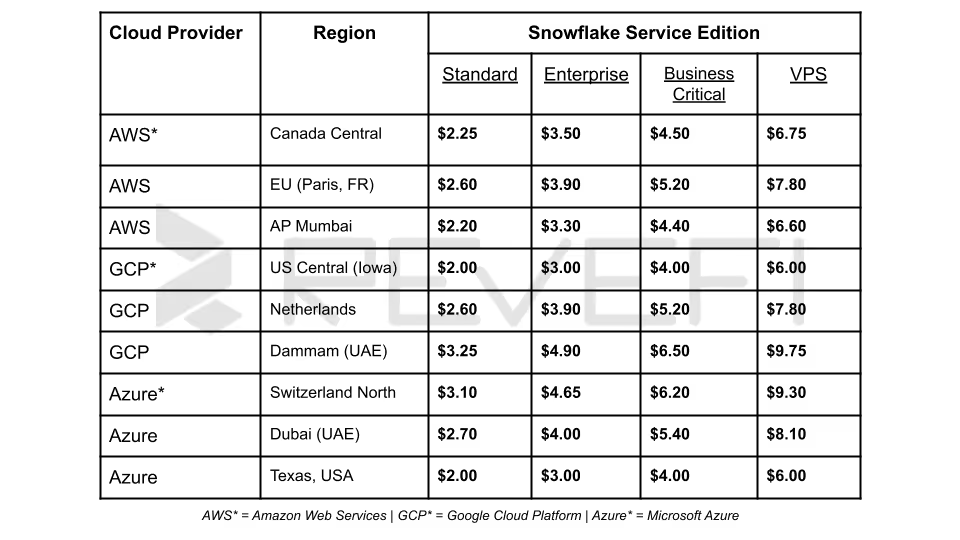
Varies by edition and cloud provider/region. Standard Edition starts at approximately $2 per credit on-demand (AWS US East), while Enterprise reaches $3–$4. Capacity contracts or pre-purchase commitments lower the effective rate significantly.
Storage Pricing:
A flat monthly rate per TB of compressed on-disk data (typically $23/TB/month for AWS US East On-Demand accounts). Pricing differs slightly by region (US vs. EU) and account type (Capacity vs. On-Demand).
Data Transfer:
While you will not incur any ingress fees, egress charges apply only when moving data across regions or clouds. Intra-region and same-cloud transfers within Snowflake’s ecosystem are often free (or minimized) via replication groups and auto-fulfillment.
Example:
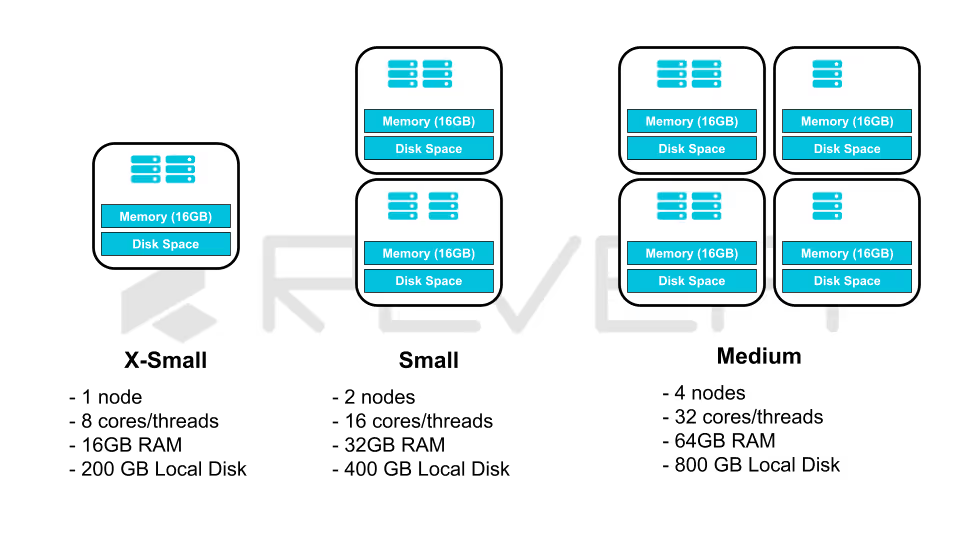
A Medium warehouse (4 credits/hour) running 8 hours/day for 20 business days consumes 640 credits.
At $3/credit (Enterprise), that equals $1,920 monthly (before any storage or serverless add-ons).
Multiply across dozens of warehouses and the numbers escalate quickly, underscoring why right-sizing and auto-suspend are non-negotiable.
For a more in-depth dive into how costs are calculated, and how Snowflake credits are exhausted, check out our updated Snowflake’s 2026 pricing model guide.
Key Cost Drivers in Snowflake
Snowflake’s architecture separates storage from compute, enabling independent scaling but introducing distinct cost vectors:
- Virtual Warehouse Compute:
Typically 60-80% of total spend User-managed clusters executing queries, loads, and DML. Idle time, oversized warehouses, and poor concurrency settings drive waste. - Serverless Compute:
Automatic Clustering, Snowpipe Streaming, Materialized Views, Dynamic Tables, and Search Optimization Service. These scale transparently but accrue credits proportional to data volume and churn. - Cloud Services Layer:
Metadata operations, query compilation, and security. Normally capped at 10% of warehouse credits; excessive joins, large IN lists, or poor selectivity in COPY commands can push it higher. - Storage Layers:
- Active database tables (compressed)
- Time Travel (default 1 day Standard, up to 90 days Enterprise/Business Critical)
- Fail-safe (7 days after Time Travel)
- Staged files for loading/unloading
- Clones (zero-copy but retain full historical storage until dropped)
- Data Transfer and Other:
Cross-region egress, Marketplace consumption, and AI/Snowflake Cortex features.
Core Strategies for Snowflake Cost Optimization
1. Virtual Warehouse Cost Optimization
The most common mistake is using a "one-size-fits-all" warehouse. In 2026, best practices dictate segregating warehouses by workload type. To enforce effective Snowflake warehouse right-sizing best practices, the first step involves matching size to workload scan volume and complexity.
Users can employ a Query Profile to analyze bytes scanned and data disk spill. Start with X-Small or Small for BI dashboards, and scale to Large/2X-Large only for heavy ETL or complex analytics.
Over-provisioning by even one size level doubles hourly credits.

Every second a warehouse is idle, but "provisioned", costs Snowflake users valuable credits. The AUTO_SUSPEND command is a critical practice to prevent the over-utilization of compute resources. While the default auto-suspend time of 10 minutes is often left unchanged, you can set AUTO_SUSPEND command to dynamic timings to increase efficiency and maximize overall ROI.
- Set AUTO_SUSPEND = 60 seconds for BI/Interactive tools
- Set AUTO_SUSPEND = 30 seconds for programmatic ETL tasks (dbt, Airflow, or Snowflake Tasks)
- For cache-sensitive ETL tasks, the default set time of 10 minutes may preserve materialized results
SQL
ALTER WAREHOUSE etl_wh SET
AUTO_SUSPEND = 30,
AUTO_RESUME = TRUE,
INITIALLY_SUSPENDED = TRUE;
Multi-Cluster Warehouse (MCW) Management handles high concurrency by spinning up additional clusters of the same size. By using an "Economy" scaling policy, this methodology waits for the system to estimate if there is enough queued work to keep a new cluster busy for at least 6 minutes, preventing frequent, expensive spin-ups for minor spikes.
2. Storage Cost Optimization
While the overall storage cost is always, or mostly cheaper than Snowflake’s compute resource consumption costs, "storage bloat" from Time Travel and Fail-safe can lead to unexpected monthly costs.
Data retention tuning in Snowflake is the practice of optimizing Time Travel and Fail-safe settings to balance data recovery needs, storage costs, and overall warehouse efficiency. Reduce DATA_RETENTION_TIME_IN_DAYS at the table or schema level (minimum 0 for transient).
Automatic clustering in Snowflake is a feature that continuously reorganizes table data in the background to improve query performance, optimize pruning, and reduce manual maintenance. Enable AUTOMATIC_CLUSTERING_HISTORY only on tables with frequent range or equality filters on clustering keys. Disable on low-churn tables to eliminate serverless compute.
Stage and Clone Management is where Snowflake users regularly purge old staged files (REMOVE) and drop unused zero-copy clones. Query ACCESS_HISTORY and STORAGE_USAGE to identify tables which have not been queried in 90+ days.
Compression File Sizing is for bulk loads, where users usually target 100-250 MB uncompressed files per COPY. Snowflake compresses automatically, but optimal file sizing maximizes parallelism and pruning.
3. Query Optimization for Compute Savings
A major contributing factor behind compute resource wastage are poorly written queries. Improper, or erroneous queries waste Snowflake credits through full scans and spills.
- Pruning and Clustering:
Define clustering keys on high-cardinality filter columns. This can be monitored using the functions TABLE_QUERY_PRUNING_HISTORY and COLUMN_QUERY_PRUNING_HISTORY. - Caching Leverage:
Result cache (24 hours), local disk cache (warehouse-specific), and metadata cache reduces recomputation. Avoid SELECT* and unnecessary columns to maximize cache hits. - Query Profile Analysis:
The GET_QUERY_OPERATOR_STATS function helps identify spills to disk, high cardinality joins, and Cartesian products in Snowpark. To eliminate these, rewrite identified queries with CTEs, window functions, or incremental logic. - Serverless Task and Stream Optimization:
Use Tasks with serverless compute for scheduled jobs instead of always-on warehouses.
4. Data Transfer and Serverless Feature Optimization
To minimize data egress costs in Snowflake, organizations should keep data consumers as close as possible to the source by co-locating workloads in the same cloud region whenever feasible.
They can also use replication groups or Snowflake’s Egress Cost Optimizer for Snowflake Marketplace listings to reduce unnecessary cross-region or cross-cloud data movement and improve overall cost efficiency.
For high-volume real-time ingestion, Snowpipe Streaming offers a more cost-effective and predictable pricing model than legacy file-based ingestion methods. With pricing at 0.0037 credits per GB, it helps teams manage streaming data pipelines more efficiently while lowering ingestion costs at scale.
Snowflake Cortex AI features (including Cortex Search and Cortex Analyst) are billed through serverless compute, which can increase usage costs as workloads grow.
To control spending and optimize performance, it is best to begin with smaller datasets, evaluate usage patterns, and then scale gradually based on business needs.
5. Monitoring Spend Through Governance and Modern FinOps
You cannot optimize what you do not measure. A robust Snowflake FinOps framework uses Resource Monitors and Query Attribution. Resource monitors are your non-traditional "circuit breakers” or primary guardrails that enable data teams to be completely on top of their compute resource usage.
SQL
CREATE RESOURCE MONITOR monthly_limit
  WITH CREDIT_QUOTA = 5000
  FREQUENCY = MONTHLY
  TRIGGERS
    ON 75 PERCENT DO NOTIFY
    ON 100 PERCENT DO SUSPEND
    ON 110 PERCENT DO SUSPEND_IMMEDIATE;
ALTER ACCOUNT SET RESOURCE_MONITOR = monthly_limit;
In 2026, it is standard practice to have:
- Account-Level Monitor: A hard cap at 100% of the monthly budget
- Warehouse-Level Monitor: Progressive alerts at 50%, escalate or notify concerned teams at 75%, and completely suspend at 90%
By applying tags to sessions or warehouses, organizations can attribute costs to specific departments (e.g., Marketing vs. Engineering).
SQL
ALTER SESSION SET QUERY_TAG = 'Q3_Marketing_Campaign_Analysis';
6. Optimizing Costs Across Snowflake’s Advanced Features
Snowflake's "Gen2" runtime and AI capabilities have introduced new ways to automate savings.
Snowflake Optima & Autonomous Intelligence
Last year, Snowflake introduced Optima, a background service that identifies repeated access patterns. It automatically applies "hidden indexes" and metadata optimizations without user intervention. This reduces I/O by up to 4x for high-churn tables.
Query Acceleration Service (QAS)
Rather than scaling an entire warehouse to a larger size for one outlier query, QAS "borrows" additional compute resources from a shared pool to speed up specific massive scans. This allows you to keep your base warehouse small (saving money) while handling occasional spikes gracefully.
AI-Aware Query Rewriting
Snowflake’s built-in AI now analyzes SQL patterns to suggest cheaper queries that are semantically equivalent. For example, it might suggest replacing a costly DISTINCT on a large join with a more efficient GROUP BY or a metadata-based count.
7. Advanced Monitoring and Visibility Tools
While basic Snowsight dashboards, and ORGANIZATION_USAGE views provide Snowflake customers with reasonable visibility into Snowflake credit consumption, and other costs, it doesn’t enable users to enforce proactive Snowflake Cost Management.
Third-party FinOps, and Data Observability platforms provide end-to-end visibility across the Snowflake ecosystem. As a result, Snowflake cost optimization goes from becoming a reactive, “fire-fighting” activity into an actual real-time, proactive exercise.
- Set up automated alerts for credit quota thresholds and unused objects
- Tools like Snowflake’s Cost Insights integrate query tags with business dimensions for true unit economics (e.g., cost per active user or per report)
- AI agents, specifically built for this purpose, eliminates redundant tasks across the Snowflake cost management lifecycle for data teams
Common Pitfalls to Avoid
- Leaving auto-suspend disabled on development warehouses.
- Over-relying on Fail-safe for non-critical data.
- Ignoring cloud services credit spikes from inefficient COPY or JOIN patterns.
- Creating ad-hoc warehouses without resource monitors.
- Neglecting stale clones and materialized views that continue accruing storage.
Snowflake’s Triple Threat: How Cortex, Intelligence, and SnowWork Automate the Enterprise
Snowflake’s strategic transition from a cloud data warehouse to a comprehensive Agentic AI platform is driven by three core innovations: Cortex, Snowflake Intelligence, and the 2026 debut of Project SnowWork. This evolution redefines the Data Cloud, shifting it from a static storage repository into a proactive execution engine for global enterprises.
The AI Foundation: Snowflake Cortex and Intelligence
Snowflake Cortex serves as the primary AI service layer. By integrating fully managed Large Language Models (LLMs) and vector search directly within the Snowflake security perimeter, it enables high-performance tasks (such as sentiment analysis and document summarization) without the security risks of moving data to external providers.
Building upon this, Snowflake Intelligence functions as a conversational "Enterprise Intelligence Agent." It empowers non-technical stakeholders to query complex datasets using natural language. By synthesizing insights from both structured SQL tables and unstructured data (like PDFs or emails), it effectively bridges the gap between raw information and actionable business intelligence.
Project SnowWork: The Autonomous Execution Layer
Launched in March 2026, Project SnowWork represents a paradigm shift in data utility. While Snowflake Intelligence provides the "answer," SnowWork executes the "action." This autonomous agent framework orchestrates sophisticated, multi-step workflows (ranging from identifying customer churn to auto-generating executive slide decks) all within a governed, secure environment.
Maximizing Consumption and the Priority of Active Remediation
Cortex, Intelligence and SnowWork will be significant drivers for Snowflake credit consumption. By automating "last-mile" tasks previously handled in fragmented offline tools, Snowflake is now attempting to capture compute cycles for the entire operational lifecycle.
However, this level of autonomy necessitates active remediation. To mitigate risks associated with autonomous agents, enterprises must implement:
- Algorithmic Cost Governance:
Deploying automated guardrails to halt recursive loops or "hallucinated" high-compute tasks that could impact cloud budgets. - Proactive Data Integrity:
Continuous monitoring to ensure agents do not inadvertently alter "Golden Records" or misinterpret data lineage during automated sequences.
Looking Beyond 2026: The Path Forward in Snowflake Cost Optimization
An important point that data teams, and business leaders must grapple with is that Snowflake Cost Optimization is a continuous journey, and not a one-time project.
As Snowflake continues to push the boundaries of the AI Data Cloud, the most successful organizations will be those that automate their guardrails while maintaining a deep technical understanding of their workload patterns.
By mastering virtual warehouses, storage lifecycle policies, resource monitors, and visibility tools, data teams are transforming Snowflake from a variable expense into a high-ROI strategic platform.
And finally, the most important point for customers looking to overhaul their Snowflake cost management is that as Snowflake continues to evolve and mature, data teams need to regularly revisit strategies and pivot as workloads evolve.
By implementing these Snowflake cost optimization strategies today, you’re on your way to turning data cloud spending into a competitive advantage.