
Where we left off
In Part 1, we asked if you knew what was happening behind the scenes as Claude Code executed your tasks. In our example, a small checked-in script let Claude Code do one task 8x cheaper, replacing the throwaway Python script it had been writing session after session. We ended with questions we couldn't answer.
- Is there repetitive work that my agent is struggling with?
- What instructions is my agent missing?
In Part 2, we introduce Revefi's Agent Optimizer and show how to use it to answer those questions for your own agent.
An agentic session as a series of tasks
Imagine asking Claude Code (or any coding agent) to do something like: "Add a last-login timestamp field to the user's profile page and send a pull request". Soon after, you'll have a session that looks like this:
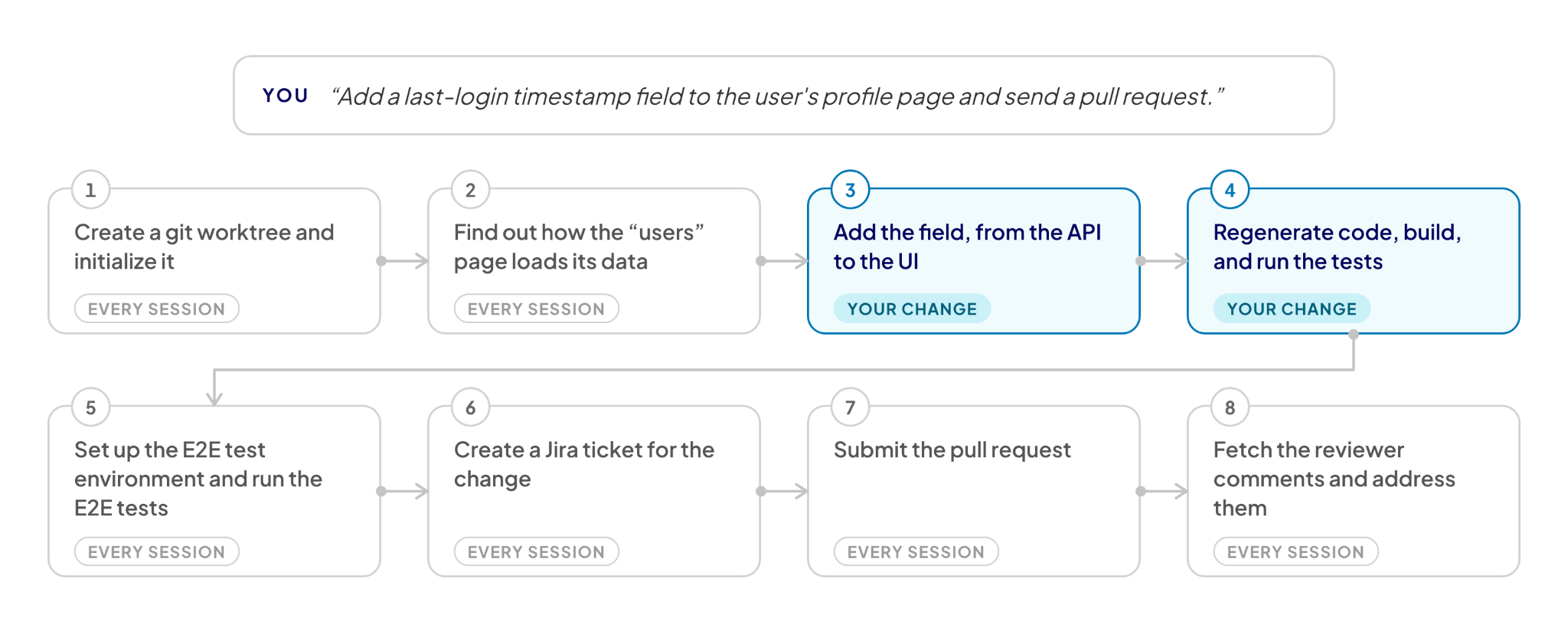
Think of each of these steps as a task the agent performs to achieve what you asked for. Tasks 3 and 4 are the real work. Everything else happens in every session, for every engineer.
Once you look at sessions this way, you stop asking “which sessions were expensive?” and start asking “which tasks keep repeating, and what do they cost?”
Turn reduction is the goal
To perform a task, the agent calls an LLM (large language model) multiple times (turns). Creating a Jira ticket, the example from Part 1, took six turns:
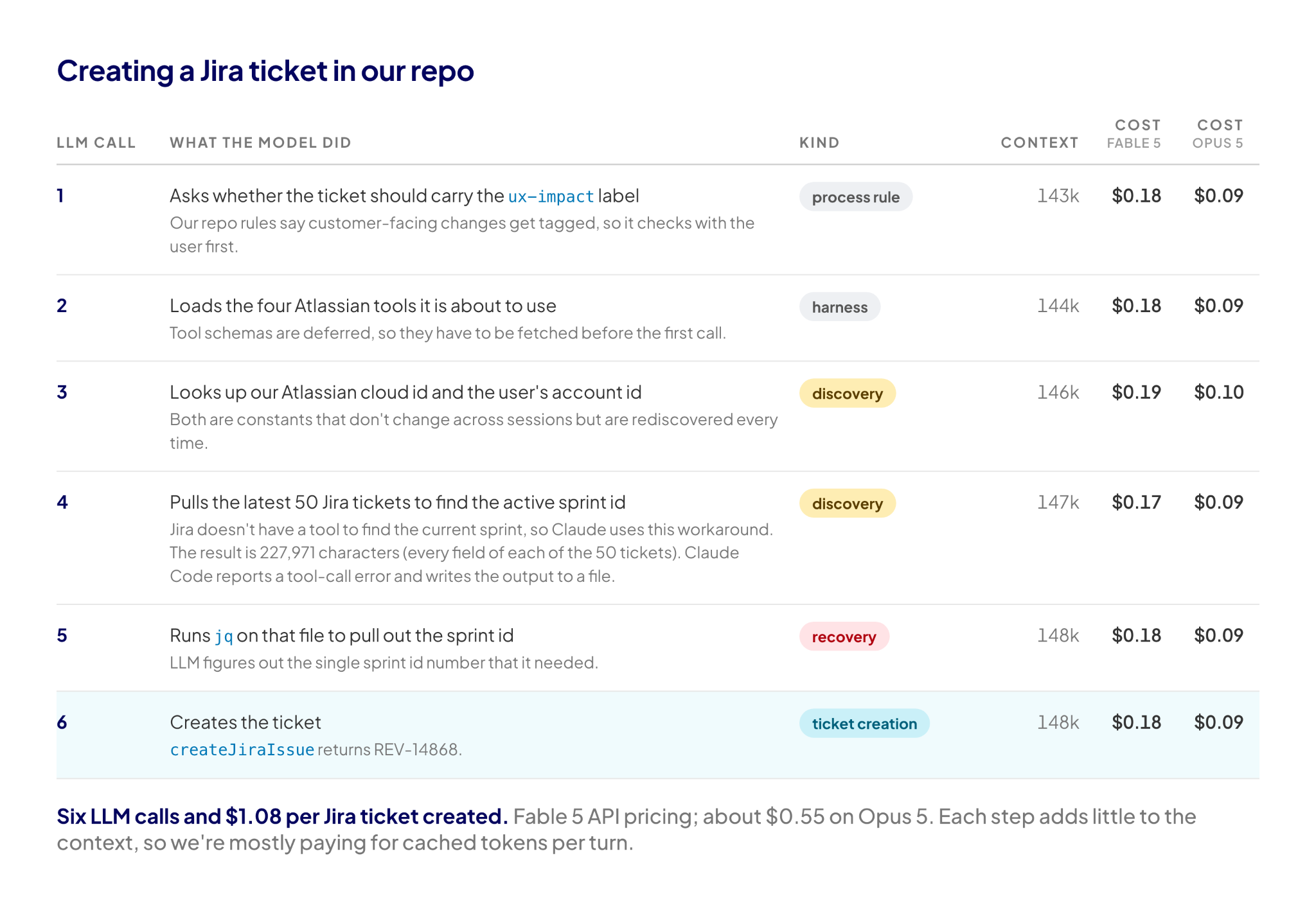
A task that takes six turns instead of two adds four extra round trips that are costly both in tokens and wall-clock time. And if the task repeats often across sessions, the costs start adding up. Our goal is to help the agent do its work in as few turns as possible.
The Agent Optimizer
We built Revefi's Agent Optimizer to achieve that goal. It is a semantic optimizer that reads an agent's session logs, finds the tasks that repeat, and reasons out what instructions the agent is missing.
As part of our AI FinOps platform, the optimizer runs on agents our customers build and provides these recommendations. Starting today, everyone can run it! We're starting with support for Claude Code.
How the Optimizer works
The optimizer operates as a multi-stage pipeline described below. Each phase extracts more signals from the output of the one before it, from raw logs down to a handful of ranked clusters and a fix for each. Each stage is a mix of programmatic and AI-powered steps with no human analysts involved.
Image 3: The Agent Optimizer pipeline
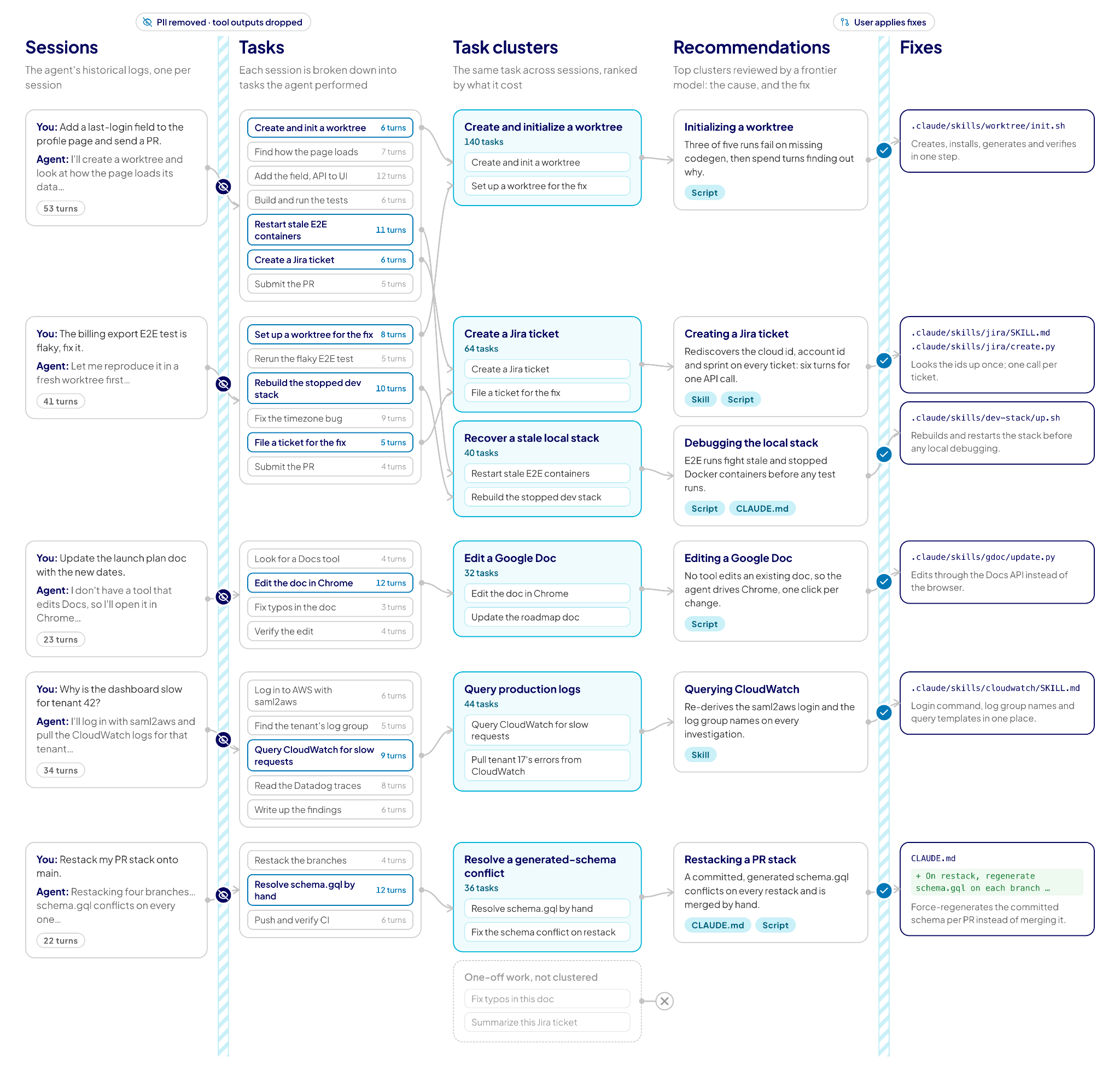
Input. The agent's logs (session transcripts or OTel logs), one file per session.
- Transcripts. The first phase condenses each log into a transcript that keeps the turn structure, so later phases can join what they find back to specific turns. It scrubs secrets and PII and trims long lines. Tool responses are dropped, since they are large and may contain your intellectual property; the exception is errors, where we keep some anonymized error metadata.
- Segmentation. This phase breaks each session into the tasks the agent performed. Each task is annotated with a statement of intent, total and marginal cost, and other metadata. By design, there is no fixed taxonomy or categories (more on this later).
- Clustering. This phase clusters tasks, across all of the agent's sessions, and recursively merges clusters that turn out to be near-duplicates. Each cluster aggregates its tasks' occurrences, turns, cost, and error profile.
- Ranking and recommendations. Finally, the clusters are ranked by cost and optimization opportunity. The top clusters, with their metrics and evidence slices, go to a frontier model such as Opus or Fable, which provides the final recommendations for a fix.
Why this approach works
Fixes are commits, not personalized memory. You often hear engineers complain about coding agents: “It works for you, but it doesn't work for me”. Personalized memory makes this worse. Our fixes are checked into the repo, so every user benefits.
Accuracy, not just cost. Deterministic scripts and the right instructions help agents complete their tasks without running into errors, significantly boosting the agent's success rate. Further, we've seen tasks that needed an Opus-level model become doable by a Sonnet-level model once the recommendations were applied.
Usage limits count too. If you're on seat-based pricing, you may not pay per token. However, you still wait for every turn, and you hit your plan's limits sooner when the agent spends turns on work it has already done.
Offline analysis. The optimizer runs on logs after the fact. There is no proxy between your agent and the model and no rewriting of prompts; nothing about how your agent runs changes until you check in a fix.
Largely domain and agent agnostic. The pipeline needs only sessions, tasks, and intents, so a new agent needs, at best, a small adapter for its log format and nothing else.
Example findings with Claude Code
Below are some example findings by our Optimizer. Thanks to some of our early customers who shared examples back with us with permission to share them.
A generated GraphQL schema breaks rebases. One of our early customers used stacked pull requests and committed a generated GraphQL schema file. Every rebase of a stack produced a merge conflict on that file. The optimizer flagged the agent struggling with this conflict. It suggested instructions to avoid the conflict entirely and simply regenerate the full file for each pull request.
Stale local Docker containers make the agent thrash. The optimizer found that sessions running our local E2E tests kept fighting stale and stopped Docker containers. It recommended an instruction to run a script that rebuilds and restarts the stack before any local debugging.
Editing Google Docs needs a browser. At the time, the Google Drive MCP server could create a document but had no tool to edit one, so Claude Code opened the doc in Chrome and made the edits click by click. The optimizer suggested a script that edits the doc through the Docs API instead. (Google has since shipped a separate Docs connector that can edit in place).
The Jira ticket example we've used through both blogs was also identified by our Optimizer.
Try it
You can run our optimizer on your own Claude Code sessions at optimizer.revefi.com. If you find something surprising in your sessions, drop us a note at optimizer@revefi.com. We'd love to hear about it.
Building your own agents? Sign up at revefi.com or reach out to us at optimizer@revefi.com.