

.avif)
What is Snowflake Adaptive Compute?
Snowflake Adaptive Compute is a warehouse feature that reached general availability on AWS on June 16, 2026, and expanded to select Microsoft Azure and Google Cloud regions on July 28, 2026.
Snowflake Adaptive Compute replaces manual warehouse sizing, multi-cluster configuration, and Query Acceleration Service (QAS) tuning with a workload-aware compute pool that routes and scales queries automatically. It simplifies operations.
At GA, Snowflake's own claim was narrower than the pre-announcement suggested: 1.2x better price-performance than Gen2 on Snowflake's internal TPC-DS 10TB benchmark, framed as throughput per dollar rather than a guaranteed lower bill. The July update added a further claim of up to 30% cost improvement over the June release, but only for variable and lower-concurrency workloads, and Snowflake's own disclosure is that actual savings vary by cloud, region, warehouse size, workload, and usage pattern. Read plainly, these are workload-dependent price-performance claims, not a committed reduction in total spend.
Does Snowflake Adaptive Compute Matter?
We anticipate that adaptive warehouses will alleviate the operational tuning load. For a data platform owner or a CDO responsible for Snowflake at enterprise scale, the key distinction still holds: this is a price-performance and operations feature, not a cost-attribution or FinOps feature. Adaptive warehouses remove tuning surface area but do not eliminate the structural Snowflake problems that drive cost overruns:
- Query-level attribution gaps
- Workload-level optimization decisions
- Anomaly detection
- Cross-platform FinOps across Snowflake, Databricks, and BigQuery
- The feedback loop between data quality issues and compute waste
Snowflake has not published dedicated query-level cost attribution for adaptive warehouses as of this update (September 2026). Until those changes, the primary unit of cost-optimization work, decomposing spend to the query, user, or workload, remains outside the feature.
What Is a Snowflake Adaptive Warehouse?
A Snowflake adaptive warehouse is a warehouse type that uses the Adaptive Compute service instead of a fixed-size virtual warehouse. Rather than specifying WAREHOUSE_SIZE (XSMALL, SMALL, MEDIUM, etc.) and MAX_CLUSTER_COUNT, you set two properties:
- MAX_QUERY_PERFORMANCE_LEVEL: a t-shirt-sized upper bound on how much compute any single query can consume (default: XLARGE).
- QUERY_THROUGHPUT_MULTIPLIER: an integer scale factor over a system-computed base capacity, controlling how much parallelism the warehouse can burst to at any instant (default: 2).
All queries across all adaptive warehouses in an account are routed to a single shared compute pool dedicated to that account. Snowflake decides per-query how much compute to allocate, up to the MAX_QUERY_PERFORMANCE_LEVEL cap and decides when to queue versus execute based on the throughput multiplier. Suspend and resume semantics disappear. So does Query Acceleration Service tuning, because QAS usage is folded into adaptive compute credits automatically.
Adaptive Compute Requirements and Availability
Adaptive Compute reached general availability on AWS on June 16, 2026, in six regions:
- Americas: US West 2 (Oregon), US East 2 (Ohio)
- Europe: EU West 1 (Ireland), EU Central 1 (Frankfurt)
- Asia Pacific: AP Northeast 1 (Tokyo), AP Southeast 2 (Sydney)
On July 28, 2026, Snowflake extended general availability to select Microsoft Azure and Google Cloud regions:
- Microsoft Azure: Central US (Iowa), East US 2 (Virginia), West Europe (Netherlands), North Europe (Ireland), UK South (London), Switzerland North (Zurich), Sweden Central (Gävle)
- Google Cloud: us-east4 (Northern Virginia), europe-west2 (London), europe-west3 (Frankfurt), europe-west4 (Netherlands), Australia-Southeast2 (Melbourne)
It requires Enterprise Edition or higher across all supported clouds.
How Adaptive Compute Works
It is relatively easy to get started with Adaptive Compute if you meet the requirements noted earlier.
- You create an adaptive warehouse (CREATE ADAPTIVE WAREHOUSE my_wh) or convert an existing standard warehouse in place (ALTER WAREHOUSE my_wh SET WAREHOUSE_TYPE = 'ADAPTIVE'). Conversion is online, with no downtime. Existing queries finish on the old compute, new queries start on the adaptive pool, and during the transition you are billed for both.
- You set two dials: MAX_QUERY_PERFORMANCE_LEVEL (the per-query ceiling) and QUERY_THROUGHPUT_MULTIPLIER (the concurrency burst factor). Snowflake auto-computes sensible starting values if you convert an existing warehouse, based on its size, max cluster count, QAS scale factor, and generation.
- Queries land in the shared pool. Snowflake inspects the plan, picks a compute footprint up to the performance-level cap, and either executes or queues based on the throughput multiplier's computed ceiling.
- You still get billed in credits. Adaptive warehouse consumption is reported as COMPUTE in usage statements using standard virtual warehouse credits. Usage data lands in WAREHOUSE_METERING_HISTORY, QUERY_HISTORY, and WAREHOUSE_LOAD_HISTORY ACCOUNT_USAGE views.
- You govern spend with budgets and resource monitors: the same cost-governance tools that exist for standard warehouses. Snowflake's guidance is to use MAX_QUERY_PERFORMANCE_LEVEL and QUERY_THROUGHPUT_MULTIPLIER to shape performance and burst, and use budgets and resource monitors for absolute cost controls.
Adaptive Compute does not replace the cost-governance layer. It simplifies the capacity-sizing layer.
What Snowflake Is and Isn't Claiming
The pre-announcement in June 2025 and early conversations around Adaptive Compute suggested a cost-optimization feature. Snowflake's own published claims, at GA and in the July update, are more specific.
Source: Snowflake documentation; Snowflake's GA announcement (June 16, 2026) and Azure/Google Cloud expansion post (July 28, 2026). Last verified September 14, 2026.
Based on what we know today, Adaptive Compute is a Snowflake upgrade to warehouse management, with workload-dependent price-performance improvements at the hardware layer. It is not offering a FinOps engine, and it does not claim to.
For a data leader evaluating Adaptive Compute against a significant annual Snowflake bill, the correct frame is: this reduces how much tuning you do and can improve throughput per dollar on the right workloads; it does not, on its own, tell you where spend is leaking.
How Adaptive Compute Compares to Standard and Gen2 Warehouses
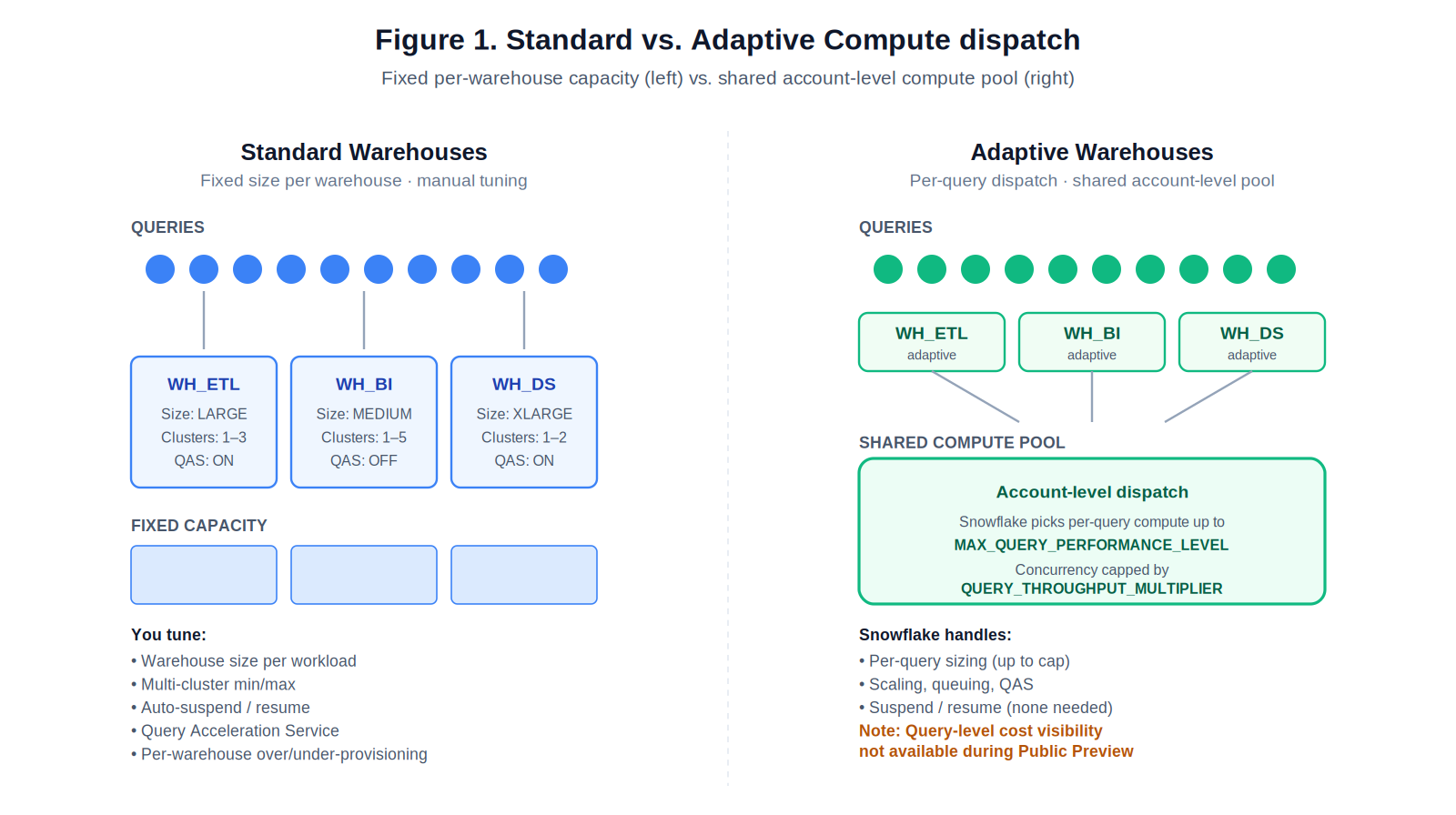
Standard warehouses allocate a fixed compute footprint per warehouse. Adaptive warehouses dispatch each query from a shared account-level pool up to per-query and concurrency caps.
Source: Snowflake documentation; GA and July 2026 update announcements. Last verified September 14, 2026.
The Adaptive Compute feature will likely help teams drowning in warehouse management. It is less likely to help enterprises struggling with cost optimization, attribution, chargeback accuracy, or identifying the specific queries and users burning credits.
Where Adaptive Compute Is Likely To Help
Adaptive Compute will help in a few areas:
- Warehouse-sprawl overhead. Enterprises commonly end up with dozens to hundreds of warehouses, each with its own size, cluster count, and auto-suspend settings. Adaptive warehouses remove four dials (size, min/max cluster, QAS scale factor) and collapse them into two.
- Right-sizing uncertainty. Teams routinely over-provision to absorb spikes, or under-provision and suffer queuing. A per-query dispatch model with a shared pool reduces these failure modes.
- Chargeback continuity. Because warehouse-level totals are preserved, existing showback and chargeback structures continue to work.
If your primary problem is tuning fatigue across many warehouses, Adaptive Compute is a good step forward.
Where Adaptive Compute Falls Short for Enterprises
The more you scale on Snowflake, the more these gaps tend to matter:
1. No committed cost reduction
Snowflake's published claims are workload-dependent: 1.2x price-performance versus Gen2 at GA, and up to 30% further improvement for variable workloads in the July update, both measured against the prior release, not a committed reduction in total spend. For an enterprise whose stated problem is cost overruns, these numbers only help if your workloads match the profile Snowflake benchmarked (variable, lower-concurrency). If your workload is steady-state or concentrated in a few heavy reports, there is no guarantee Adaptive Compute reduces your bill. The dials (MAX_QUERY_PERFORMANCE_LEVEL, QUERY_THROUGHPUT_MULTIPLIER) are performance envelopes; the cost controls remain budgets and resource monitors, the same coarse tools teams already have today.
2. Query-level cost visibility remains the open question
This is arguably the most important open item. Snowflake has not published dedicated query-level cost attribution for adaptive warehouses since GA. For any organization doing chargeback, showback, or root-cause analysis on cost spikes, this is a working constraint. As of this update, you can see that an adaptive warehouse cost $X this week, but native decomposition of that $X to the query, user, role, or workload has not been confirmed as shipped. Verify against current Snowflake documentation before you build a FinOps process around it.
3. QUERY_THROUGHPUT_MULTIPLIER = 0 is documented as unlimited
A zero value means the warehouse can use as much burst capacity as available with no cap. In a feature promoted for automation and simplicity, this is a dial that removes the concurrency ceiling entirely if a well-meaning platform engineer sets it to zero in the name of "let it scale." Resource monitors catch the aggregate, but not before a bad afternoon's worth of runaway queries land in the bill. This is not a bug; it's a legitimate configuration. It's also a reminder that "adaptive" is not the same as "bounded."
4. The automation stops at the warehouse
Adaptive Compute does not rewrite queries, recommend indexing or clustering changes, identify inefficient joins, or tell you that a specific dashboard is the reason your credit burn doubled on Tuesday. It does not detect anomalies. It does not tie compute spikes to upstream data quality problems (schema drift, volume spikes, pipeline misfires). Those optimization loops live outside the warehouse abstraction and outside the Adaptive Compute feature.
5. It is Snowflake-only
This is the point most often missed in field conversations. Enterprises running Snowflake at meaningful scale are rarely single-platform. The typical cloud data footprint is Snowflake plus Databricks, plus BigQuery or Redshift in some business units, plus a lakehouse or Iceberg-based architecture emerging alongside. Adaptive Compute now spans AWS, Azure, and Google Cloud infrastructure, but that is about where Snowflake runs, not which data platforms it optimizes across. A CDO looking at total data-platform spend, and the architectural arbitrage question of which workloads belong where, gets no help from Adaptive Compute on that decision surface.
6. It presumes you already know what to configure
Setting MAX_QUERY_PERFORMANCE_LEVEL "to the highest query performance you're comfortable having for your largest queries" assumes you know what that is. Setting QUERY_THROUGHPUT_MULTIPLIER to balance queuing against spend spikes assumes you have visibility into queuing behavior and spend shape over time. These are analytically non-trivial decisions in large data estates. The documentation's guidance is correct, but generic. Making it concrete for a given account requires exactly the kind of observability and workload analysis that Adaptive Compute itself does not provide.
The Questions Adaptive Compute Does Not Answer
If you are a Snowflake customer running at enterprise scale and experiencing cost overruns, the real questions sit at a different altitude than warehouse sizing. The table below maps each question to what Adaptive Compute provides today and what actually answering it requires.
These are FinOps and observability questions. Adaptive Compute does not address them. This is not a deficiency in the feature; it is a statement about scope.
How A Self-Driving Platform Like Revefi Addresses These Gaps
Revefi is a self-driving data observability and FinOps platform that operates as an analytical layer using metadata only from Snowflake, Databricks, BigQuery, and other modern data platforms. The problems Revefi is built to address are complementary to Adaptive Compute.
Cross-platform observability (Snowflake + Databricks + BigQuery)
Enterprises increasingly run multi-platform estates. Revefi provides a single operational view across Snowflake warehouses (standard, Gen2, and adaptive), Databricks clusters and SQL warehouses, and BigQuery slots and reservations. That unified view is what makes architecture decisions data-driven instead of tribal: which workloads run where, where consolidation pays off, where migration is justified.
Query-level cost attribution and chargeback
Query-level cost attribution for adaptive warehouses is not confirmed as shipped as of this update. Whether or not that changes, Revefi provides query-level attribution across warehouse types and across platforms. Costs can be attributed to queries, users, roles, tags, dbt models, dashboards, and business units, with chargeback and showback reports that hold up under finance scrutiny.
Automated warehouse right-sizing and self-tuning
Revefi continuously analyzes workload shape against warehouse configuration, whether that warehouse is standard, Gen2, or adaptive. For adaptive warehouses, this includes recommendations on MAX_QUERY_PERFORMANCE_LEVEL and QUERY_THROUGHPUT_MULTIPLIER based on actual query behavior and queuing patterns. For standard warehouses, it covers size, cluster count, auto-suspend, and QAS configuration. The goal is that configuration decisions are grounded in the last N days of workload reality, not in anticipated behavior.
Proven cost savings of up to 60%
Enterprise data teams, such as Verisk, have reduced their Snowflake spend by up to 60% using Revefi. Imagine what you could do with 60% savings from your Snowflake bill!
- Re-purpose savings for Claude Code projects
- Use for Snowflake Cortex projects, which are compute intensive
- Build newer data and AI products
Workload-level optimization recommendations
Adaptive Compute dispatches individual queries well; it does not tell you which workloads are structurally inefficient. Revefi surfaces query anti-patterns, full-table scans that should be clustered, repeated expensive queries that should be cached or materialized, and joins that are consuming disproportionate compute. These are the optimization levers that actually move the bill.
Anomaly detection and proactive cost alerts
Budgets and resource monitors alert after the fact, when a threshold is crossed. Revefi's anomaly detection identifies cost trajectories before they hit the budget, ties spikes to the specific upstream change that caused them, and alerts the team that owns that change. This is the difference between "your Q3 budget is gone" and "this pipeline change on Tuesday morning is projected to add $28K to Q3 if it continues."
Data quality and cost optimization in one platform
A substantial portion of cost anomalies in large Snowflake estates are symptoms of data quality issues: late data causing full reloads, schema drift breaking incremental logic, upstream volume spikes, broken pipelines retrying. Adaptive Compute absorbs the load; it does not tell you the root cause lives upstream. Revefi combines data-quality monitoring and cost monitoring in one system, which collapses the common "is this a data problem or a compute problem?" triage loop.
Put together, these capabilities address the layer of enterprise FinOps that Adaptive Compute leaves open by design. Adaptive Compute makes Snowflake's compute layer easier to operate. Platforms like Revefi make the whole data estate easier to optimize.
Decision Framework: Should You Adopt Adaptive Warehouses?
We recommend understanding its capabilities first by experimenting.
Source: Revefi analysis based on Snowflake documentation and GA announcements. Last verified September 14, 2026.
For most enterprises at that spend tier, the third path is the realistic one. Adaptive Compute and a platform like Revefi are complementary; they operate at different layers of the stack.
Closing Note
Snowflake Adaptive Compute addresses operational problems that had genuinely grown expensive to manage: warehouse sprawl and manual tuning at enterprise scale. It is now generally available on AWS, Azure, and Google Cloud.
It is not an answer to the cost-overrun problem most enterprise Snowflake customers experience. That problem lives in query-level attribution, workload optimization, anomaly detection, data-quality-linked diagnostics, and cross-platform FinOps across Snowflake, Databricks, and BigQuery. Those are different layers of the stack, and they are the layers where platforms like Revefi operate.
The most useful way to think about Adaptive Compute for a CDO or data platform owner is as one component of a data estate, not as a FinOps platform in disguise. Treating it as the latter is where the gap between overpromise and reality tends to manifest.
Links:
"Introducing Even Easier-to-Use Snowflake Adaptive Compute with Better Price/Performance", Snowflake Press Release, June 2025
"Adaptive Compute", Snowflake Documentation, 2026
"Adaptive Compute is Now Generally Available", Snowflake Blog, June 16, 2026
"Snowflake Adaptive Compute: Improved Real-World Price-Performance, Available on AWS, Azure and GCP", Snowflake Blog, July 28, 2026
"2026 Snowflake Pricing Guide", Revefi, February 2026

.avif)