Introduction:
Understanding Snowflake’s Consumption-Based Pricing Model
Snowflake customers use its AI-powered Data Cloud to unify data from multiple sources and support workloads across analytics, AI/ML, data engineering, application development, and cybersecurity.
Snowflake leverages its AI-powered Data Cloud to integrate data from multiple sources, enabling essential workloads across various domains such as artificial intelligence, machine learning, data engineering, application development, or even cybersecurity. Like most cloud-based Software-as-a-Service (SaaS) platforms, Snowflake employs a usage-based pricing model. Instead of relying on a fixed monthly or annual subscription fee, customers incur costs based on three key elements:
1. Data Storage
2. Data Transfer
3. Computation
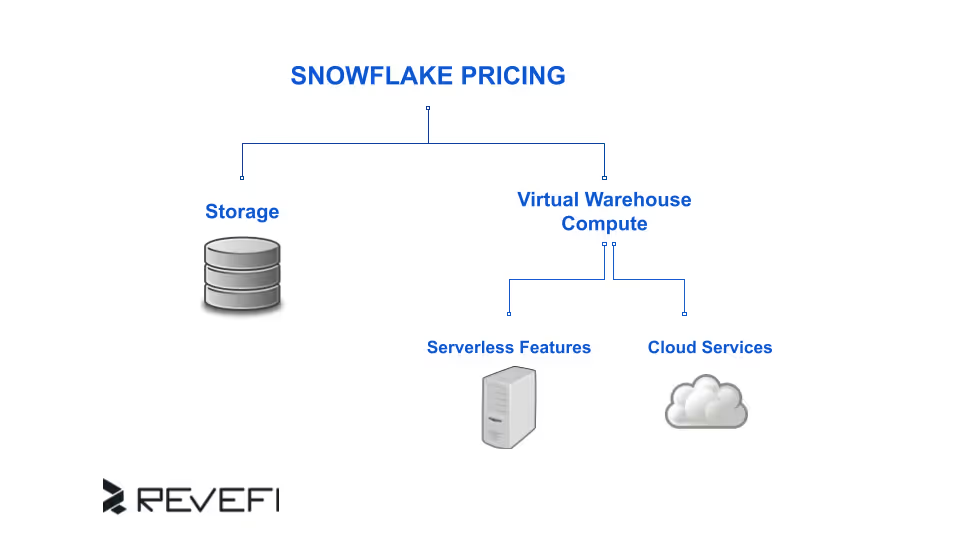
Hence, the overall expense of utilizing Snowflake is determined by the combined costs of data transfer, storage, and computational resources.
Snowflake Pricing Explained:
Storage, Compute, and Credits
Data storage costs are determined by the volume of data retained within the platform, while computational expenses are based on the processing power used for tasks such as querying, analytics, and machine learning.
1. Snowflake Storage Costs Explained
Snowflake stores structured, semi-structured, and unstructured data at virtually unlimited scale. Storage costs are based on the average monthly volume of compressed data stored, measured in terabytes.
There are no costs associated with transferring data within the same cloud provider and region. However, charges apply when data is moved across different regions within the same cloud provider or between distinct cloud providers. Similar to storage, data transfer fees are assessed per terabyte per month, with pricing varying depending on the specific region and cloud service provider selected.
Key facts about Snowflake storage pricing:
- Billed per TB per month (after compression, often 3×–5× reduction)
- No charge for data transfer within the same cloud provider and region
- Charges apply for cross-region or cross-cloud data movement
- Pricing varies by cloud provider (AWS, Azure, GCP) and region
Snowflake publishes detailed storage pricing by cloud and region on its official website.
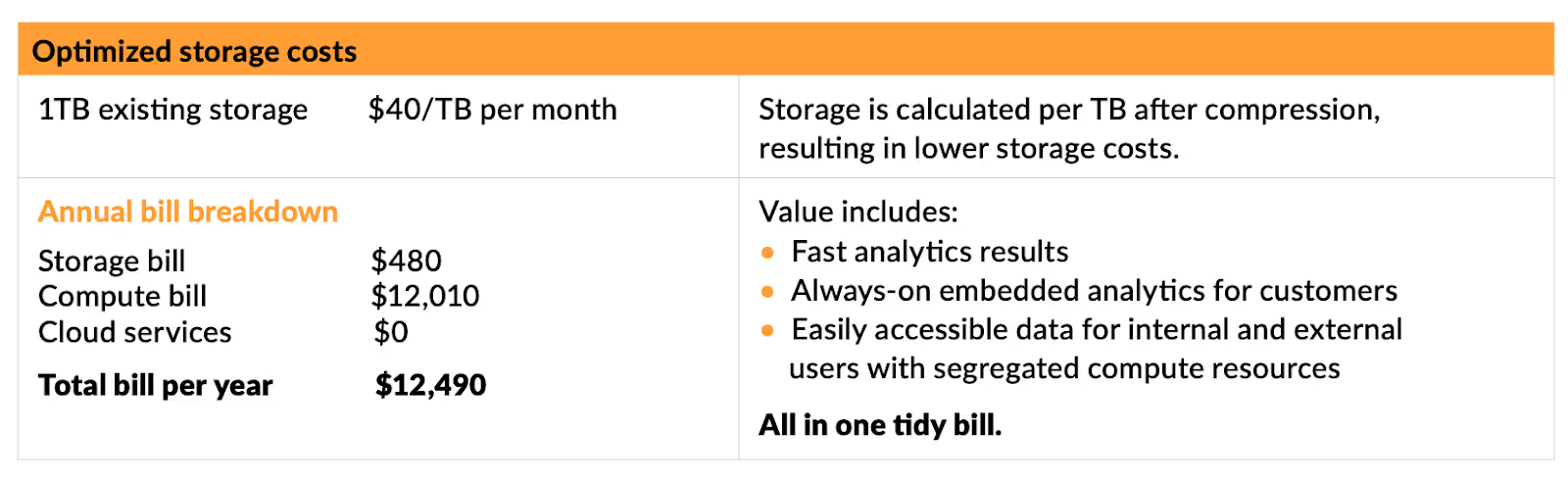
Since Snowflake can be deployed across three major cloud service providers (Amazon Web Services (AWS), Google Cloud Platform (GCP), and Microsoft Azure), you can find a detailed breakdown of storage costs based on cloud, region, and demands on the company’s official website.
2. Snowflake Compute Pricing: How It Works
Snowflake, utilizing computational resources results in the consumption of Snowflake credits.
The total cost incurred for compute usage is determined by multiplying the number of credits used by the rate assigned to each credit. Snowflake credits are utilized exclusively when a customer actively engages with resources, such as executing queries, loading data, or running workloads.
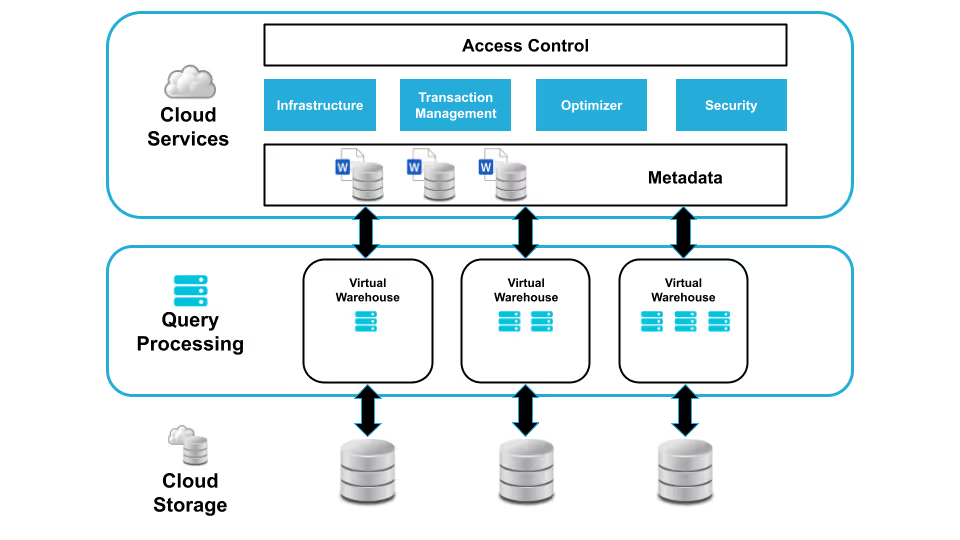
Compute services within Snowflake fall into three main categories: virtual warehouses, which serve as the primary compute resource, along with serverless features and cloud services, which are used less frequently.
Snowflake Compute Categories:
- Virtual Warehouses: User-managed compute resources that consume credits for queries, data loading, and DML operations.
- Serverless Compute: Snowflake-managed resources handling workloads without virtual warehouses.
- Compute Pools: Provide compute power for Snowpark Container Services.
- Cloud Services Compute: Snowflake-managed layer handling user requests, authentication, query display, and system coordination.
How Snowflake Credits Work:
Regional, and Cloud-based Pricing Explained
Snowflake employs a proprietary credit system known as ‘Snowflake Credits’ as its pricing mechanism. These credits are used whenever operations are performed within the platform, including tasks like running virtual warehouses.
The price of each credit is determined by three key variables: the chosen Snowflake edition, the data hosting region, and the cloud provider selected for deployment.
Credits are the "currency" of the Snowflake ecosystem. You do not pay for compute features, or resources in dollars per hour directly. Instead, you purchase or consume credits called Snowflake credits. The dollar value of a credit is determined by your Service Edition and your Cloud Region.
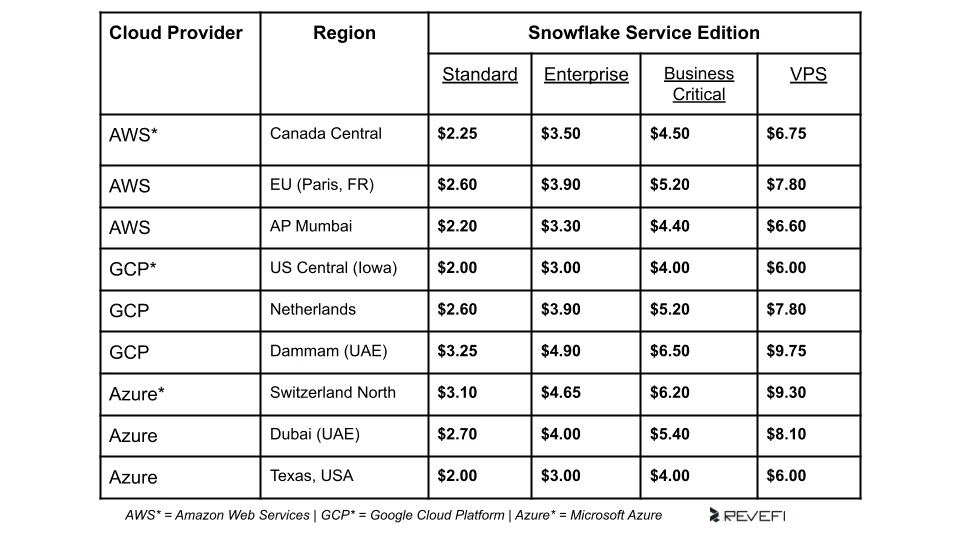
Snowflake offers warehouses in various sizes, each corresponding to a specific level of compute resources per cluster. Upgrading to a larger warehouse generally results in a twofold increase in both processing power and the number of credits consumed per hour of active usage.
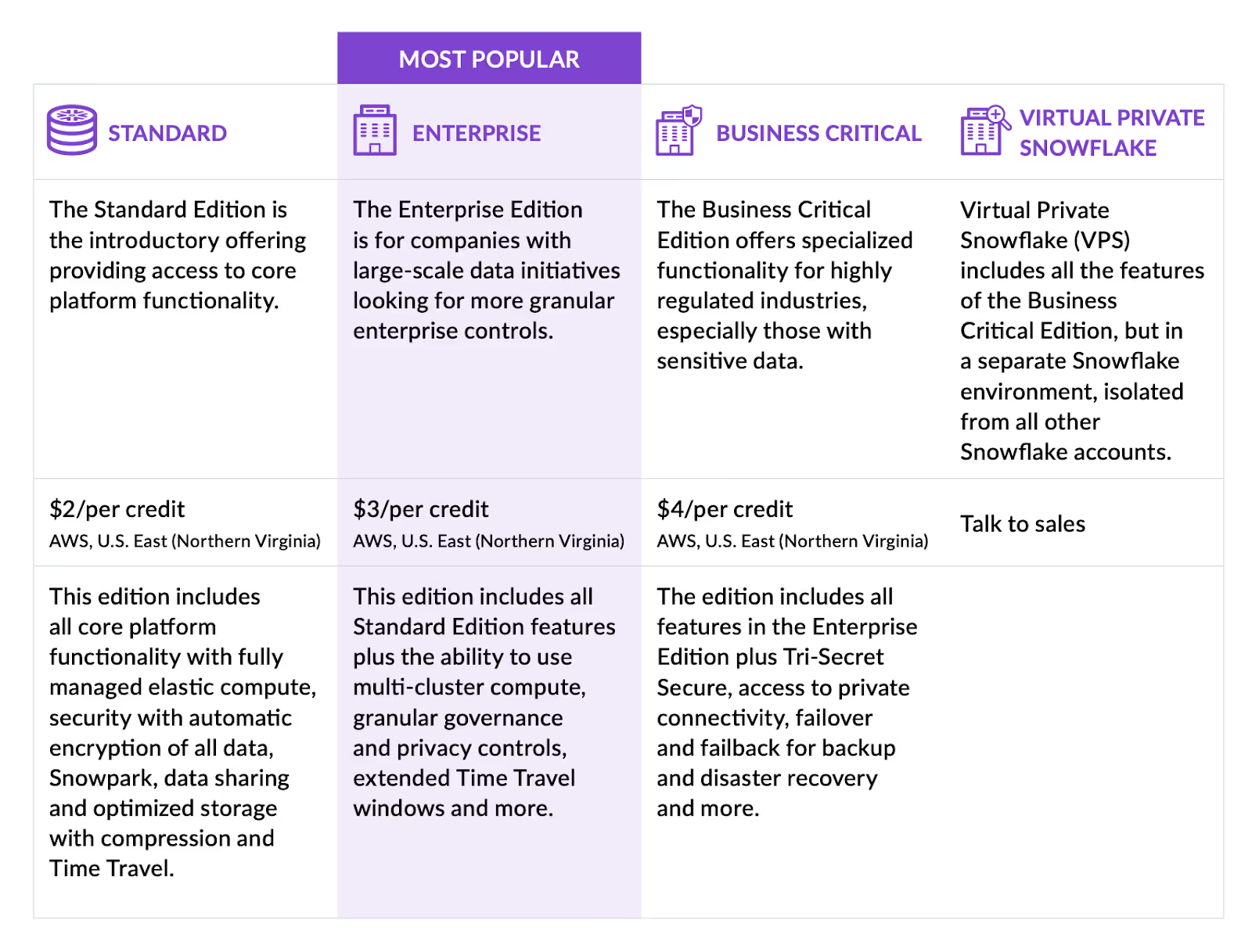
Snowflake Service Editions and Credit Pricing:
Choosing the Right Tier
The cost per credit is dictated by the features and service level agreements (SLAs) required for your business.
Standard Edition
The entry-level tier provides full access to Snowflake’s core features. It is ideal for startups or small teams that need a robust data warehouse without enterprise-grade security requirements.
- Key Feature: 1 day of Time Travel (data retention).
- Best For: Ad-hoc analysis and basic reporting.
Enterprise Edition
This is the most popular tier for established businesses. It introduces features designed for high-concurrency environments and longer data retention.
- Key Feature: Multi-cluster warehouses and up to 90 days of Time Travel.
- Best For: Large-scale data initiatives and production-grade ETL pipelines.
Business Critical Edition
Formerly known as the "Enterprise for Sensitive Data" (ESD), this tier is designed for highly regulated industries like Finance and Healthcare.
- Key Feature: Failover/failback for disaster recovery and "Tri-Secret Secure" (customer-managed encryption keys).
- Best For: Organizations with strict compliance (HIPAA, HITRUST, SOC2) requirements.
Virtual Private Snowflake (VPS)
The most expensive tier, providing a completely isolated environment within the cloud infrastructure.
- Key Feature: Dedicated metadata stores and compute resources.
- Best For: Tier-1 financial institutions or organizations requiring total physical isolation from other tenants.
How Do Virtual Warehouse Costs Work?
Compute functions are where the majority of your Snowflake costs will occur. Snowflake uses Virtual Warehouses, which are essentially clusters of compute resources.
Warehouse Sizing and Credit Consumption
Warehouses follow a T-shirt sizing model. Each size represents a doubling of the compute power and, consequently, a doubling of the credit consumption per hour.
Storage Costs: Active vs. Historical
Storage is priced based on the average monthly volume of data stored in Snowflake. This is calculated after Snowflake’s proprietary compression, which often reduces the raw data footprint by 3x to 5x.
Hidden Storage Drivers
- Time Travel: Snowflake allows you to query data as it existed at any point in the past (up to 90 days). While this is a lifesaver for data recovery, Snowflake must store the "pre-modified" versions of that data, which increases storage costs.
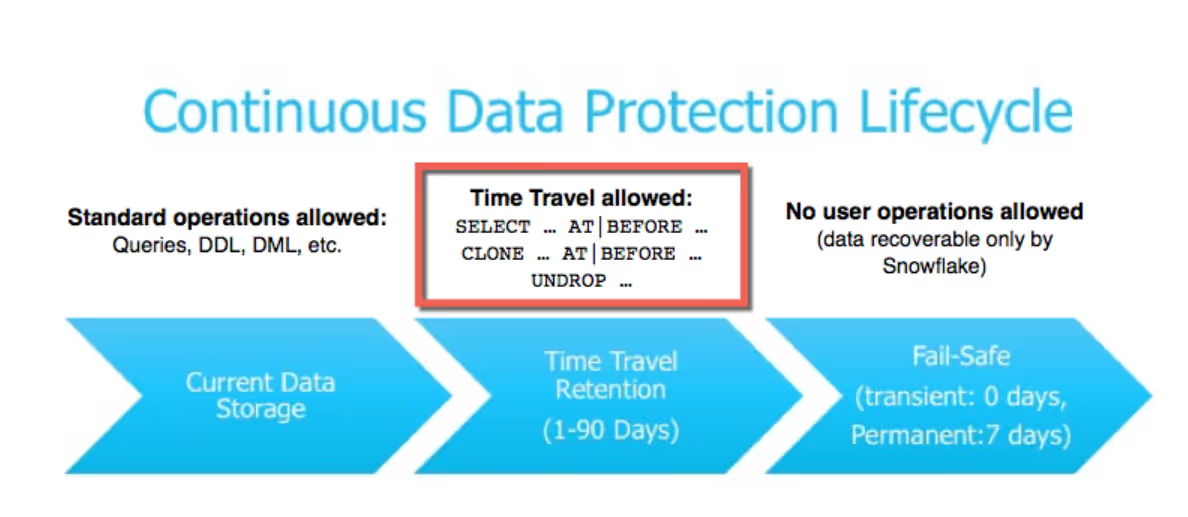
- Fail-safe: A non-configurable 7-day period after Time Travel expires where data is kept for emergency disaster recovery by Snowflake engineers. This adds a permanent overhead to your storage bill.
Cloud Services Costs Explained
The Cloud Services layer acts as the coordinator. It manages user logins, query optimization, and metadata.
The 10% Rule
Snowflake provides a "free" allowance for cloud services. You are only charged for cloud services if they exceed 10% of your daily Snowflake credit consumption.
Example 01:
If your warehouses use 100 credits today, and your cloud services use 9 credits, your total bill is 100 credits.
Example 02:
If your warehouses use 100 credits, but your cloud services use 15 credits, your total bill is 105 credits (100 compute + 5 excess service credits).
Extra Costs Of Snowflake’s Serverless Features
Snowflake offers several "Serverless" features where you do not manage the warehouse size; instead, Snowflake manages it for you. These are billed separately:
- Snowpipe: Continuous data ingestion. You pay for the Snowflake credits used to load the files plus a small overhead charge per file.
- Automatic Clustering: Keeps your data sorted for optimal query performance. This is highly efficient for massive tables but can be expensive if your data changes frequently.
- Materialized View Maintenance: Automatically updates views as underlying data changes. Use these sparingly for frequently queried, static data.
- Search Optimization Service: Speeds up point-lookup queries (finding one row in billions). This is billed based on the amount of data scanned and maintained.
How Does A Monthly Snowflake Bill Add Up:
Summation Of All Costs
Your total Snowflake bill is naturally the sum of costs for both loading and querying data. Since both processes consume resources in the form of nowflake Credits, it's understandable that your final expense reflects their combined usage. Hence, by using a generic example, we’re going to breakdown how your Snowflake bill would look like.
Example
Imagine a company that continuously processes data around the clock, and whose database is being accessed by two distinct user groups (Finance and Sales) at overlapping periods throughout the day. To give users a comprehensive view of their Snowflake spend, batch reports are generated on a weekly basis.

Optimizing, Monitoring & Controlling Costs With Revefi
Managing Snowflake costs manually does not scale.
Revefi improves how you manage data by automating data quality tracking, performance monitoring, and cost-cutting. For Snowflake users, the AI Data Engineer acts as a system co-pilot that helps you monitor data usage, track system health, keep data accurate, and reduce compute expenses.
How Revefi Helps Snowflake Users Reduce Costs
- Identifies underutilized or idle warehouses
- Recommends right-sizing and auto-suspend tuning
- Detects inefficient or runaway queries
- Tracks credit usage across teams and workloads
- Enforces credit spending limits automatically
Executive-Level Visibility
Revefi provides C-level dashboards that connect Snowflake usage to business outcomes, making spend transparent, accountable, and aligned with strategy.
Intelligent Data Quality Oversight
Beyond cost, Revefi continuously monitors data health, pipeline failures, schema changes, and downstream impact, protecting trust in analytics while controlling spend
TRANSFORM YOUR DATA EXPERIENCE
Revefi FinOps for Snowflake is used by innovative data teams at enterprises across the globe.


Get your journey started today.
Talk to our team of experts to learn moreIs Snowflake Worth the Cost?
Snowflake’s pricing is a reflection of its performance and ease of use. While it may appear more expensive than "do-it-yourself" open-source stacks on the surface, the Total Cost of Ownership (TCO) is often lower.
By eliminating the need for database administrators (DBAs) to manage hardware, patching, and tuning, your team can focus on what matters: extracting value from data.
However, the true price of your Snowflake licence isn’t something that can be just calculated using certain hard-and-fast metrics. To learn more, check out our blog on how to use Snowflake’s Pricing Calculator.