How Databricks Pricing Works:
Accelerating the Move to Consumption-Based Costing
Legacy data environments relied on capital expenditures (CapEx), where hardware investments were amortized over several years. Modern data platforms, by contrast, operate on a consumption-based operating expenditure (OpEx) model (where costs scale directly with usage).
Databricks, the creator of the Data Intelligence Platform, exemplifies this transformation through a granular, usage-based pricing framework. Its pricing model separates compute from storage, allowing organizations to pay only for the resources they actively consume rather than provisioning infrastructure for peak demand.
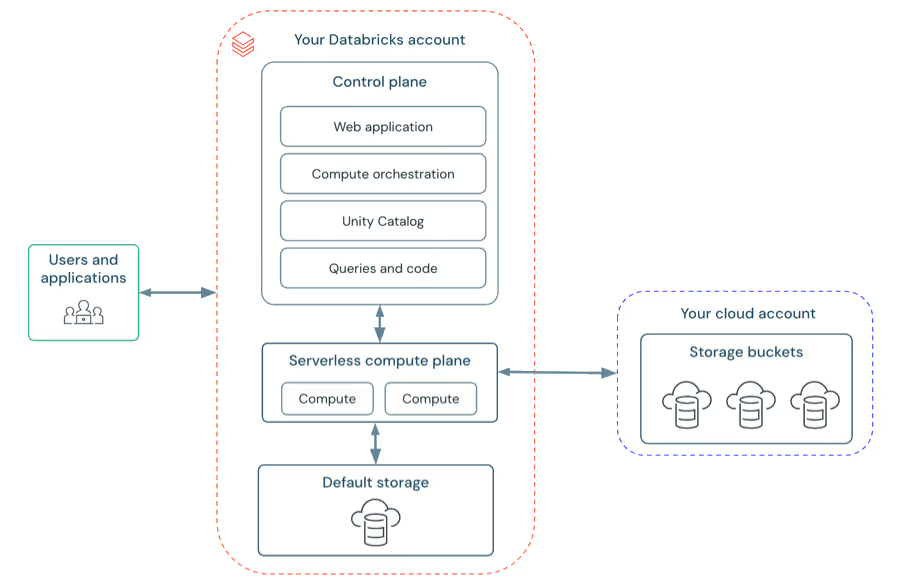
Why do Databricks Separate Compute and Storage?
Databricks’ pricing architecture lays the foundation of its economic model.
Data is stored persistently in low-cost cloud object storage such as Amazon S3, Azure Data Lake Storage, or Google Cloud Storage.
Compute, on the other hand, is delivered through ephemeral clusters that spin up only when workloads are running and shut down when tasks complete.
This separation ensures that costs are incurred only when data processing, analytics, or machine learning workloads are actively generating business value.
This approach differs significantly from legacy data warehouses, which often require always-on infrastructure or rigid licensing tied to peak capacity (leading to wasted spend during periods of low utilization).
What Drives Databricks Total Cost of Ownership (TCO)?
Databricks total cost of ownership (TCO) is not a single fixed expense; but rather a cumulative result of several interdependent cost drivers that include:
- Workload intensity (CPU, memory, and concurrency requirements)
- Execution duration (how long clusters run)
- Feature selection (such as Vector Search, Photon, or Standard SQL)
- Cloud infrastructure costs from the underlying provider (AWS, Azure, or GCP)
At the center of this model is the Databricks Unit (DBU), the platform’s core billing metric and a layered SKU structure that varies by workload type, runtime, and deployment mode.
This guide delivers a comprehensive technical and financial breakdown of the Databricks pricing model. It explains how costs accumulate across common workload types, including:
- Batch ETL and data engineering
- Streaming analytics
- Serverless data warehousing
- Generative AI and vector search
It also explores the financial observability tools and practices required to monitor, attribute, and optimize Databricks spend in production environments.
Databricks Units (DBUs):
The Currency of Compute in Databricks
At the core of the Databricks pricing model is the Databricks Unit (DBU).
A DBU functions as a standardized pricing currency that allows Databricks to charge consistently across a wide range of compute resources (from lightweight single-core instances to large, multi-GPU nodes used for deep learning and AI workloads).
Rather than pricing each virtual machine type independently, Databricks uses DBUs as an abstraction layer that normalizes compute value across AWS, Azure, and Google Cloud. This enables predictable pricing even when the underlying infrastructure differs by cloud provider.
How Databricks Units (DBUs) Work?
What is a DBU?
From a technical perspective, a DBU represents a unit of compute capacity consumed per hour. However, it is not a direct equivalent to a CPU core, memory size, or GPU count. Instead, it reflects relative processing throughput based on the performance characteristics of a given instance type.
Each supported virtual machine configuration is assigned a predefined DBU rate by Databricks. When a cluster runs, total DBU consumption is calculated based on the sum of all active nodes.
How DBU Consumption Is Calculated?
- Cluster-level aggregation:
DBU usage is determined by adding the DBU rates of the driver node and all worker nodes in a cluster. For example, if each node is rated at 0.5 DBUs per hour and the cluster consists of 11 nodes, the cluster consumes 5.5 DBUs per hour. - Second-level billing granularity:
DBU usage is metered on a per-second basis. A workload that runs for 30 minutes incurs exactly half of the hourly DBU cost, making Databricks economically efficient for short-lived and ephemeral jobs.
This fine-grained billing model is a key differentiator compared to platforms that rely on fixed hourly minimums or always-on infrastructure.
Databricks Storage Unit (DSU) Explained
While DBUs measure compute consumption, Databricks uses a separate metric: the Databricks Storage Unit (DSU).
What Does a DSU Measure?
DSUs are used to price storage-centric services within the Databricks platform, including components such as Vector Search indexes and select serverless storage layers.
- Storage usage:
Managed storage is typically billed at approximately one DSU per gigabyte per month. - Transaction costs:
API operations against managed storage incur fractional DSU charges. For example, write-heavy operations (such as PUT or COPY requests) consume more DSUs than read operations, reflecting their higher resource impact.
This separation ensures that storage-heavy workloads with minimal compute requirements are billed accurately, without forcing a compute-based pricing model onto storage access patterns.
Databricks Pricing Tiers and DBU Rates
The dollar value of a DBU depends on the service tier selected for a Databricks workspace. Each tier gates access to specific governance, security, and compliance features.
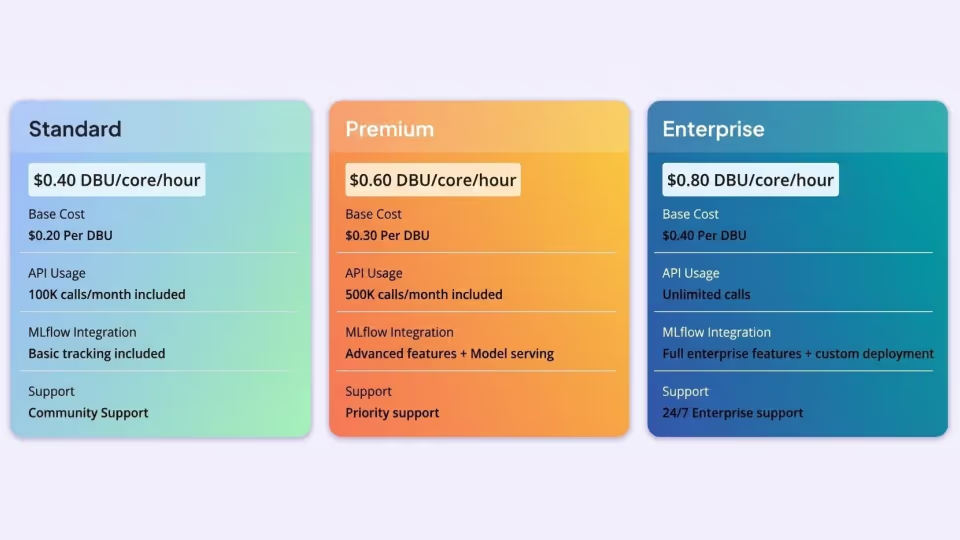
Standard Tier (Being Retired)
The Standard tier historically served as the entry-level option for basic Apache Spark workloads. Databricks has announced its end-of-life, with support ending in October 2025 for AWS and GCP, and October 2026 for Azure. Organizations on this tier must migrate to Premium, which carries higher DBU rates and may require long-term budget re-forecasting.
Premium Tier
Premium is the default choice for most enterprise deployments. It includes essential governance capabilities such as role-based access control (RBAC), advanced SQL Warehouses, and the Photon query engine. Unless otherwise stated, most DBU pricing references assume the Premium tier.
Enterprise Tier
The Enterprise tier targets highly regulated environments. It adds advanced security features such as HIPAA compliance, customer-managed encryption keys (CMK), and enforced private connectivity. DBU pricing at this level is typically higher or governed by custom committed-use agreements.
Databricks Compute Architectures Explained:
Interactive, Automated, and Serverless
Compute architecture is the single biggest driver of Databricks costs. Databricks categorizes compute resources based on how workloads are executed (whether by humans during development, by automation in production, or fully managed through serverless infrastructure).
Each category has distinct DBU pricing, performance characteristics, and cost tradeoffs.
Understanding these differences is essential for optimizing Databricks spend and avoiding unnecessary compute waste.
All-Purpose Compute (Interactive Workloads)
All-Purpose Compute is designed for collaborative, human-driven work. It powers Databricks Notebooks and enables data engineers, analysts, and data scientists to run code interactively, install libraries on the fly, and visualize results in real time.
Pricing and Cost Characteristics
All-Purpose Compute typically carries the highest DBU rates (for example, around $0.55 per DBU on the Premium tier). This premium reflects the value of a persistent Spark context, multi-user access, and the ability to use the driver node for interactive analysis and visualization.
Cost Risk: Idle Time
The biggest cost risk with All-Purpose Compute is idle cluster time. Because these clusters are manually started, they often remain running while users review results, switch tasks, or step away. Even with auto-termination policies, the higher DBU rate makes idle time particularly expensive.
Cost Attribution and Visibility
Databricks usage logs identify these environments using SKU names that include ALL_PURPOSE_COMPUTE, making it easier for administrators to separate development and experimentation costs from production workloads.
Jobs Compute (Automated Workloads)
Jobs Compute, commonly referred to as job clusters, is optimized for automated, production-grade execution. Each job run provides a dedicated cluster that shuts down immediately after the job completes.
Lower DBU Pricing
Jobs Compute is significantly more cost-efficient than All-Purpose Compute, with DBU rates often 40–60% lower, depending on the cloud provider and service tier. This makes it the preferred option for batch ETL, scheduled pipelines, and recurring analytics jobs.
Performance Isolation
Each job runs in its own isolated environment, eliminating resource contention and delivering predictable performance and more reliable SLAs.
Jobs Light for Simple Tasks
For lightweight orchestration or scripts that don’t require a full Spark cluster, Databricks offers Jobs Light SKUs. These are priced even lower and are ideal for simple automation tasks or coordinating downstream workflows.
High-ROI Optimization Opportunity
Migrating stable workloads from interactive notebooks to Jobs Compute is often the highest-impact cost optimization available. It reduces compute costs immediately without requiring changes to application logic or data pipelines.
Serverless Compute in Databricks
Serverless Compute represents a major shift from the traditional “classic” Databricks model. In classic deployments, customers pay two bills: DBUs to Databricks and infrastructure costs directly to the cloud provider. Serverless changes this entirely.
Bundled Pricing Model
With serverless compute, Databricks operates and manages the underlying infrastructure. Customers pay a single DBU rate that includes both compute and cloud infrastructure costs. There are no separate VM or EC2 charges for serverless workloads. While the DBU rate is higher on paper, it often results in a lower total cost of ownership (TCO).
Why Serverless Is Often More Cost-Efficient
- Instant startup: Serverless clusters start in seconds, avoiding the multi-minute provisioning delays (and wasted VM spend) common with classic clusters.
- Scale-to-zero behavior: Clusters shut down immediately when work finishes, eliminating idle “tail” time.
- No over-provisioning: Fast, elastic scaling removes the need to size clusters for worst-case demand, reducing excess capacity costs.
Databricks SQL Pricing and Data Warehousing Economics
Databricks SQL brings modern data warehousing capabilities to the lakehouse, enabling users to run high-performance SQL queries directly on Delta Lake data. Instead of traditional warehouse infrastructure, Databricks SQL relies on SQL Warehouses (formerly called SQL Endpoints), which are purpose-built for high concurrency, low latency, and business intelligence (BI) workloads.
Databricks SQL pricing is segmented into three tiers:
- SQL Classic
- SQL Pro
- SQL Serverless
Each offers a different balance of cost, performance, and operational overhead.
SQL Classic:
Low DBU Cost, Higher Operational Overhead
SQL Classic is the entry-level compute option for Databricks SQL. In this model, the compute resources run in the customer’s own cloud account, using the classic Databricks data plane.
Pricing Model
SQL Classic offers the lowest DBU rate among SQL Warehouses (for example, approximately $0.22 per DBU), making it appear cost-effective on a per-hour basis.
Performance and Limitations
- Despite the low DBU price, SQL Classic warehouses have slow startup times, often taking several minutes to become available.
- To avoid cold-start delays that frustrate end users, administrators frequently leave these warehouses running continuously.
- This extended uptime can quickly offset the lower DBU rate and drive higher total costs.
- SQL Classic also lacks advanced performance optimizations such as Predictive I/O, which limits efficiency for selective or highly targeted queries.
SQL Pro:
Faster Queries Through Intelligent Optimization
SQL Pro builds on the Classic architecture while still running compute in the customer’s cloud account. It is designed for organizations that need faster query performance and better efficiency for analytical workloads.
Pricing Model
SQL Pro is priced at a mid-range DBU rate (for example, around $0.55 per DBU), higher than Classic but lower than Serverless.
Predictive I/O
The defining feature of SQL Pro is Predictive I/O, a machine-learning-driven optimization that accelerates point lookups and highly selective scans.
The “Needle-in-a-Haystack” Effect
For queries that retrieve a small number of rows from very large tables, Predictive I/O can reduce execution times by an order of magnitude. Because Databricks bills compute based on time, a query that runs ten times faster on SQL Pro can cost significantly less than the same query on SQL Classic (despite the higher DBU rate).
Workflow Integration
SQL Pro also integrates directly with Databricks Workflows, enabling SQL queries to be orchestrated as part of end-to-end data pipelines and production analytics jobs.
SQL Serverless:
Elastic Performance with the Lowest TCO for BI
SQL Serverless is a fully managed SQL warehouse where compute resources are hosted and operated entirely by Databricks. This model eliminates the need for customers to manage infrastructure or capacity planning.
Pricing Model
SQL Serverless has the highest DBU rate (for example, around $0.70 per DBU), but this price includes the underlying cloud infrastructure. There are no separate VM or cloud compute charges.
Intelligent Workload Management (IWM)
A core differentiator of SQL Serverless is Intelligent Workload Management (IWM). This AI-driven system dynamically manages query queues and scales capacity up or down in seconds based on real-time demand.
Unlike Classic or Pro warehouses, which rely on static scaling, IWM predicts concurrency spikes and adjusts resources automatically to maintain low latency.
Cost Efficiency for Intermittent Workloads
SQL Serverless warehouses start in seconds, allowing aggressive auto-termination policies (often as low as 10 minutes of inactivity). A serverless warehouse can spin up for a burst of morning BI queries and shut down immediately afterward.
In contrast, Classic or Pro warehouses are often left running 24/7 to avoid startup delays. This architectural difference makes SQL Serverless the lowest-TCO option for intermittent, spiky, or user-driven BI workloads, even with a higher DBU rate.
Choosing the Right
Databricks SQL Tier
- Selecting the right SQL Warehouse tier depends on query patterns, concurrency, and usage predictability.
- SQL Classic minimizes DBU rates but increases operational overhead. SQL Pro trades higher DBU pricing for dramatically faster query execution.
- SQL Serverless delivers the best elasticity and often the lowest total cost for dynamic BI environments.
Aligning SQL workloads with the appropriate tier is one of the most effective ways to optimize Databricks SQL performance and cost.
Delta Live Tables (DLT):
Data Engineering and Streaming Economics
Delta Live Tables (DLT) shifts data engineering from imperative ETL code to declarative pipeline definitions. Instead of managing infrastructure, scheduling, retries, and failure recovery manually, engineers define what transformations should occur while the DLT engine handles how they run.
Because DLT delivers a fully managed pipeline experience, Databricks applies tiered pricing based on pipeline complexity, data governance requirements, and historical state management.
DLT Core:
Cost-Efficient Streaming Ingestion
DLT Core is designed for high-throughput ingestion and simple transformations, making it ideal for foundational pipelines
- Typical use case: Streaming ingestion, basic transformations, Bronze-layer pipelines
- Pricing: Approximately $0.30 per DBU (Premium tier), plus cloud VM costs
- Capabilities: Supports core pipeline construction without advanced data quality enforcement or historical change tracking
DLT Core is the most economical option when raw throughput matters more than validation or lineage, particularly for landing data into the lakehouse at scale.
DLT Pro:
Built-In Data Quality and Governance
DLT Pro targets standard production ETL pipelines where data correctness and reliability are critical.
- Typical use case: Curated ETL pipelines, Silver-layer transformations
- Pricing: Approximately $0.38 per DBU (Premium tier), plus cloud VM costs
- Capabilities: Streaming Tables, Materialized Views, and data quality Expectations
Expectations allow teams to automatically drop, quarantine, or alert on invalid records, embedding governance directly into the pipeline. This automated quality enforcement justifies the higher DBU rate compared to DLT Core.
DLT Advanced:
Change Data Capture and Historical Tracking
DLT Advanced is required for pipelines that manage data history and incremental change.
- Typical use case: Change Data Capture (CDC), Slowly Changing Dimensions (SCD Type 2)
- Pricing: Approximately $0.54 per DBU (Premium tier), plus cloud VM costs
- Capabilities: This tier enables the APPLY CHANGES INTO syntax, which automates SCD Type 2 logic and historical row versioning.
A Common Budgeting Pitfall
If any table in a DLT pipeline requires SCD Type 2 logic, the entire pipeline runs at the Advanced DBU rate. Teams must carefully evaluate whether the engineering time saved by managed CDC outweighs the higher hourly compute cost compared to implementing custom MERGE logic in Jobs Compute.
Serverless Delta Live Tables
DLT is also available in a serverless deployment model.
- Pricing: Approximately $0.45 per DBU (Serverless)
- Capabilities: Compute, infrastructure, and managed service bundled into one rate
Serverless DLT automatically scales with data volume and is especially effective for streaming workloads with variable throughput (such as daytime peaks and overnight lulls), often delivering a lower total cost of ownership (TCO) than provisioned clusters.
Mosaic AI Pricing:
The Cost of Generative AI in Databricks
With Mosaic AI, Databricks extends its pricing model across the full generative AI lifecycle: model training, fine-tuning, vector storage, and real-time inference.
Mosaic AI Model Serving
Model Serving allows teams to deploy machine learning models and large language models (LLMs) as high-availability REST APIs.
Provisioned Concurrency Pricing
- CPU-based serving: Approximately $0.07 per DBU per concurrency unit
- GPU-based serving: DBU usage varies significantly by GPU class
- Small GPUs (T4-class): ~10 DBUs per hour
- Large GPUs (A100-class): 500+ DBUs per hour
A single large GPU endpoint running continuously can generate tens of thousands of dollars in monthly costs, making autoscaling and right-sizing essential.
Foundation Model APIs (Pay-Per-Token)
For teams that don’t want to manage infrastructure, Databricks offers token-based pricing for open-source foundation models.
- Input tokens: ~$0.50 per million
- Output tokens: ~$1.50 per million
- Guaranteed throughput: Capacity Units available at ~$6 per hour for SLA-backed token rates
Mosaic AI Vector Search Pricing
Vector Search underpins Retrieval-Augmented Generation (RAG) architectures and includes both storage and compute costs.
Storage Costs
Vector embeddings stored at approximately $0.23 per GB per month
Compute Costs
- Standard Endpoint: ~$0.28 per hour (≈4 DBUs), supports up to 2 million vectors
- Storage-Optimized Endpoint: ~$1.28 per hour (≈18 DBUs), supports up to 64 million vectors
The Scale-Down Trap
Standard endpoints do not automatically scale down when data volume shrinks. If capacity is over-provisioned, costs persist until the endpoint is recreated. Storage-optimized endpoints handle scaling automatically, making them safer for dynamic RAG workloads.
Infrastructure Differences: AWS vs Azure vs GCP
While DBUs normalize compute pricing, infrastructure behavior differs by cloud provider.
Databricks on AWS
- Separate billing for DBUs and AWS infrastructure
- Supports Spot Instances (up to 90% discounts) for Job clusters
- Supports Graviton (ARM-based) instances with superior price-performance
Azure Databricks
- Unified billing through Microsoft
- Eligible for Microsoft Azure Consumption Commitment (MACC)
- Azure “Premium” maps roughly to AWS/GCP “Enterprise”
Databricks on Google Cloud
- Runs on Google Kubernetes Engine (GKE)
- Supports Preemptible VMs for cost reduction
- Premium tier aligns with AWS Enterprise features
Strategic Cost Optimization in Databricks
Technical Levers
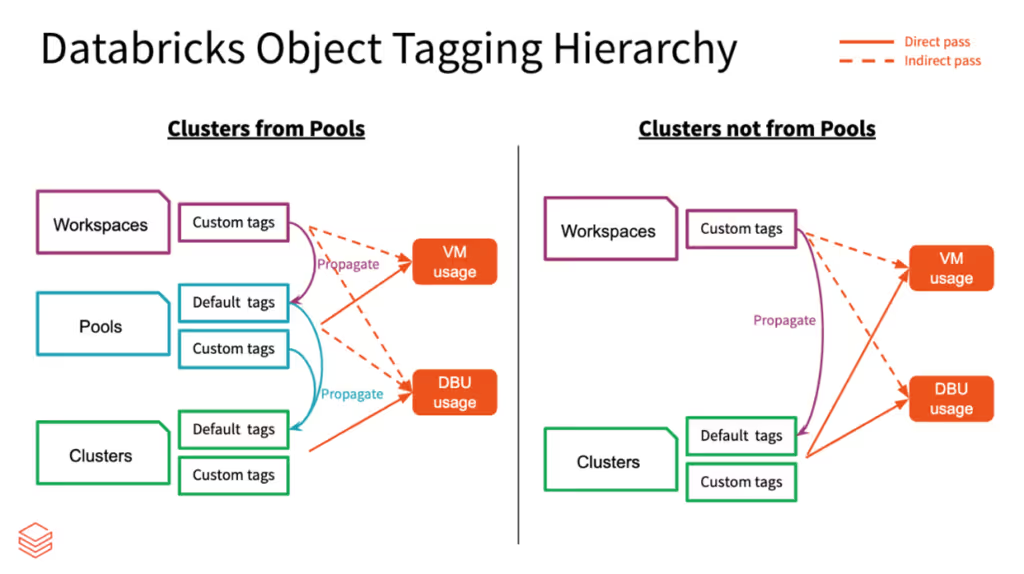
- Mandatory tagging via Compute Policies
- Aggressive auto-termination (especially for interactive compute)
- Photon adoption for faster query execution
- Cluster right-sizing using utilization metrics
Architectural Shifts
- Move stable workloads from interactive notebooks to Jobs Compute
- Use Serverless SQL for spiky BI workloads
- Optimize data formats with Delta Lake, OPTIMIZE, and VACUUM
Managing Vector Search Costs
Consolidate smaller indices onto shared endpoints and avoid over-provisioning Standard endpoints that cannot scale down automatically.
Automated Data FinOps with Revefi
Manual optimization doesn’t scale. Platforms like Revefi automate Databricks cost and performance optimization using AI agents.
How Revefi Helps
Continuous detection of idle, inefficient,
or misconfigured resources
Automated cluster right-sizing and
autoscaling optimization
Job- and query-level performance
diagnostics
Photon usage analysis to balance
cost and speed
Business Impact
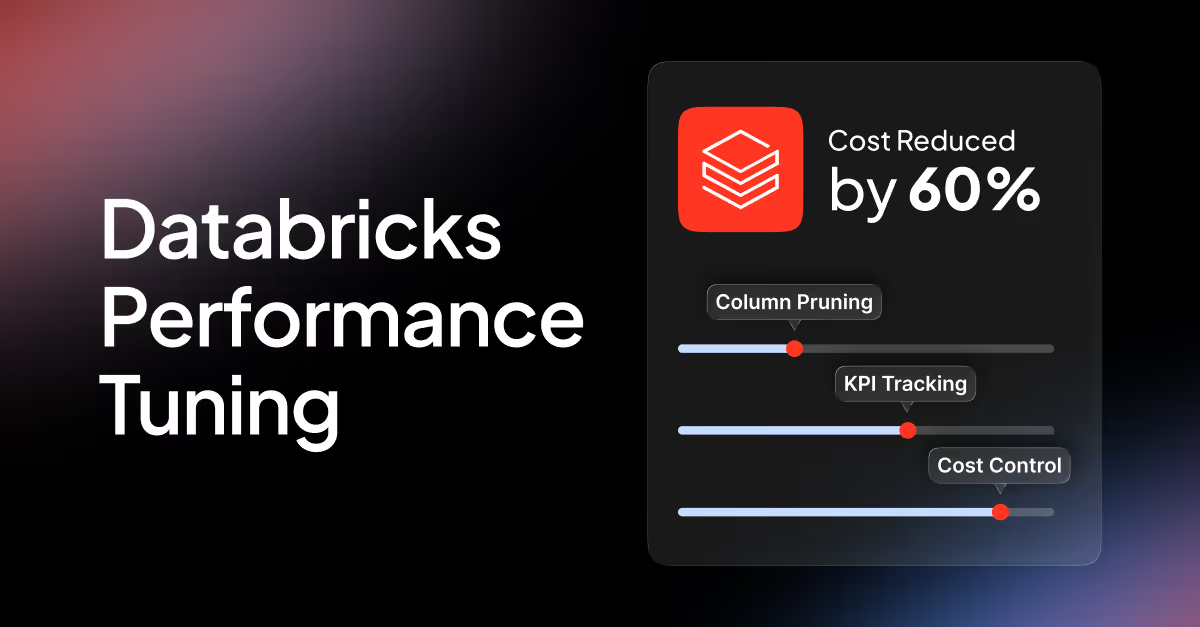
- Reported cost reductions of up to 60%
- Up to 99% reduction in manual monitoring effort
- Rapid ROI through continuous, autonomous optimization
Conclusion: Treat Cost as an Engineering Metric
Databricks pricing reflects the modern cloud data stack, which is elastic, granular, and unforgiving of inefficiency!
Serverless architectures reduce infrastructure complexity but increase the velocity of spend, making financial observability and automation essential. Organizations that succeed with Databricks treat cost as a continuously optimized engineering signal (not a static monthly bill) leveraging system tables, architectural discipline, and automated FinOps to maximize ROI across the Data Intelligence Platform.
Data Tables for Reference
Table 1: Comparative DBU Rates (Indicative Premium Tier)
Table 2: System Table Schema for Cost Analysis
References
- Best Practices for Cost Management on Databricks,, https://www.databricks.com/blog/best-practices-cost-management-databricks
- Databricks technical terminology glossary, https://docs.databricks.com/aws/en/resources/glossary
- AI Agent Costs on Databricks: A Complete Guide to Pricing, Optimization, and Real-World Examples, https://community.databricks.com/t5/technical-blog/demystifying-databricks-pricing-for-ai-agents/ba-p/122281
- Storage - Databricks, accessed January 15, 2026, https://www.databricks.com/product/pricing/storage
- Databricks Pricing: Flexible Plans for Data and AI Solutions