
In 2026, Databricks Serverless became the latest benchmark for data engineering and AI functions across the Databricks ecosystem by eliminating frictions resulting from manual cluster management.
However, the shift from fixed-size clusters to "always-on" elastic compute introduces a new challenge: variable cost unpredictability. Without rigorous budget policies, the convenience of serverless can lead to significant "cloud sprawl."
With many organizations running analytics and AI workloads at scale, serverless options are becoming a go-to for productivity and flexibility. However:
- Serverless compute functions can scale quickly along with its associated costs if not monitored properly
- Traditional budget alerts alone don’t ensure cost attribution
- Databricks now extends FinOps features to include policies that programmatically associate compute spend with business metadata
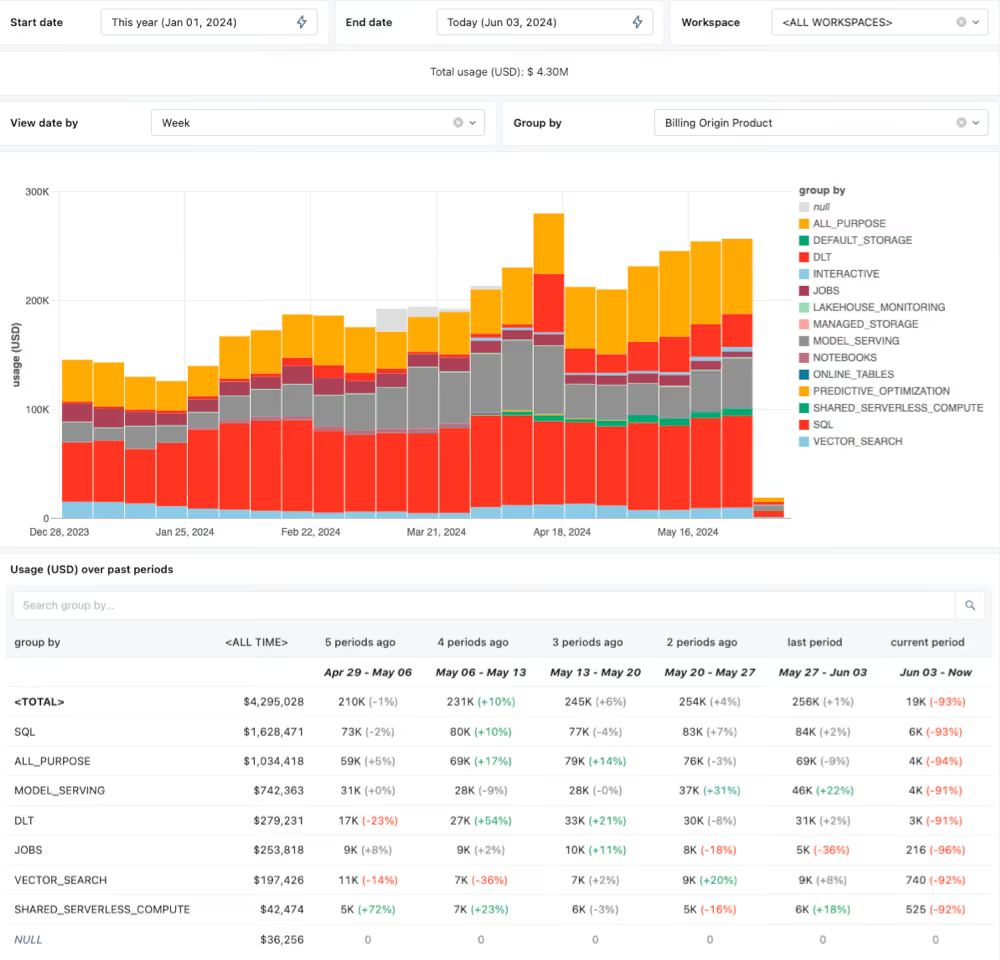
This is critical for operations teams, cloud architects, and finance leaders seeking transparency and accountability in cloud spending. This technical guide outlines the best practices for implementing Databricks Serverless budget policies to ensure high performance at the lowest possible price point.
1. Governance via Serverless SQL Warehouse Policies
In 2026, we anticipate organizations to lead with Serverless SQL Warehouses. To control costs, you must move beyond default settings.
- Aggressive Auto-Termination:
While the default is often 10-20 minutes, serverless warehouses start in seconds. Set your auto-termination to 1 minute for development environments. This prevents paying for idle time when a user walks away from their desk. - Scaling Range Constraints:
Use the "Scaling" slider to set a maximum number of clusters. Even in serverless, you should cap the maximum concurrency for non-production workloads to prevent runaway recursive queries from scaling to massive proportions. - Warehouse Tagging:
Enforce mandatory tags (e.g., CostCenter, ProjectID) using Workspace-level Policies. This ensures every DBU (Databricks Unit) consumed is attributable to a specific budget.
2. Implementing DBU Budget Alerts & Hard Stops
Databricks doesn't always provide a "hard kill" switch for credits by default, but you can build one using the Account Console and System Tables.
The Best Practice Workflow:
- Monitor via system.billing.usage:
Query the system tables to track DBU consumption in near real-time. - Define Thresholds:
Use the $inline$ $DailyUsage < BudgetLimit$ $inline$ logic to trigger alerts. - Automated Mitigation:
Use the Databricks Terraform Provider or REST API to automatically downsize or disable warehouses when a project hits 110% of its monthly budget.
3. Serverless Notebooks: Guarding the Sandbox
Serverless compute for notebooks (Python/Scala) is highly productive but risky. Unlike traditional clusters with a fixed "Master" node, serverless resources scale based on the complexity of the code.
- Compute Policies:
Apply a policy that restricts serverless notebook access to specific instance types or regions where pricing might be lower. - Idle Timeouts:
Force a global workspace policy that disconnects serverless compute resources from notebooks after 30 minutes of inactivity. - Photon Optimization:
Ensure Photon is enabled only for vectorized workloads where the speed-to-cost ratio justifies the higher DBU rate.
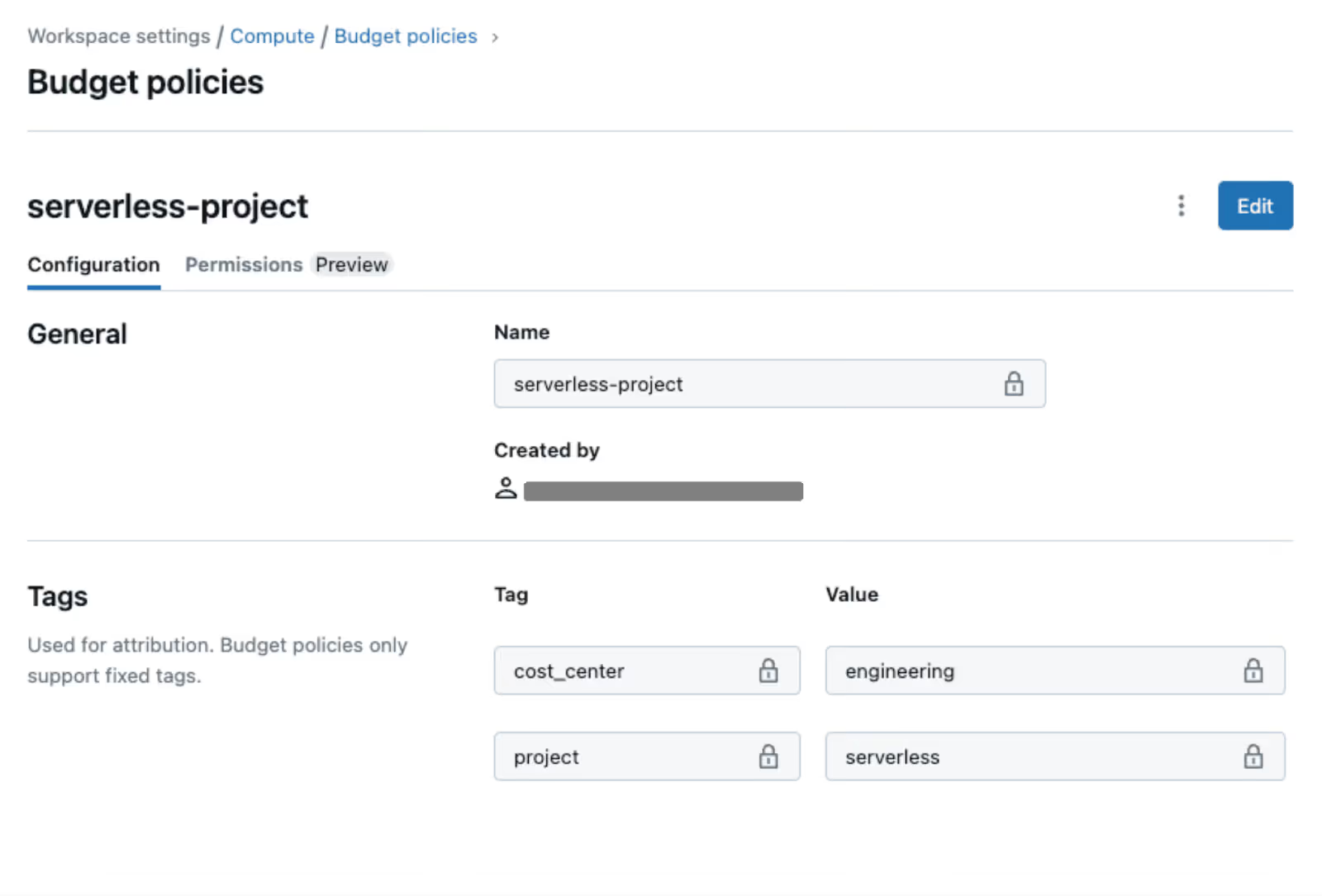
4. Cost Allocation, and Unit Economics
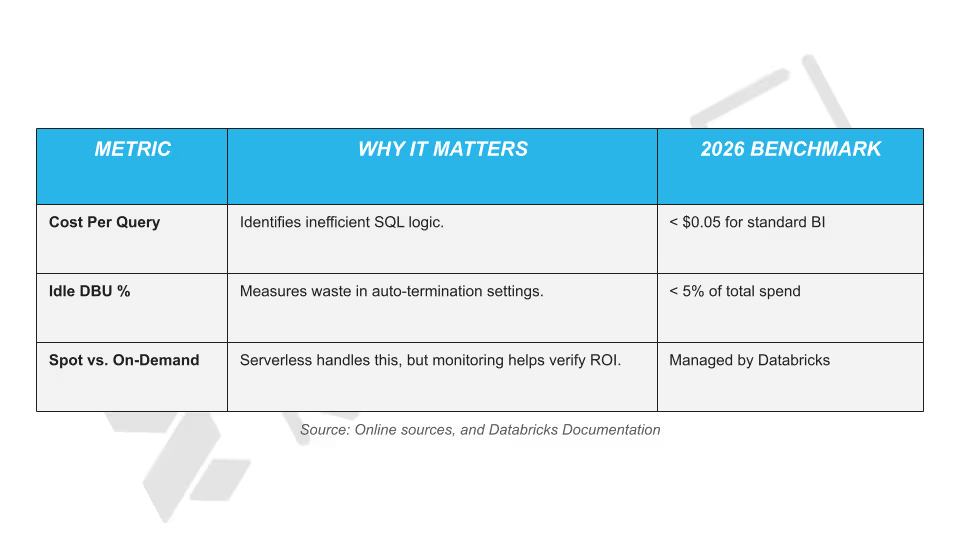
In 2026, the most successful data teams measure cost per Insight or Query, not just total monthly spend.
5. Leveraging AI-Driven Cost Recommendations
Databricks now includes built-in AI advisors that analyze your query history.
- Review Over-provisioned Warnings:
The platform identifies warehouses that never hit their scaling peaks and suggests lowering the maximum cluster count. - Query Profile Analysis:
Use the Query Profile tool to find "spilling" operations. If data is spilled onto the disk, it increases execution time and serverless costs. Optimize your joins to keep operations in-memory.
Turning Databricks Serverless Cost Control into a Continuous Advantage with Revefi
Databricks Serverless Budget Policies are a powerful step toward better cost attribution and governance. As usage scales in 2026 with workloads officially becoming more dynamic in nature, organizations need continuous visibility, automated insights, and proactive optimization to stay ahead of cloud spend.
Revefi extends Databricks’ native budget and tagging capabilities by providing deep, automated cost intelligence across serverless workloads.
It analyzes spend at the query, job, user, and team level, thereby identifying inefficiencies in real time, and highlights optimization opportunities that budget policies alone can’t surface.
Instead of reacting to budget alerts after costs accrue, teams can prevent waste before it happens.
- Detect anomalous serverless spend early
- Continuously optimize DBU consumption without manual analysis
- Align engineering usage with finance and FinOps goals
- Enable accurate chargeback and showback with business context
In short, Revefi operationalizes cost optimization. To learn more, check out other relevant blogs, whitepapers, e-books, and case studies available in our resource center.
If you wish to get a tailored demo from our in-house experts, schedule a free demo today.