Google BigQuery Cost & Pricing Calculator

Estimate your monthly and annual BigQuery costs from queries, slots and storage.

Cost component Usage /mo Rate Monthly

The first 1 TiB of on-demand query processing per month is free, the calculator applies it automatically. Published US list rates as of July 2026; rates vary by region, verify on the official BigQuery pricing page. Rule of thumb: if your on-demand bill consistently exceeds ~$2,900/month (about 100 Standard slots running 24/7), compare capacity pricing.

Estimated Annual Cost
$0
Based on your BigQuery usage inputs
$0
Monthly Cost

Get Full Analysis

Enter your details to receive your personalized report.

Please enter a valid work email.
🔒 100% secure. We never sell your data.

Check your inbox

How Does Google BigQuery Pricing Work?

Quick answer: BigQuery bills compute and storage separately. Compute is either on-demand ($6.25 per TiB scanned, first 1 TiB/month free) or capacity-based Editions priced per slot-hour (Standard ~$0.04, Enterprise ~$0.06, Enterprise Plus ~$0.10). Storage is ~$0.02/GiB/month for active data and ~$0.01 once a table goes unmodified for 90 days.

Because BigQuery is serverless, there are no clusters or VMs to manage  and no separate cloud infrastructure bill. The trade-off is that cost control shifts entirely to how you query: bytes scanned drive on-demand cost, and slot time drives Editions cost.

On-demand vs. Editions: which costs less?

On-demand wins for unpredictable or low volumes. You pay only for bytes scanned, drawing from a shared pool of up to 2,000 slots per project. Editions win for sustained workloads, because cost is tied to slot time and commitments cut rates 25–40%.. A well-partitioned workload can be far cheaper on-demand, while heavy, steady workloads favor slots. Most enterprises run a mix, and misallocating workloads between models is one of the most common sources of BigQuery overspend.
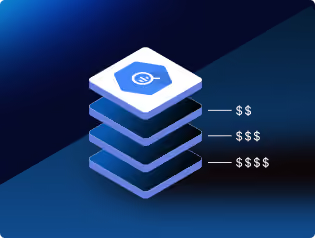
Rates vary by region; physical (compressed) storage billing is an alternative model. Always confirm on the official BigQuery pricing page.

BigQuery pricing page ↗

Where BigQuery Budgets Leak, and What's Recoverable?

Quick answer: Most organizations can recover 25–50% of BigQuery spend.

The biggest leaks: over scanning, clustering or SELECT *, idle and over-provisioned slot reservations, excessive shuffle from large unfiltered joins, continuous streaming where free micro-batch loading would suffice, and workloads running on the wrong pricing model.

How Revefi Reduces BigQuery Costs Automatically

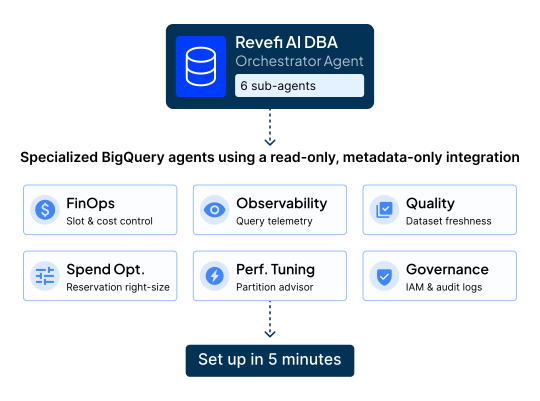
Revefi's AI DBA runs specialized agents for BigQuery for FinOps, observability, quality, spend optimization, performance tuning and governance using a read-only, metadata-only integration that sets up
in about 5 minutes. Our AI agent, RADEN, automates slot reservation optimization, analyzes millions of queries for overscanning, shuffle-heavy joins and partitioning opportunities, models on-demand vs. reservation economics, and attributes cost per user, job and project; unifying BigQuery, Looker, Composer and Gemini in one interface.
FAQs

How is Google BigQuery pricing calculated?+
Compute and storage are billed separately. Compute: on-demand at $6.25/TiB scanned (first 1 TiB/month free) or Editions per slot-hour (Standard ~$0.04, Enterprise ~$0.06, Enterprise Plus ~$0.10; commitments lower Enterprise to ~$0.048/~$0.036). Storage: ~$0.02/GiB/month active, ~$0.01 long-term.
What is a BigQuery slot?+
A slot is a unit of BigQuery compute capacity used to run queries. Editions pricing bills per slot-hour, with baselines, autoscaling and optional commitments. Idle or over-provisioned reservations are a leading source of waste.
Should I use on-demand or capacity (Editions) pricing?+
On-demand for unpredictable or low volumes; Editions for sustained workloads where commitments cut rates 25-40%. Practical markers: an on-demand bill consistently above ~$2,900/month equals roughly 100 Standard slots running 24/7, and scanning ~467+ TiB/month typically favors reserved capacity. Many teams run a mix.
Does LIMIT reduce BigQuery query costs?+
No. BigQuery scans the full table before applying LIMIT, so you're billed for all bytes processed regardless of rows returned. To explore data cheaply, use TABLESAMPLE or table previews, and note that repeated identical queries are served free from the 24-hour result cache.
Why is my BigQuery bill so high?+
Usually overscanning (missing partitioning/clustering, SELECT *), idle or oversized slot reservations, repeated full-table scans from dashboards and scheduled queries, and workloads on the wrong pricing model.
How much can I save on BigQuery costs?+
Organizations using agentic AI cost optimization typically see 40-60% reductions in BigQuery spend, via slot right-sizing, overscanning elimination, query optimization and pricing-model alignment. Revefi's automated slot optimization has cut spend 60% even as usage grew 50%.
How does Revefi reduce BigQuery costs?+
Revefi's AI DBA monitors BigQuery via a read-only, metadata-only connection: automated slot reservation optimization, overscanning and partitioning analysis, per-user/job cost attribution and data quality monitoring, live in about 5 minutes. Get a demo.

Know your number. Then shrink it.

Revefi's AI agents find where your Databricks spend is leaking, in minutes, not months.

Data professional using a laptop