
Snowflake’s consumption-based pricing model gives organizations significant architectural flexibility, but it also requires disciplined cost forecasting during planning and scaling initiatives.
To support this, Snowflake offers an interactive, web-based Pricing Calculator that helps teams estimate expected spend based on workload characteristics, data volume, and infrastructure choices. While the calculator delivers a transparent, self-service approach to generating high-level cost estimates, its accuracy depends on a clear understanding of the required inputs and the underlying mechanics of Snowflake’s billing model.
The 5-Step Configuration Workflow
The Snowflake Pricing Calculator follows a structured, step-by-step workflow that reflects the platform’s core architectural pillars. Each stage allows users to tailor key variables that directly impact credit pricing and overall resource consumption, enabling more accurate and scalable cost estimates.
Step 1: Infrastructure and Licensing Selection
The first step in the Snowflake Pricing Calculator involves choosing a Cloud Service Provider (AWS, Microsoft Azure, or Google Cloud Platform) and a specific deployment region. These choices are essential because Snowflake credit pricing and storage costs vary by cloud provider and geography, reflecting differences in underlying infrastructure and regional pricing models. Users must also select a Snowflake Edition (such as Standard, Enterprise, or Business Critical). Each higher-tier edition carries a higher credit rate to support advanced capabilities, including multi-cluster warehouses, greater concurrency, and enhanced security and governance features.
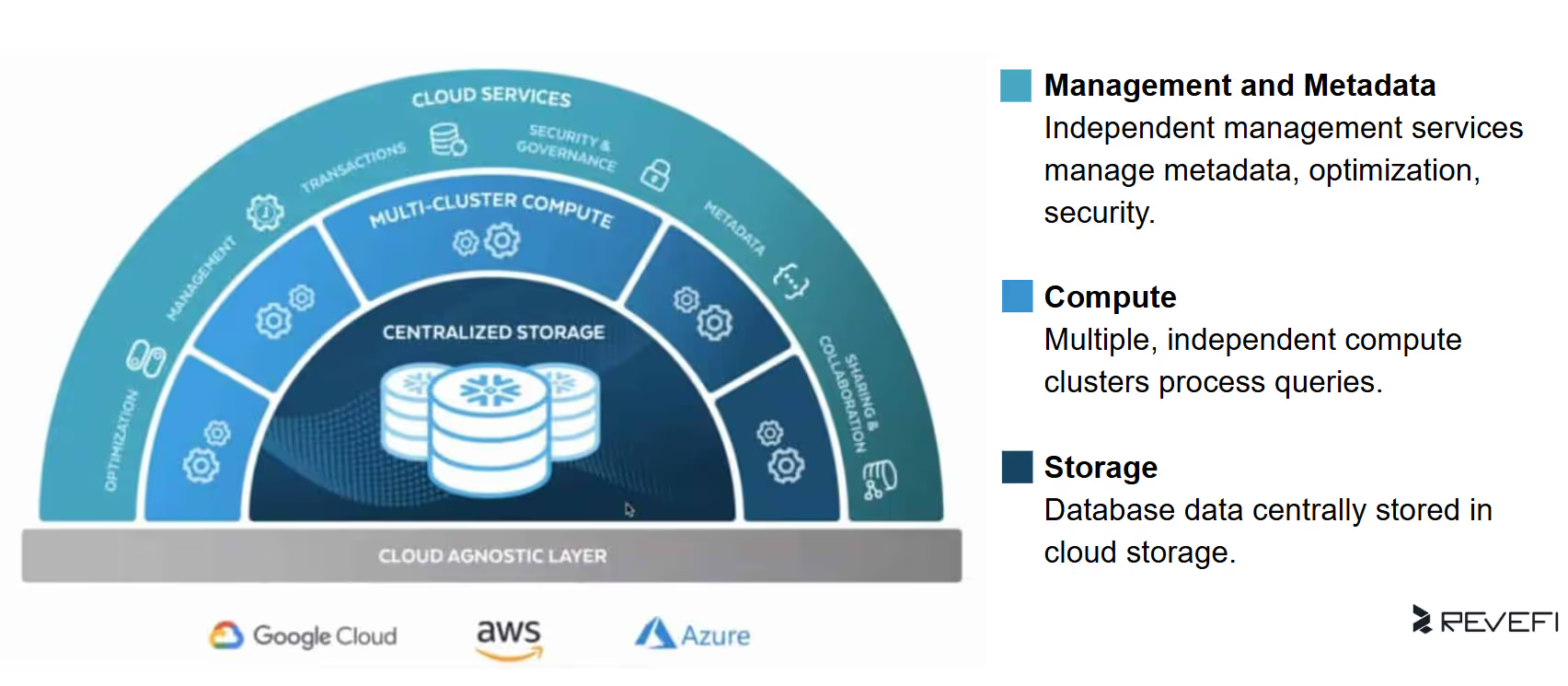
Step 2: Compute Resource Configuration
Compute resources are typically the largest component of your Snowflake expenditure. The calculator requires users to define "Compute Types," which represent virtual warehouses.
Users must specify:
- Warehouse Size: Snowflake utilizes a T-shirt sizing model (XS to 6XL) where each increase generally doubles the processing power and the hourly credit consumption.
- Runtime Duration: The estimated hours per day and days per week the warehouse will remain active.
Because Snowflake utilizes per-second billing with a 60-second minimum, the calculator provides a monthly estimate based on these runtime inputs.
Step 3: AI and Machine Learning Features
Modern data workloads increasingly rely on built-in AI and machine learning capabilities, and the Snowflake Pricing Calculator enables users to estimate costs for services within the Snowflake Cortex ecosystem, including Document AI and Cortex Search.
Unlike standard virtual warehouse billing, consumption for these AI services follows more nuanced pricing models.
- Document AI costs are driven by factors such as the number of documents processed, page complexity, and the volume of fields extracted.
- Cortex Search pricing is based on two components: serving compute, billed per GB-month of uncompressed indexed data, and embedding compute, billed per token processed.
Step 4: Storage Volume
Snowflake storage costs are calculated based on the average monthly volume of compressed data stored. Users enter their expected total storage footprint in terabytes (TB) to estimate monthly charges. In many commonly used regions, such as AWS US East (Northern Virginia), on-demand storage pricing is approximately $23 per TB per month.
Step 5: Add-ons and Data Transfer
The final stage of the Snowflake Pricing Calculator covers add-ons, with a primary focus on data egress costs. While Snowflake does not charge for data ingress, fees apply when data is transferred out of a Snowflake account across cloud providers or geographic regions.
These egress charges are billed on a per-byte basis and vary significantly depending on the source region and the destination cloud environment, making them an important consideration for organizations with cross-region analytics, data sharing, or external data export workflows.
Assumptions and Financial Realism
To keep cost modeling straightforward, the Snowflake Pricing Calculator is built on several core assumptions that organizations should understand when converting estimates into a production-ready budget:
- Zero Infrastructure Costs:
The calculator assumes no separate charges from the underlying cloud provider (AWS, Azure, or GCP), as Snowflake credit pricing is all-inclusive and covers infrastructure, hardware, and platform management. - On-Demand vs. Capacity Pricing:
Users can compare On-Demand pricing, which is billed after usage occurs, with Capacity pricing, which offers discounted credit rates in exchange for an upfront spending commitment. - Cloud Services Adjustment:
The calculator applies Snowflake’s “10% rule,” where cloud services (such as authentication, metadata management, and query optimization) are billed only when daily cloud services usage exceeds 10% of that day’s virtual warehouse consumption. - Workload Optimization Considerations:
The tool does not account for performance optimization effects. For example, a larger warehouse may complete queries significantly faster than a smaller one, potentially consuming the same number of credits while delivering lower latency and improved user experience.
Applications for Data Teams
Within a FinOps framework, the Snowflake Pricing Calculator supports several critical use cases:
Initial Deployment Benchmarking: It helps startups and organizations migrating from legacy data platforms establish a baseline cost estimate based on their selected Snowflake edition, cloud provider, and region.
Project ROI and Budget Forecasting: Prior to launching new initiatives (such as large-scale analytics or data science workloads) architects and FinOps teams can model expected resource consumption to validate ROI and ensure projects stay within departmental budgets.
Cost and Architecture Comparison: The calculator enables side-by-side comparisons of different deployment scenarios, including changes in cloud provider or upgrading from Enterprise to Business Critical to meet security, governance, or compliance requirements.
Constraints and Best Practices
While the Snowflake Pricing Calculator is a powerful planning resource, it is not a comprehensive financial modeling or quoting tool. It is intended to provide educational, directional estimates rather than guaranteed pricing.
For enterprise-scale forecasting, organizations should complement calculator estimates with historical usage data from Snowflake’s account usage and information schema views. These sources deliver detailed, analytics-ready insights into actual data growth, query patterns, and workload complexity, variables the calculator cannot fully replicate!
These egress charges are billed on a per-byte basis and vary significantly depending on the source region and the destination cloud environment, making them an important consideration for organizations with cross-region analytics, data sharing, or external data export workflows.
Real-world spend is shaped by operational factors such as warehouse auto-suspend configurations, micro-partition pruning efficiency, and the frequency of serverless features and background services. To achieve the highest level of budget accuracy, organizations should validate calculator estimates through a proof of concept (POC) using real production-like workloads.