
As we enter 2026, Google BigQuery has emerged as a serious contender and powerhouse in the data warehousing game primarily due to its elasticity and execution speeds. But as many data engineers and CTOs have learned the hard way, with great power comes a great cost responsibility that can spiral out of control if left unchecked.

As we move through 2026, the complexity of data ecosystems (driven by AI workloads and massive streaming datasets) makes cost management a survival skill rather than a "nice-to-have."
If your monthly Google Cloud bill is giving you heart palpitations, you aren't alone. Fortunately, with the right architectural shifts and query hygiene, you can significantly reduce your spend without sacrificing performance.
Here are 4 proven strategies to help you slash your Google BigQuery bills in 2026.
Strategy 01: Refine Your Query Habits for Maximum Efficiency
One of the simplest yet most impactful ways to reduce Google BigQuery costs is by optimizing how you write and execute queries. Since BigQuery charges based on the amount of data scanned (typically around $6.25 per terabyte with on-demand pricing), inefficient queries can quickly add up.
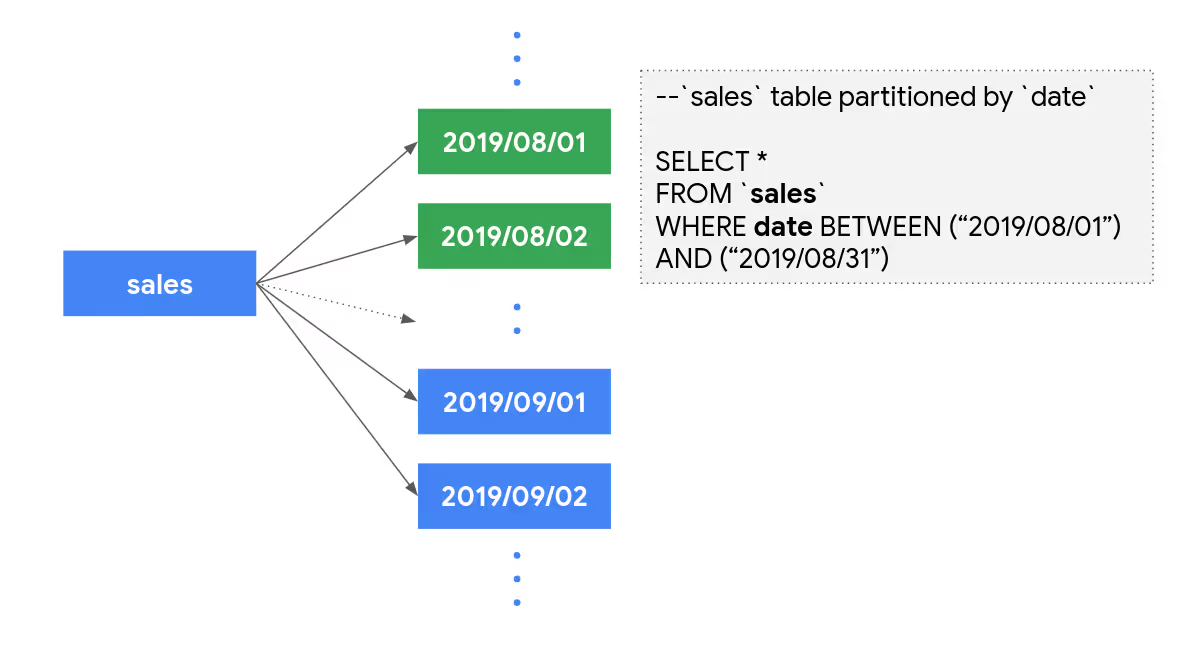
Start by ditching the SELECT* command, which scans every column in a table (even the ones you don't need). Instead, specify only the required columns to minimize data processed.
For example, if you're analyzing sales data, query just the (i) Date, (ii) Product ID, and (iii) Revenue fields rather than the entire row. Add precise WHERE clauses to filter data early, such as limiting results to the last 30 days. This alone can cut scanned data by 80% in large tables.
Additionally, use dry runs or the query validator in the BigQuery console to estimate costs before execution. Avoid exploratory queries on full datasets; preview tables or sample data instead to test logic without incurring charges.
With AI-powered real-time query optimization tools integrated into BigQuery (like Revefi’s AI Agent), you can even leverage automatic suggestions to rewrite queries for better performance. Teams that have adopted automation and AI have reported savings of 20-50% across their BigQuery costs.
Strategy 02: Implement Partitioning and Clustering on Tables
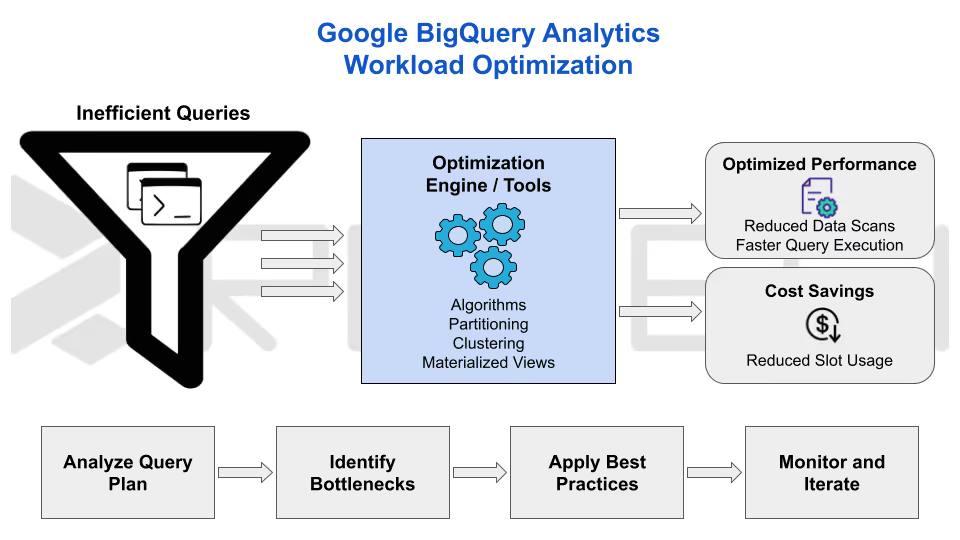
Partitioning and clustering are game-changers for BigQuery cost optimization (especially for time-series or categorical data common in IoT and e-commerce datasets).
Partitioning divides tables by date, integer ranges, or ingestion time, allowing queries to scan only relevant partitions. For instance, a table partitioned by transaction date means querying last week's sales by skipping years of historical data, thereby reducing scanned bytes dramatically.
Clustering takes it further by organizing data within partitions based on frequently filtered columns (like customer ID or region), which minimizes I/O operations during scans. Combined, these features can slash query costs by 20-50% for organizations running large-scale analytics.
To get started, use the CREATE TABLE statement with PARTITION BY and CLUSTER BY clauses when loading data.
Strategy 03: Switch to Capacity-Based Pricing Models
Google BigQuery's on-demand pricing is flexible but unpredictable for steady workloads. Shifting to capacity-based options like (i) slot reservations or (ii) editions can lock in savings for consistent usage.
Reservations allocate dedicated "slots" or compute resource units at a flat rate, eliminating per-query fees. This is ideal for dashboards, ETL pipelines, or ML training exercises that run regularly.
BigQuery Editions, which was introduced relatively recently, offers tiered plans (Standard, Enterprise, and Enterprise Plus) with built-in autoscaling and predictable billing.
Flex slots provide short-term bursts for spikes, blending on-demand flexibility with reserved savings. Companies with variable loads in 2026, like those in fintech or media, save 30% by reserving baseline slots and flexing during peaks. Review your billing export in BigQuery to identify patterns and justify the switch to stakeholders.
Strategy 04: Set Up Robust Monitoring and Cost Controls
Visibility is the bedrock of sustained savings. In today's landscape, BigQuery’s enhanced monitoring tools make it significantly easier to track, analyze, and cap expenses before they spiral.
Data-Driven Cost Management
By centralizing your financial data, you can move away from guesswork and toward precision for cloud cost control.
- Custom Dashboards:
Export billing data to BigQuery to build granular visualizations that analyze costs by user, project, or specific query types. - Preventative Quotas:
Set custom quotas to limit the daily bytes scanned per user or project, effectively "deadbolting" the door against runaway queries. - Automated Alerts:
Enable Cloud Billing notifications to alert teams the moment spending hits critical thresholds (e.g., reaching 80% of the monthly budget).
Proactive Optimization
Efficiency isn't a one-time setup; it requires consistent oversight and the right intelligence.
- Audit Log Reviews:
Regularly scan logs to identify inefficient patterns, such as repeated full table scans that could be optimized with partitioning or clustering. - Anomaly Detection:
Utilize BigQuery Lens or third-party platforms to catch sudden, unexpected spikes in usage. - AI Insights:
Leverage Google Cloud’s recommendations engine to automatically identify and implement optimization opportunities.
Conclusion: Supercharge Your GCP Cost Optimization With AI
The four proven strategies, which are refining queries, implementing partitioning and clustering, switching to capacity-based pricing, and setting up proactive monitoring offer a powerful manual framework for slashing Google BigQuery costs in 2026.
In addition to these strategies, Revefi supercharges these tactics with its AI Agent to provide automated, AI-powered data observability that uncovers and eliminates hidden inefficiencies far beyond traditional methods.
Revefi drives substantial BigQuery bill reductions through:
- Automated slot reservation and dynamic optimization
- Proactive inefficiency detection
- Idle and unused resource identification
- Real-time monitoring and predictive analytics
By integrating Revefi, data teams transition from reactive fixes to autonomous, proactive cost control (often delivering 40-60% in overall reductions across cloud data costs) while simultaneously enhancing performance, reliability, and ROI.
As workloads grow more complex, Revefi ensures sustainable efficiency. Explore Revefi's BigQuery solution today to automate your path to lower bills and higher value.