


Snowflake’s architecture is defined by the decoupling of storage and compute, a design shift that enables a flexible, consumption-based pricing model. Unlike legacy on-premises data warehouses that require costly provisioning for peak capacity, Snowflake allows for independent scaling. This modern approach ensures organizations only pay for the resources they actively use, eliminating the financial waste of idle hardware often found in traditional cloud solutions.
To achieve fiscal efficiency and predictable spending, businesses must manage three primary expenditure pillars: compute, storage, and data transfer. Compute costs are driven by virtual warehouses processing queries, while storage fees are based on the monthly average of data volume. Finally, data transfer costs apply when moving information across cloud regions. Mastering these pillars allows companies to align their data operations with actual usage, optimizing their total cost of ownership in the Data Cloud.
Snowflake Pricing Guide: Understanding Snowflake Pricing in 2026
To achieve fiscal efficiency and predictable spending, businesses must manage three primary expenditure pillars: compute, storage, and data transfer.
- Compute costs are driven by virtual warehouses processing queries
- storage fees are based on the monthly average of data volume
- data transfer costs apply when moving information across cloud regions.
Mastering these pillars allows companies to align their data operations with actual usage, optimizing their total cost of ownership in the Data Cloud.
For a more in-depth dive into the nitty-gritties of how Snowflake customers are billed, Snowflake credits and their costs, and how Snowflake pricing works in 2026, check out our detailed 2026 Snowflake Pricing Guide.
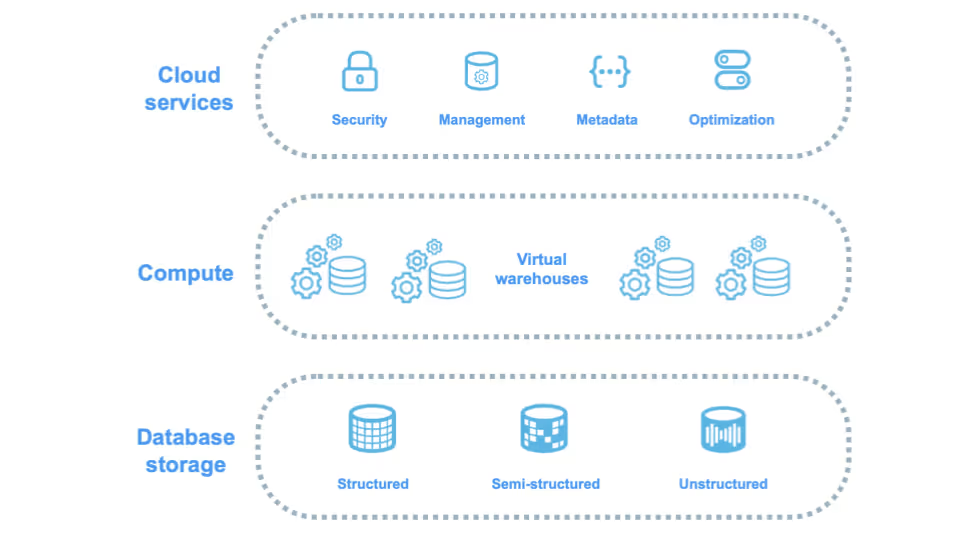
Virtual Warehouses and Credit Mechanics:
The Compute Pillar
In Snowflake, compute resources are the primary factor driving credit consumption, as they provide the processing power needed to run queries, execute data transformations, and support data ingestion pipelines.
Compute usage is measured in Snowflake credits, which act as the standard unit of cost for all processing activity on the platform. The price of a Snowflake credit varies depending on the edition selected and the cloud region where the account is deployed, making it important for organizations to understand how compute resource consumption choices impact overall Snowflake costs..
Virtual Warehouse Sizing and Scaling Logic
Snowflake uses a T-shirt sizing model for virtual warehouses, where each incremental size doubles the available compute power and, correspondingly, doubles the hourly credit consumption rate. Understanding this sizing and scaling logic is essential for optimizing Snowflake performance while controlling compute costs.
Snowflake compute costs are determined by warehouse size, the number of active clusters, and total run time, with usage billed in credits on a per-second basis. While this model ensures organizations pay only for actual compute consumption, Snowflake enforces a 60-second minimum charge each time a warehouse starts or resumes. If a warehouse is scaled up while running, an additional 60-second charge applies for the increased compute capacity before billing returns to per-second increments. This approach delivers accurate, usage-based pricing while preventing cost avoidance through frequent resizing or rapid start-and-stop cycles.
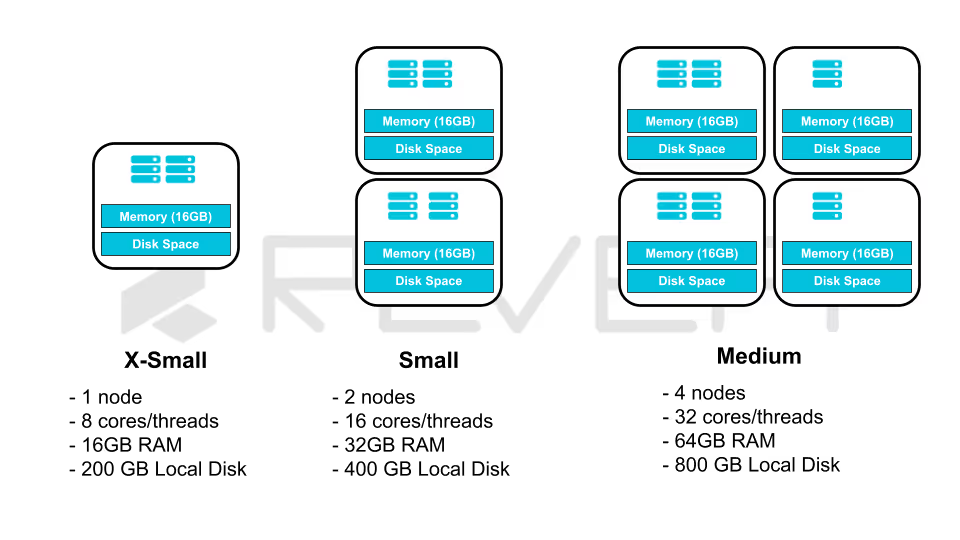
Architectural Resizing and Quiescing
When a Snowflake virtual warehouse is scaled down (especially from very large sizes such as 5X-Large or 6X-Large to 4X-Large or smaller) there is a short transition period during which both the old and new warehouse resources are billed. This happens because the larger warehouse is temporarily “quiesced,” allowing in-flight queries to complete before the resources are fully released, which ensures uninterrupted query execution but can slightly increase costs during frequent resizing.
In addition, warehouse efficiency is closely tied to the size of its local SSD cache, with larger warehouses benefiting from bigger caches that improve performance for recurring queries by minimizing data reads from remote storage. As a result, consolidating workloads into a larger, longer-running warehouse can often be more cost-efficient than relying on multiple smaller warehouses that frequently start and stop, due to improved cache reuse and reduced overhead.
Automated Scaling and Specialization:
The Serverless Compute Layer
Snowflake serverless features use compute resources that are fully managed by Snowflake, removing the need for users to manually start, stop, or size virtual warehouses. These services automatically scale up or down based on workload demand, simplifying operations and reducing administrative overhead. However, because serverless capabilities operate independently of user-managed warehouses, they rely on feature-specific billing metrics, making it important for organizations to understand how each serverless service contributes to overall compute costs.
The Evolution of Snowpipe Pricing Models
One of the most impactful updates to Snowflake’s pricing model is the simplification of Snowpipe ingestion costs. Previously, Snowpipe pricing was based on a combination of compute-hours consumed and a per-1,000-files processing fee, which made cost tracking more complex.
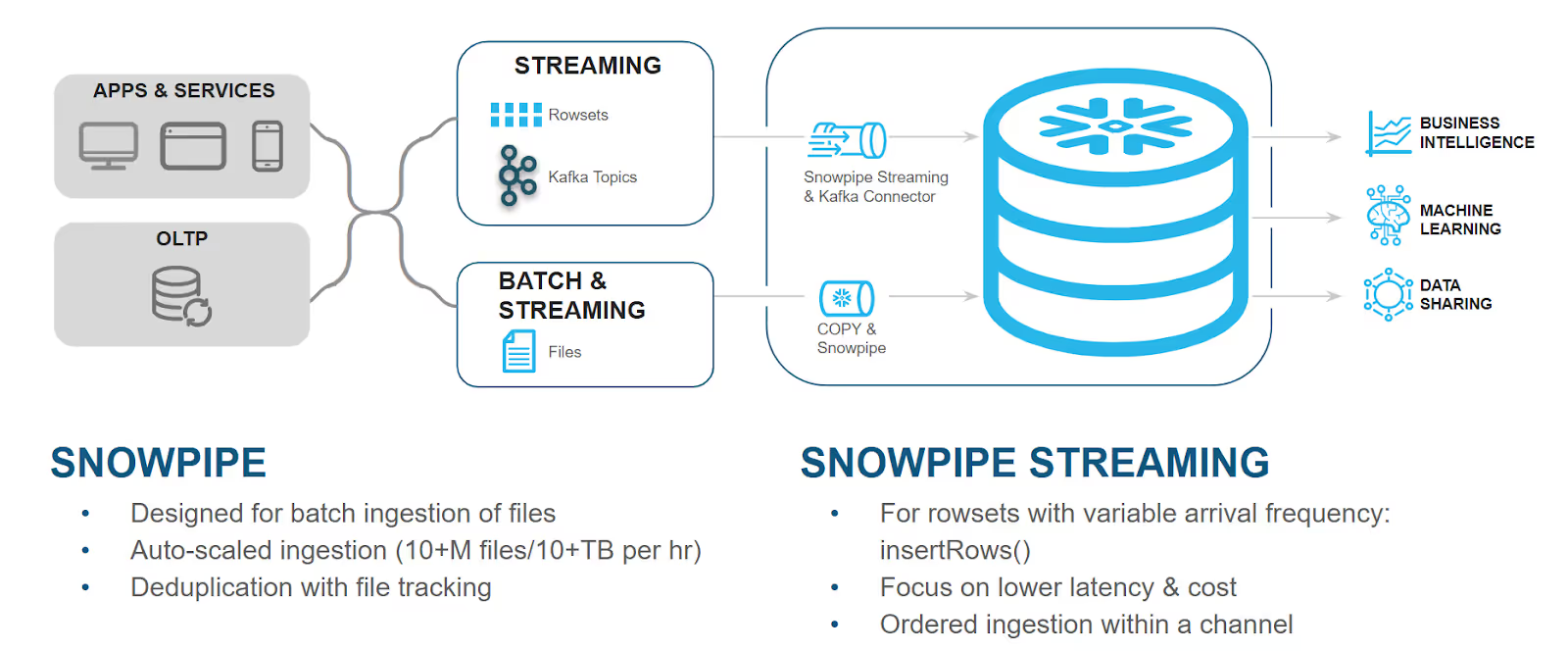
Source: Snowflake Snowpipe Documentation
Late into 2025, Snowflake introduced a streamlined credit-per-gigabyte pricing model for Standard and Enterprise editions, aligning them with Business Critical and VPS accounts that adopted this approach earlier in the year. This change makes Snowpipe costs more transparent, predictable, and easier for organizations to manage as data ingestion volumes scale.
This simplified approach provides more predictable data-loading expenses. Organizations can now estimate costs based on anticipated data volumes rather than core-utilization metrics, which are often difficult to forecast. It also removes the overhead of managing file counts to avoid the previous per-file fees.
Specialized Serverless Maintenance, and AI Services
Several Snowflake serverless features continue to consume credits based on compute-hours, with usage metered on a per-second basis. These capabilities are essential for maintaining performance, scalability, and operational reliability across the Snowflake data platform.
Automatic Clustering uses credits as Snowflake continuously reorganizes table data to maintain optimal clustering depth, enabling more efficient query pruning and faster performance on large datasets.
The Search Optimization Service consumes credits to create and maintain specialized indexing structures that speed up point lookup queries, with costs influenced by the number of optimized columns and the frequency of data changes. Materialized View Refresh processes also incur compute costs, as background operations keep materialized views synchronized with their base tables during ongoing data inserts, updates, and deletes.
Snowflake Document AI similarly consumes compute credits to run machine learning models that extract insights from unstructured documents. Credit usage varies based on factors such as document complexity, text density, and the number of data elements extracted. To help organizations forecast and control costs, Snowflake provides estimated credit consumption ranges for Document AI workloads, enabling more predictable budgeting and more efficient design of data extraction pipelines.
These estimates demonstrate that document complexity has a direct impact on compute credit consumption in Snowflake. For table extraction workloads, cost is primarily driven by the number of cells within each table, as larger tables with 51 to 400 cells require substantially more processing resources than smaller or simpler tables. Understanding these cost drivers enables organizations to better forecast Document AI expenses and design extraction workflows that balance accuracy, performance, and compute efficiency.
The 10% Adjustment Rule:
The Cloud Services Layer
Cloud services act as the central control layer of the Snowflake architecture, coordinating essential functions such as user authentication, metadata management, and query optimization. Although this layer operates continuously in the background, Snowflake includes a built-in “10% adjustment” in its pricing model to prevent typical cloud services usage from generating unexpected charges for most customers.
Mechanics of the Daily Adjustment
Cloud services usage in Snowflake is only billed when daily consumption exceeds 10% of the same day’s virtual warehouse usage within the account. This calculation is performed daily using the UTC time zone, and the monthly bill reflects the total of these daily adjustments.
For example, if an account consumes 100 credits from virtual warehouses and 13 credits from cloud services in a single day, the 10% allowance covers 10 credits, so only 3 cloud services credits are billed, resulting in a total of 103 credits. Conversely, if cloud services usage is just 5 credits against the same 100 warehouse credits, the usage falls entirely within the allowance, and the user is billed only for the warehouse credits.
Activities Driving Cloud Services Consumption
Organizations with high cloud services consumption often find that specific patterns of activity are driving the costs beyond the 10% threshold. These activities include:
- Authentication and Security Enforcement: Processing logins and enforcing granular access control policies.
- Metadata Management: Storing and retrieving metadata about micro-partitions. Large-scale operations involving thousands of small files can disproportionately increase metadata overhead.
- Query Compilation and Optimization: The computational work required to parse SQL and determine the most efficient execution plan before the query even reaches the virtual warehouse.
- DDL and Administrative Commands: Creating, altering, and dropping tables, views, and schemas.
- Data Sharing and Auto-Fulfillment: Background tasks that coordinate the sharing of data across regions or with other organizations.
Because serverless compute usage does not factor into the 10% adjustment for cloud services, accounts that rely heavily on serverless features (like Snowpipe) without accompanying warehouse usage may find their cloud services charges are more frequently billed.
Lifecycle Management and Data Recovery:
The Storage Pillar
Snowflake storage costs are billed at a flat rate per terabyte per month (currently $23/TB in standard U.S. regions), based on the daily average of on-disk data. Actual storage expenses, however, are significantly affected by data management practices, including compression techniques, historical data retention policies, and the types of tables used, making efficient data lifecycle management essential for controlling costs.
Micro-partitions and Compression Efficiency
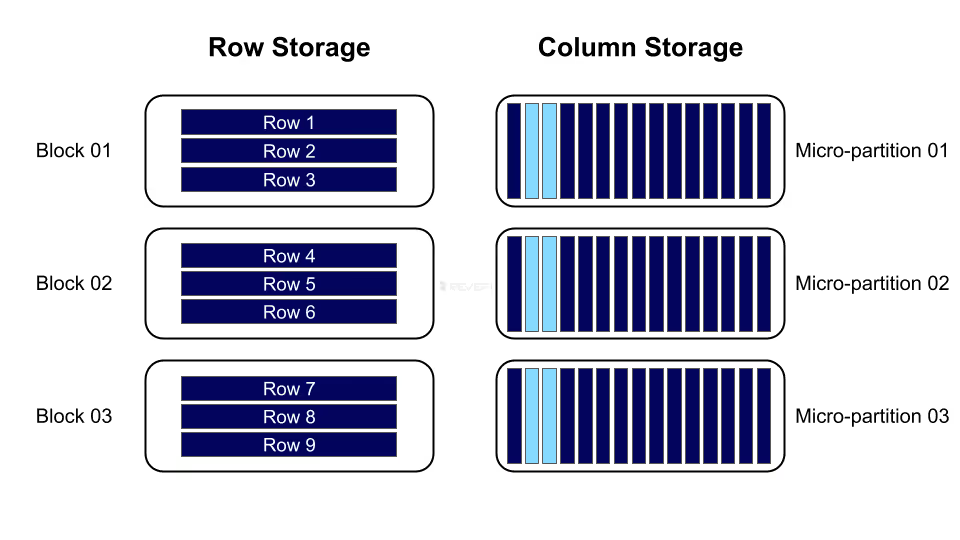
When data is ingested into Snowflake, it is automatically organized into micro-partitions and compressed using advanced algorithms. Storage billing is calculated based on the compressed data size, often leading to substantial cost savings. For instance, an organization with 325 TB of raw data might only incur charges for 65 TB after Snowflake’s compression is applied, significantly reducing effective storage costs.
Continuous Data Protection: Time Travel and Fail-safe
Snowflake retains historical data versions to support recovery and auditing, but this protection incurs additional storage costs. Time Travel enables users to query data as it existed at any point within a specified retention period.
- Time Travel Storage: Charges are calculated for each 24-hour period from when the data changed. Snowflake optimizes costs by storing only the specific information needed to restore modified or deleted rows, rather than creating full table copies.
- Fail-safe Storage: Extending beyond Time Travel, Fail-safe storage provides a 7-day window for recovering data after catastrophic events. This feature is non-configurable and applies to all permanent tables, ensuring additional protection at a fixed storage cost.
Optimizing with Transient and Temporary Tables
To help reduce the storage costs associated with historical data retention, Snowflake offers transient and temporary table types. These table options are designed for short-lived or intermediate data that does not require long-term recovery or auditing, allowing organizations to minimize Time Travel and Fail-safe storage costs while maintaining efficient data processing workflows.
By using transient tables for large-scale ETL intermediate workloads, organizations can avoid incurring the 7-day Fail-safe storage costs on data that is only required for short periods. Temporary tables offer even greater efficiency for session-specific operations, as all associated storage is automatically removed when the session ends, helping further reduce unnecessary Snowflake storage expenses.
Data Transfer Resources:
Egress Economics and Optimization
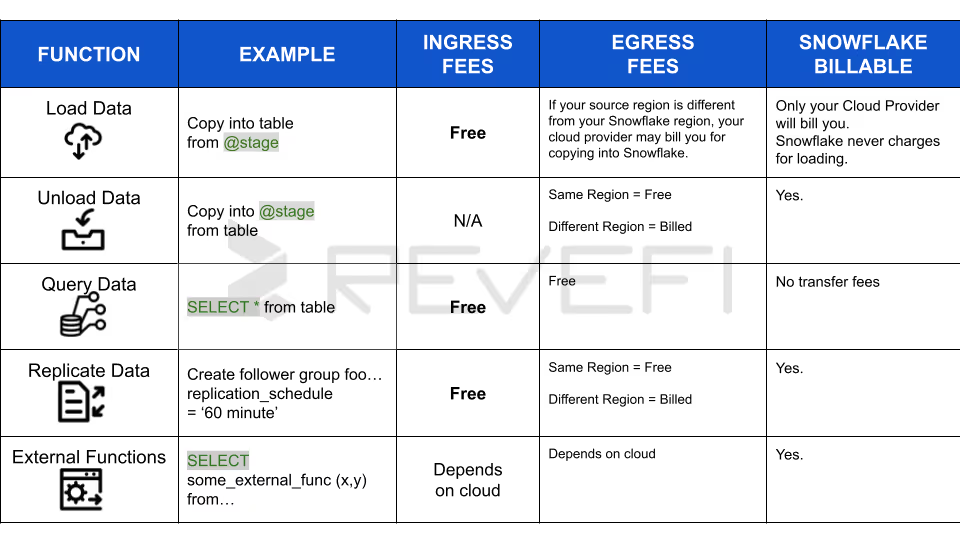
Snowflake data transfer pricing follows a “free ingress, paid egress” model, meaning there are no charges for loading data into a Snowflake account from cloud platforms or external sources. Costs are incurred only when data is moved out of Snowflake, with per-byte fees applied if the transfer crosses cloud providers or geographic regions.
Factors Influencing Egress Charges
Snowflake egress charges vary based on the cloud region where your account resides and where the data is being sent. Data movement that stays within the same cloud region does not incur additional fees. Egress costs are typically generated by the following activities:
- Exporting data: Running the COPY INTO <location> command to transfer data from Snowflake to external object storage services such as Amazon S3, Google Cloud Storage, or Microsoft Azure.
- Cross-region replication: Synchronizing data to another Snowflake account located in a different region for purposes like disaster recovery or regional data distribution.
- External connectivity: Invoking external functions, UDFs, or stored procedures that communicate with outside networks or third-party APIs.
- Iceberg table writes across regions: Persisting data to Iceberg tables when the underlying storage is hosted in a region different from the Snowflake account.
Egress Cost Optimizer (ECO)
For organizations that regularly share data across multiple regions using Cross-Cloud Auto-Fulfillment, Snowflake provides the Egress Cost Optimizer (ECO) to help reduce data transfer expenses by as much as 80%.
ECO minimizes egress charges by routing shared data through a Snowflake-managed cache, allowing a single one-time egress fee to move the data into the cache instead of incurring separate charges for each destination region. From there, data can be distributed to additional regions without further egress costs, with organizations paying only for the temporary storage of the cached data, which is typically retained for up to 15 days. ECO is enabled selectively using a heuristic algorithm that ensures it is applied only when it delivers meaningful cost savings compared to standard replication methods.
Snowflake Editions and Unit Cost Determinants
The choice of Snowflake edition directly determines the unit cost of credits and storage. Each edition builds upon the previous one, adding features focused on scale, security, and governance.
Features and Pricing Tiers
The Snowflake Enterprise edition is the most commonly adopted option for growing organizations, as it adds support for multi-cluster warehouses and extends Time Travel retention to 90 days. The Business Critical edition is designed for organizations with stricter security and availability requirements, making it the preferred choice for workloads involving highly sensitive data, such as protected health information (PHI), or for teams that need advanced failover and disaster recovery capabilities.
Beyond the edition, costs are influenced by the contract types:
- On Demand:
Provides maximum flexibility with usage-based monthly billing but higher unit costs. - Capacity:
Involves an upfront dollar commitment in exchange for discounted credit and storage rates. Unused credits from a Capacity commitment can often be "rolled over" into a new contract term if the renewal occurs before expiration.
Governance and Financial Monitoring Framework
To manage the inherent variability of consumption-based billing, Snowflake provides a suite of monitoring and governance tools that allow organizations to set limits, attribute costs, and reconcile usage.
Resource Monitors and Quota Enforcement
Resource monitors are the primary tool for controlling credit usage at the warehouse or account level. Administrators can create monitors with a specific credit quota and set triggers to take actions based on usage thresholds.
- NOTIFY
Sends an alert to account administrators when a specific percentage of the quota is reached.
- SUSPEND
Stops the assigned warehouses from starting new queries once the quota is reached, while allowing active queries to finish.
- SUSPEND_IMMEDIATE
Stops all warehouses and cancels all executing queries immediately.
A well-configured monitor might send notifications at 50% and 75% usage, trigger a suspend action at 100%, and an immediate suspension at 110% to provide a buffer for mission-critical tasks while preventing massive overruns.
Reconciling Usage with Historical Views
Snowflake provides two central schemas for financial transparency:
1. ACCOUNT_USAGE
2. ORGANIZATION_USAGE
These schemas contain analytical views that allow users to build custom reports or reconcile their billing statements.
By querying the USAGE_IN_CURRENCY_DAILY view, organizations can move beyond credit-counting and view their actual spend in dollars (or their local currency), facilitating better communication between technical teams and the finance department.
Operational Best Practices for Cost Efficiency
Maximizing the value of a Snowflake investment requires moving beyond mere monitoring to proactive performance tuning. Often, performance improvements and cost reductions are mutually beneficial.
Query Pruning and Effective Data Shaping
Snowflake performance optimization relies heavily on effective data pruning, warehouse sizing, and intelligent caching strategies. Snowflake’s micro-partitioning and columnar storage enable queries to scan only the relevant portions of a table, meaning a query that touches just 10% of micro-partitions will execute faster and consume fewer credits than a full table scan. Defining clustering keys on columns commonly used in WHERE clauses improves this pruning efficiency, while avoiding SELECT * and querying only required columns further reduces I/O and processing overhead.
Warehouse Right-Sizing and Concurrency Management
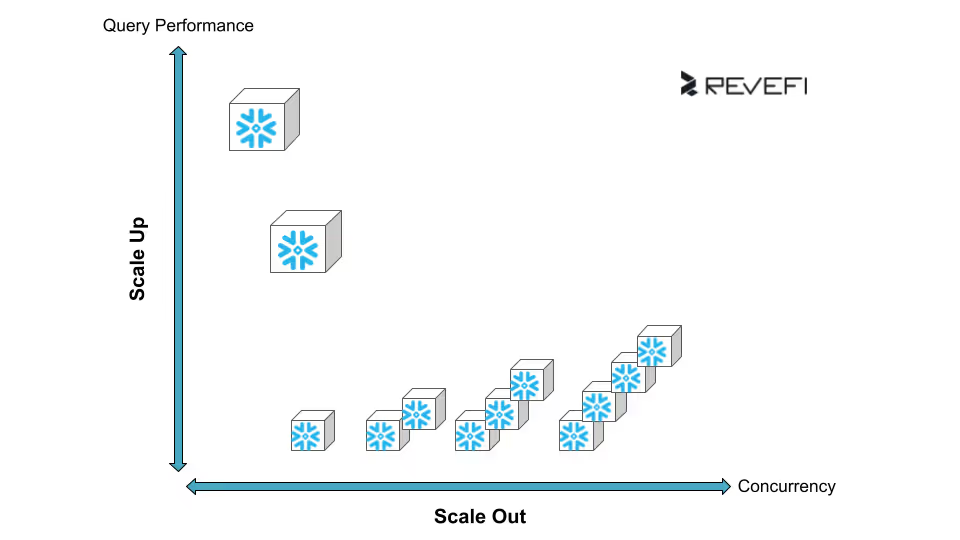
Proper warehouse right-sizing is equally important for balancing query latency and throughput. In many cases, Small or Medium warehouses deliver sufficient performance, and increasing to Large or X-Large sizes does not always produce proportional gains if workloads cannot fully leverage parallelism. Multi-cluster warehouses help manage concurrency by automatically scaling out during usage spikes and scaling back when demand decreases, ensuring compute resources are used efficiently.
Strategic Use of Caching
Caching plays a strategic role in cost and performance optimization, with Snowflake supporting metadata, result, and local warehouse caches. By configuring auto-suspend settings to keep warehouses running slightly longer, organizations can take advantage of the local SSD cache for recurring queries. This approach often proves more cost-effective than repeatedly starting cold warehouses that must reload data from remote storage, helping reduce both query latency and overall compute costs.
Conclusion
A Snowflake pricing guide is an essential tool for organizations transitioning to the cloud. These guides are incredibly convenient because they translate complex, abstract architecture into tangible benchmarks, such as credit costs per hour or flat monthly storage rates per terabyte.
However, while a guide provides a reliable baseline, it is rarely 100% accurate for predicting your final monthly invoice. Snowflake operates on a pure consumption-based model, meaning costs fluctuate based on real-time usage patterns that a static guide cannot foresee.
- Even a few seconds of warehouse use is billed as a full 60 seconds, increasing costs for short jobs.
- Snowpipe, clustering, and search optimization credits fluctuate and often exceed estimates.
- A single unoptimized query can cause unexpected credit spikes.
- Costs vary widely by cloud provider and region.
While a guide is perfect for high-level budgeting, true cost transparency requires active monitoring through Snowflake Resource Monitors and understanding root-cause pitfalls behind traditional Snowflake Cost Management.
While a guide is perfect for high-level budgeting, true cost transparency comes from understanding where your money is going, and how much you can actually save.
For a clear understanding of how much you can save with regards to Snowflake costs, Snowflake has a Pricing Calculator. And to understand how to use this Pricing Calculator, we have created an end-to-end guide to help you navigate through the pricing calculator.
Sources
- Understanding overall cost | Snowflake Documentation https://docs.snowflake.com/en/user-guide/cost-understanding-overall
- Understanding compute cost | Snowflake Documentation https://docs.snowflake.com/en/user-guide/cost-understanding-compute
- Snowflake Editions | Snowflake Documentation, https://docs.snowflake.com/en/user-guide/intro-editions
- Warehouse considerations | Snowflake Documentation, https://docs.snowflake.com/en/user-guide/warehouses-considerations
- Cost Optimization | Snowflake https://www.snowflake.com/en/developers/guides/well-architected-framework-cost-optimization-and-finops/
- Understanding compute cost | Snowflake Documentation https://docs.snowflake.com/en/user-guide/cost-understanding-compute#serverless-credit-usage
- Snowpipe costs | Snowflake Documentation https://docs.snowflake.com/en/user-guide/data-load-snowpipe-billing
- Do you know the true cost of your Snowflake license in 2025? | Revefi https://www.revefi.com/get-control-over-snowflake-cost
- 6 Common Problems Faced by Snowflake Customers | Revefi https://www.revefi.com/blog/common-snowflake-problems

