



Getting Started: Understanding Your Snowflake Expenses First
Snowflake offers unparalleled scalability for managing massive datasets, without sacrificing speed. This makes it a preferred cloud data platform for businesses globally.
However, without proper management, those scaling capabilities can directly translate into exorbitant bills.
So, before diving into optimizations, it's crucial to pinpoint what drives your Snowflake bills. Without grasping the underlying pricing structure, many users end up jumping the gun. They rush to tweak individual queries or trim storage without realizing these might not be the main culprits.
So, the most important step is to begin by reviewing the cost overview in Snowflake's admin dashboard, and break down expenses across services like:
- Compute
- Storage
- Serverless features.
.avif)
Keeping this in mind, let us explore the ten different Snowflake cost optimization techniques that business, and data leaders should know in 2026.
1. Set Auto Suspend to 60 Seconds
Implement a 60-second auto-suspend for all warehouses. Reserve longer intervals only for interactive applications where instant response times are critical and cache hits are common. When in doubt, start at 60 seconds and adjust upward if needed.
ALTER WAREHOUSE compute_wh SET AUTO_SUSPEND = 60;This setting matters because Snowflake bills per second of runtime, with a 60-second minimum. Avoid settings under 60 seconds to prevent overlapping charges; higher values mean paying for idle time.
Default UI creations often use 5 minutes, so double-check new setups.
When a warehouse restarts, you're charged at least one minute. Lower suspend times risk double-billing in quick successive queries.
2. Right-Size Your Warehouses
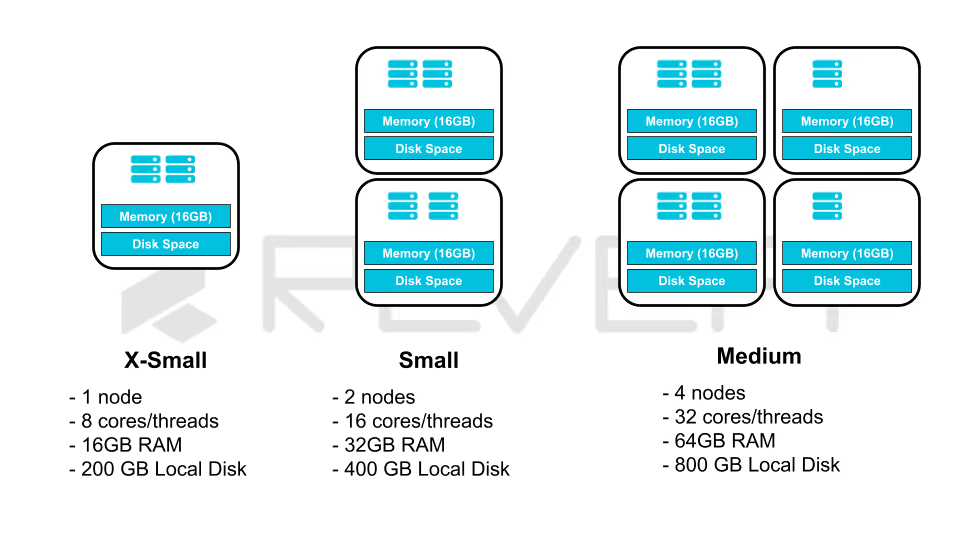
Warehouse power and pricing grow exponentially. Oversized warehouses frequently account for excess spend. Test smaller sizes and monitor effects; if performance holds, shrink further. Refer to guides on selecting optimal warehouse sizes for detection tips.
For example, an hourly data import handling 10 files on a Small warehouse (2 nodes, 16 cores) uses only 10 cores max. Switching to X-Small cuts costs without loss.
3. Combine Warehouses to Avoid Sprawl
Excessive warehouses lead to underutilization and wasted credits. Track efficiency metrics like active processing time percentage. Low values indicate idle pay time.
Minimize warehouse count for better utilization. Group by performance needs rather than data domains. For example, one for all ingestion, one for processing, one for analytics outperforms separate ones per department. Ingestion can share a multi-cluster X-Small; analytics might need larger for speed.
Assign queries to the smallest viable warehouse for cost efficiency.
4. Lower Query Execution Frequency
Many batch jobs default to hourly runs, but assess if consumers require that freshness. Reducing frequency slashes costs.
Assuming $100,000 annual for hourly full refreshes:
.avif)
5. Cluster Tables Based on Access Patterns
Pruning skips irrelevant micro-partitions, cutting network reads—a key expense. For effective pruning, cluster by filtered columns, like date fields in time-based queries.
Example: Cluster orders by creation date.
Queries like:
SELECT * FROM orders WHERE created_at > '2022-08-14';This scans far fewer partitions, saving both time and money.
6. Eliminate Unused Tables
Storage is minor but adds up with backups. Identify unused via access history (Enterprise+) or sort by billable bytes:
SELECT
    table_catalog AS database_name,
    table_schema AS schema_name,
    table_name,
    (active_bytes + time_travel_bytes + failsafe_bytes + retained_for_clone_bytes) AS total_billable_bytes
FROM snowflake.account_usage.table_storage_metrics
ORDER BY total_billable_bytes DESC
LIMIT 10;
7. Implementing Rigorous Warehouse Access Governance
Governance is the cornerstone of FinOps. Without strict Role-Based Access Control (RBAC), costs can escalate through "accidental" over-provisioning.
- Restricting ALTER Privileges: Only a select few (AccountAdmins or SysAdmins) should have the ability to resize a warehouse. If a general developer role has ALTER permissions, they may scale a warehouse to 4X-Large for a simple task and forget to scale it back down.
- Resource Monitors and Timeouts:
- Auto-Suspend: Set the AUTO_SUSPEND property to 60 seconds for standard workloads.
- Statement Timeouts: Use STATEMENT_TIMEOUT_IN_SECONDS to kill runaway queries that exceed a reasonable time limit (e.g., 1 hour), preventing a single bad join from costing thousands of dollars.
- Functional Separation: Map specific warehouses to specific business units. This allows for clear chargeback and showback reporting, holding departments accountable for their own cloud spend.
This is a critical function, because this prevents unauthorized scaling and "shadow spend", which leads to uncontrolled Snowflake bills across your organization.
8. Implement Query Timeouts
Prevent runaway queries with pre-coded engineered timeouts, like:
ALTER WAREHOUSE compute_wh SET STATEMENT_TIMEOUT_IN_SECONDS = 1800; -- 30 minutesThis halts long runners, saving thousands of dollars worth of Snowflake platform credits.
9. Deploy Resource Monitors
Monitor and cap credit usage at account, warehouse, or user levels. Set alerts or limits to enforce budgets:
This ensures that Snowflake bills stay within bounds.By applying these Snowflake cost optimization techniques, you can significantly lower expenses while maintaining performance. Start with high-impact areas like compute and iterate based on your usage patterns.
Scaling Snowflake Cost Optimization with
ML and AI-Powered Intelligence
While these ten techniques provide a strong foundation for optimizing Snowflake costs, applying them consistently at scale is where most organizations struggle.
Manual Snowflake cost management inevitably fails as organizations scale because human intervention cannot match the velocity of cloud elasticity.
Why Manual Efforts Fail:
- Manual oversight identifies "bill shock" only after the budget is exceeded
- Human-led tagging and auditing are prone to error, leading to inaccurate cost attribution
- Manual guardrails lack the nuance to distinguish between a critical high-load process and an inefficient runaway query
In short, manual management creates a scalability gap. As data footprints expand, the labor cost of monitoring Snowflake eventually rivals the cloud waste itself, turning a performance-driven platform into a financial unpredictability.
Snowflake’s consumption-based model generates cost signals at the query, warehouse, and workload level, which is far more granularity than manual monitoring or static dashboards can realistically manage!
Revefi deploys AI-powered cost optimization to continuously analyze Snowflake usage patterns across queries, warehouses, users, and teams to automatically surface inefficiencies, cost anomalies, and optimization opportunities. Instead of reactive cost reviews, teams gain proactive recommendations such as right-sizing warehouses, eliminating wasteful queries, and aligning compute usage with business-critical workloads.
Want to discover more? Schedule a free demo today with our in-house Snowflake experts.

.avif)