

Google BigQuery is a well-architected cloud data platform that grants users the ability to query hundreds of terabytes in mere seconds. This serverless magic removes the headache of infrastructure management, yet it introduces a different kind of friction in the form of an unexpected, and astronomical bill.
This tension between limitless analytical power and unpredictable costs is a common challenge for data teams across the globe.
This guide serves as a definitive roadmap for mastering that balance. We move beyond surface-level tips to explore the mechanics of BigQuery pricing, identifying exactly where expenses tend to spiral. We break down high-impact strategies across four critical pillars:
- Pricing Models:
Navigating the shift from "On-demand" to "Capacity-based" (Slots) billing. - Query Optimization:
Reducing bytes scanned through smarter SQL syntax. - Table Architecture:
Implementing partitioning and clustering to prune data. - Governance:
Setting up proactive monitoring and custom alerts to stop overspending.
Our goal is to provide a single, actionable resource that eliminates the need to cross-reference fragmented tutorials to protect your bottom line. This guide will take you through the cost factors, and what data teams need to do in order to eliminate unnecessary Google BigQuery costs.
Navigating BigQuery Pricing and Optimization
Google BigQuery serves as the analytical backbone for modern enterprises, all the way from Silicon Valley startups to Singaporean financial institutions. However, its immense power comes with a complex billing structure.
Understanding the four main dimensions of Google BigQuery pricing is essential for maintaining high cloud ROI and preventing bill-shock.
What are Compute costs in Google BigQuery?
Compute (the processing power used to execute SQL) is the primary driver of BigQuery expenses. Choosing the wrong execution model is the most frequent financial pitfall for US-based data teams.
On-Demand Pricing (Pay-As-You-Go)
This is the default model, ideal for low-volume or unpredictable workloads where you don't want to manage capacity.
- Cost: $6.25 per TiB scanned (US multi-region)
- Free Tier: The first 1 TiB per month is free
- The Risk: Costs scale linearly with poor query habits. A single analyst running SELECT* on a 10 TB table costs $62.50 instantly.
If this pattern repeats across a 20-person team, daily costs can spiral into the thousands before the day even ends!
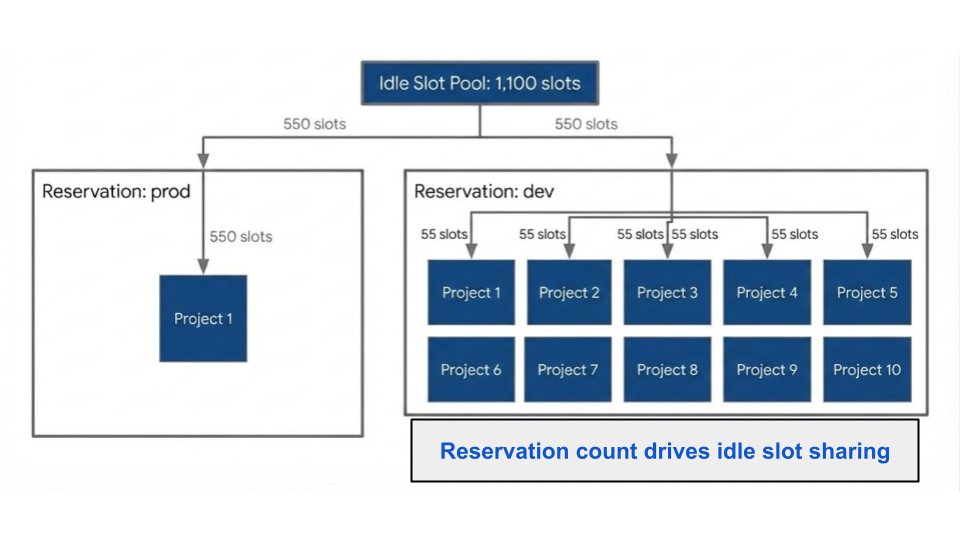
Capacity Pricing (BigQuery Editions)
Introduced in 2023, this model uses Slots (virtual CPUs) billed per slot-hour. It provides predictable monthly spend for established organizations.
- Standard:
Best for ad-hoc analysis and small-scale production. - Enterprise:
The quintessential corporate "sweet spot.” It includes Idle Slot Sharing, allowing unused capacity to be borrowed by other workloads within the same organization, and BI Engine acceleration. - Enterprise Plus:
Essential for high-security sectors such as Healthcare, Government, and Finance that require FedRAMP, CJIS, or ITAR compliance and advanced disaster recovery.
| Edition | Pay-as-You-Go | 1-Year Commitment | 3-Year Commitment |
|---|---|---|---|
| Standard | $0.04/slot per hour | $0.036/slot per hour | $0.032/slot per hour |
| Enterprise | $0.06/slot per hour | $0.048/slot per hour | $0.038/slot per hour |
| Enterprise Plus | $0.10/slot per hour | $0.080/slot per hour | $0.060/slot per hour |
For a better understanding on how Google Slot piercing works, check out our detailed guide on the same.
Storage Pricing: Active vs. Long-Term
While cheaper than compute, storage costs compound over time. Google BigQuery automatically optimizes this for you through data lifecycle management:
- Active Storage: Tables or partitions modified within the last 90 days cost $0.02 per GB/month.
- Long-Term Storage: Tables untouched for 90+ consecutive days receive an automatic 50% discount ($0.01 per GB/month).
This is calculated at the partition level. If you only update "today's" data in a partitioned table, your historical data automatically drops to the long-term rate, saving significant budget without manual intervention.
Ingestion, Transfers, and Add-ons
Real-time insights carry a premium. Streaming inserts cost $0.01 per 200 MB. For many North American logistics and retail firms, switching from continuous streaming to micro-batch loading (which is free) can reduce ingestion overhead by 90% without sacrificing operational visibility.
The "break-even" point between On-Demand and Capacity pricing typically occurs when your organization consistently scans more than 467 TiB per month. By utilizing the Google Slot Estimator, teams can identify if moving to reserved capacity will provide a rate of savings typical for high-growth data environments.
High-Impact Query Optimization: Slashing Your BigQuery Bill
In the context of cloud data warehousing, query optimization is more than just about speed. It’s about fiscal responsibility, because Google BigQuery’s on-demand model charges based on bytes scanned, where an unoptimized query is essentially a "blank check" written to the Google Cloud.
For data teams, the goal is simple: reduce the data footprint of every compute function execution across the BigQuery ecosystem.
Here is how to implement high-leverage changes that satisfy both performance and budget.
The Golden Rule: Eliminate SELECT*
The most expensive habit in BigQuery is the "select all" statement. BigQuery utilizes columnar storage, meaning it only reads the specific columns you request.
- The Cost Trap: If a table has 100 columns but you only need 5, SELECT* forces BigQuery to scan (and bill you for) the remaining 95.
- The Solution: Explicitly name your columns. This single change often reduces data processed by 80% to 90% on wide enterprise tables.
Contrary to popular belief, LIMIT does not save money. BigQuery scans the entire table first and applies the limit last. To explore data cheaply, use TABLESAMPLE instead.
Structural Efficiency and Guardrails
Optimizing the workflow around your queries can prevent accidental overspending before a single byte is processed.
- Filter Early and Often: Use WHERE clauses as close to the source as possible. By pruning rows before they reach joins or aggregations, you minimize the volume of data flowing through your entire pipeline.
- Leverage Dry Runs: Before clicking "Run," check the query validator in the console. It provides a free estimate of bytes to be processed.
- Set "Maximum Bytes Billed": Implement hard caps at the project or query level. This acts as a circuit breaker, automatically killing any query that exceeds a pre-defined cost threshold (e.g., 1 TB).
Advanced Performance Strategies
For complex ETL pipelines and recurring BI dashboards, architectural changes offer the highest ROI.
1. Materialize Intermediate Results
If your pipeline re-scans the same massive source tables multiple times a day, write those intermediate steps to permanent tables. The cost of active storage is a fraction of the cost of repetitive compute scans.
2. Master the Join Logic
Joins are where many BigQuery budgets go to die. Follow these US-standard best practices:
- Table Ordering: Place your largest table on the left side of a JOIN. BigQuery's optimizer uses this to broadcast the smaller table to all workers efficiently.
- Cluster on Join Keys: Ensure both tables are clustered on the keys being joined. This allows BigQuery to "prune" irrelevant data blocks, significantly reducing the scan size.
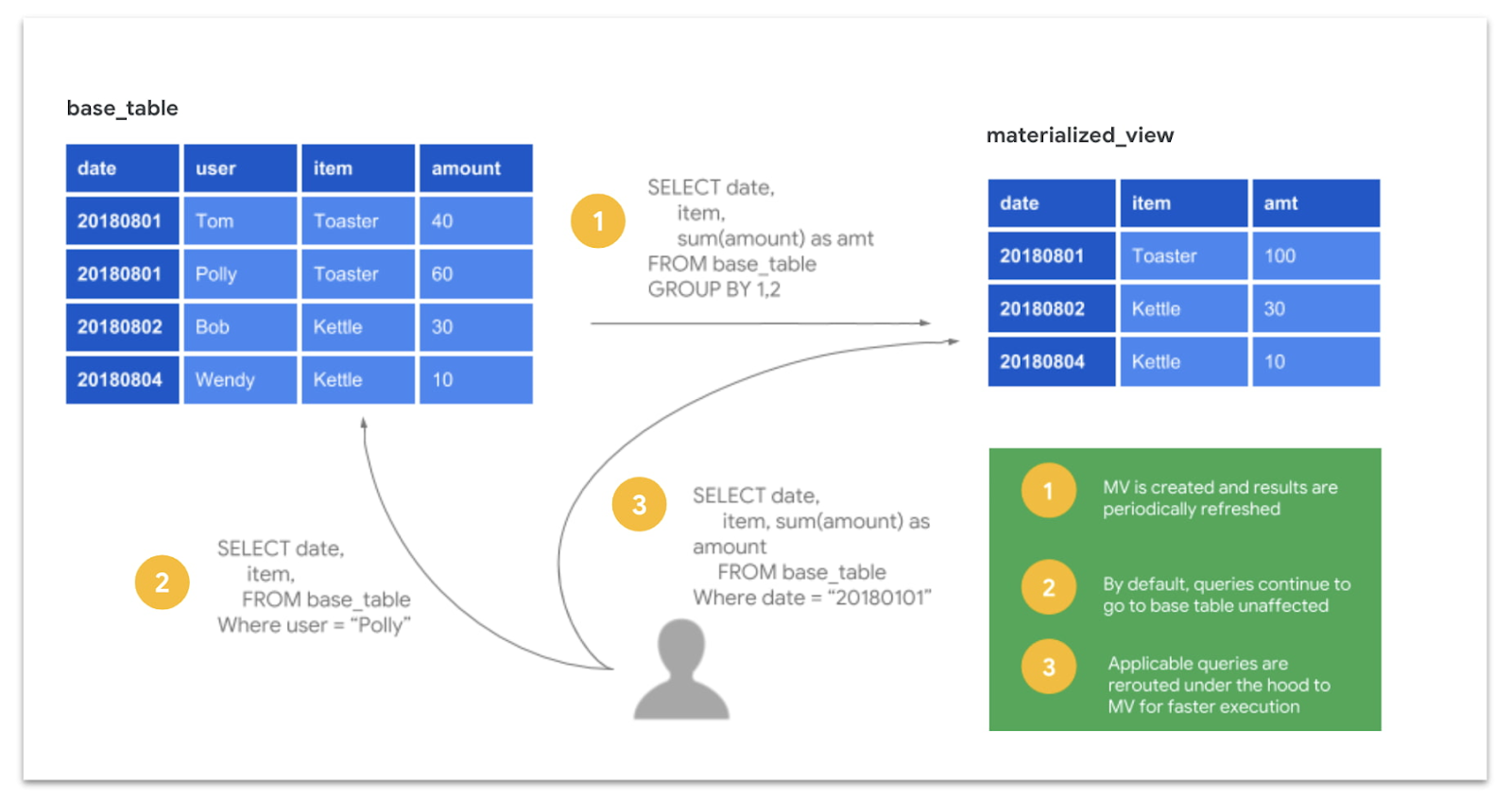
3. Use Materialized Views
For dashboards that aggregate the same metrics daily (e.g., California regional sales or NYC user engagement), materialized views are essential. They pre-compute results and incrementally refresh, turning a billion-row scan into a lightning-fast lookup.
4. Improving Join Performance
Inefficient join operations are frequently the primary source of unexpected cloud costs. To improve performance and reduce overhead, consider these essential strategies:
- Prioritize Table Ordering: Always position your largest table on the left side of the JOIN clause. This allows BigQuery’s optimizer to execute broadcast joins more effectively, distributing the smaller table across worker nodes for faster processing.
- Filter Data Early: Don’t wait until after the join to narrow down your results. By applying WHERE filters to individual tables before joining them, you significantly decrease the volume of data being processed.
Utilize Clustering:When both datasets are clustered on the join keys, BigQuery can perform block pruning. This allows the engine to skip irrelevant data segments entirely before the join operation even starts.
Imagine you are joining a table of 1 billion rows with another containing 500 million rows. Without pre-filtering, the system must scan and process up to 1.5 billion rows. By filtering each dataset to only include relevant subsets prior to the join, you can often reduce the computational load by 10x or more.
For a detailed breakdown on how to slash Google BigQuery query costs, you can read our more detailed blog on the same.
Automating BigQuery Cost Savings with Partitioning and Clustering
While SQL query optimization focuses on “how you write the code”, partitioning and clustering focuses on how you structure your data. When implemented correctly, these techniques reduce BigQuery costs by default. Because the platform scans significantly less data to deliver results, you achieve high performance without manual query tuning.
Partitioning: Dividing Data for Efficiency
Partitioning breaks a massive table into smaller, physical segments based on a specific column, which is usually a DATE, TIMESTAMP, or INTEGER. When a query filters by the partition column, BigQuery "prunes" the metadata, reading only the relevant segments and ignoring the rest.
For example, if a table contains five years of daily transaction records, a query filtered for a single month will scan only 1/60th of the total data. This pruning happens automatically behind the scenes.
Partitioning Strategies:
- Time-Unit Column: Partition based on a DATE, DATETIME, or TIMESTAMP column in your schema.
- Ingestion Time: BigQuery partitions data based on when it was loaded, using the _PARTITIONTIME pseudo-column.
- Integer Range: Ideal for partitioning by specific ID ranges or numeric categories.
- Granularity: You can define partitions as hourly, daily (default), monthly, or yearly depending on your typical query patterns.
A common mistake is "sharding", which results in the creation of hundreds of separate tables like sales_20250101. This creates massive metadata overhead and complicates permissions. Time-partitioned tables offer the same performance benefits with none of the management headaches.
Clustering: Organizing Data Within Partitions
Clustering sorts and organizes the data within each partition based on the values of one or more columns (up to four). When you filter by a clustered column, BigQuery uses block-level metadata to skip irrelevant data blocks entirely.
Clustering is most effective for tables larger than 1GB and for columns with high cardinality (many unique values) that frequently appear in WHERE clauses, such as:
- user_id or account_id
- campaign_id
- product_category
- country_code
The Power Duo: Combining Both
The most cost-effective architecture uses partitioning and clustering together. By partitioning by time and clustering by your primary filter dimensions, you create a highly surgical data structure.
For instance, a marketing events table partitioned by event_date and clustered by campaign_id allows a query targeting a specific campaign on a specific day to scan a tiny fraction of the dataset. This dual-layer approach is the gold standard for managing large, frequently queried tables in a cost-conscious enterprise environment.
Hidden Strategies for BigQuery Storage Cost Reduction
While compute resources typically dominate cloud budgets, storage costs in BigQuery can compound silently if left unmanaged. Implementing a few strategic practices ensures your data footprint remains lean and cost-effective across your US-based or global cloud regions.
Capitalize on Long-Term Storage Pricing
BigQuery offers a built-in "loyalty discount" for inactive data. Any table or partition that remains unmodified for 90 consecutive days automatically receives a 50% price reduction.
- Automatic Savings: No manual intervention is required to trigger this lower rate.
- Granular Benefits: For partitioned tables, each partition qualifies for the discount individually. This makes it a perfect, "set-it-and-forget-it" savings strategy for archival or reference data.
Evaluate Physical vs. Logical Storage Billing
Traditionally, Google BigQuery bills based on logical storage (the uncompressed size of your data). However, you can opt into physical storage billing, which charges based on the actual bytes stored on disk after compression.
If your data is heavily compressed (high compression ratios), physical billing can significantly slash costs.
Physical storage rates are higher per GB, so it is essential to calculate your compression ratios before making the transition.
Implement a "Quarterly Cleanup" Protocol
Unused development datasets, deprecated tables, and "temporary" test data are common sources of "hidden" expenses. Establishing a routine to audit your environment is a high-value FinOps habit:
- Identify Inactive Data: Use information schema queries to find tables that haven't been accessed in over 90 days.
- Delete or Archive: If the data isn't serving a production or compliance need, delete it or move it to a lower-cost cold storage tier like Google Cloud Storage (GCS) Nearline.
Leverage Destination Tables for Repeated Queries
Running the same massive query repeatedly is a common source of wasted spend. Instead, write the initial query results to a permanent destination table.
- Efficiency: Querying a smaller, pre-aggregated result set downstream is significantly cheaper and faster than re-scanning terabytes of raw source data every time.
- Automation: Use scheduled queries to refresh these destination tables at set intervals (e.g., daily or hourly).
Gaining Visibility Into Your Google BigQuery Costs Through Monitoring and Governance
The most advanced cost optimization techniques only provide lasting savings if you have total visibility into your entire Google BigQuery estate. Without consistent oversight, cloud costs naturally drift upward as new users, automated pipelines, and ad-hoc queries are introduced.
In the US enterprise landscape, robust governance is the difference between a predictable budget and an end-of-month surprise.
Leverage INFORMATION_SCHEMA for Real-Time Truth
In BigQuery, the INFORMATION_SCHEMA serves as your primary metadata repository. These views are queryable via standard SQL and provide granular details on every job executed within your projects.
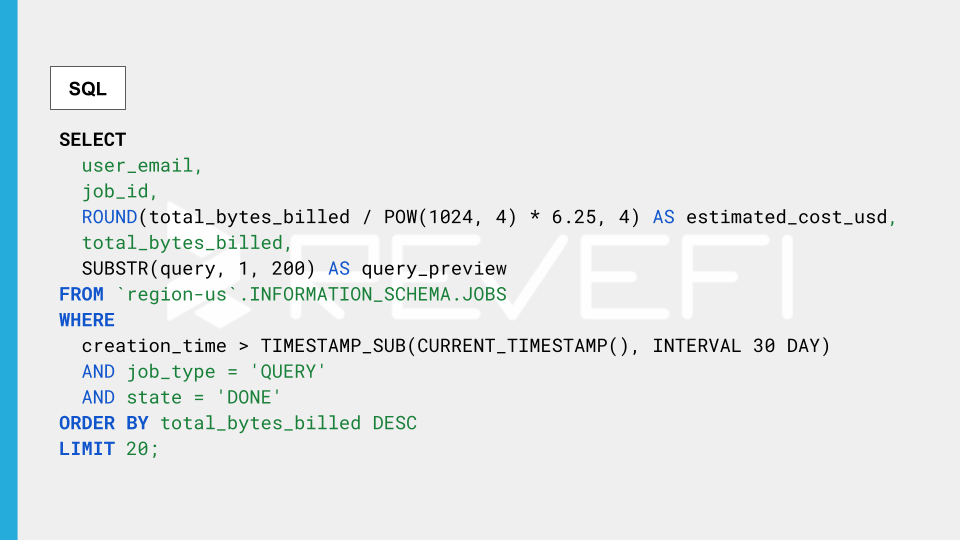
- The Power of INFORMATION_SCHEMA.JOBS: This view is essential for cost analysis. It tracks who ran what, when, how much data was scanned, and how long it took.
- Identify High-Impact Targets: Typically, the top 10–20 most expensive queries account for the majority of your spend. Optimizing a single recurring, high-cost pattern can reduce your monthly invoice more effectively than any other single architectural change.
Establish Proactive Budget Guardrails and Alerts
It’s recommended that you don't wait for the bill to arrive in order to discover a leak. In a fully-proactive environment, users are encouraged to configure Google cloud billing alerts at multiple thresholds (such as 50%, 80%, and 100% of your monthly target).
- Early Warning System: These notifications act as an early-warning signal, allowing your FinOps team to catch cost anomalies or runaway service accounts before they escalate.
- Quick Implementation: Setting these up takes less than five minutes but remains one of the highest-value governance actions available.
Implement Custom Query Quotas
For organizations with large teams or multiple departments, custom daily query quotas provide a necessary hard guardrail.
- Project and User Limits: You can set limits at the project or individual user level. Once a quota is reached, additional queries are blocked until the next window, preventing a single inefficient process from draining your entire daily budget.
- Budget Discipline: This enforces a culture of fiscal responsibility among analysts and data engineers.
Utilize Sandbox Environments for Exploration
Separating production workloads from exploratory analysis is a proven strategy for cost containment. By creating a dedicated sandbox project, you can implement:
- Stricter Quotas: Prevent ad-hoc "select *" queries from hitting massive production tables.
- Sampled Data Access: Encourage analysts to use data previews or sampled subsets rather than full production datasets for initial testing.
- Clear Attribution: A sandbox environment allows for clean cost accounting, making it easy to distinguish between spend on R&D, production pipelines, and BI dashboards.
High-Impact Performance Strategies For Advanced BigQuery Cost Optimization
To truly master Google BigQuery cost management in a global enterprise environment, you must move beyond basic filtering and into advanced architectural efficiencies.
These professional-grade techniques target the most resource-intensive workloads (such as data transformations and business intelligence (BI) reporting) to deliver massive reductions in compute spend.
Incremental Data Processing
Traditional data pipelines often rely on "full-table rebuilds," which re-process every row of data every time a script runs. Incremental processing changes the game by only transforming new or modified records.
- Massive Efficiency: Shifting to incremental models can slash compute consumption by 80% to 95% compared to full rebuilds.
- Native Tooling: This strategy is a core feature of modern data stack tools like dbt (incremental models) and Google Dataform (incremental tables).
- Best Use Cases: It is the gold standard for high-volume, append-only datasets such as transaction histories, event logs, and IoT sensor data.
Strategic Result Caching
BigQuery offers a powerful, "hidden" cost-saver, where it caches query results for 24 hours at zero cost. If a query is repeated within this window and the underlying data remains unchanged, BigQuery serves the result instantly without scanning a single byte.
- No-Cost Performance: Because cached results incur $0 in billing, they are essential for optimizing repetitive tasks.
- Smart Scheduling: Align your dashboard refresh intervals and automated pipeline triggers to sync with data update cycles. If your data only changes once a day, refreshing a dashboard every hour is an avoidable expense (unless you lean on the cache).
BigQuery BI Engine for Dashboard Acceleration
For organizations heavily reliant on Looker, Looker Studio, or Tableau, the BigQuery BI Engine acts as a high-speed, in-memory acceleration layer.
- Sub-Second Response Times: By storing frequently accessed data in memory and using a vectorized query engine, BI Engine delivers near-instant results for dashboard users.
- Cost Predictability: By using a BI Engine reservation, you can offload heavy dashboard query traffic from your standard slot or on-demand processing. This is particularly effective for high-concurrency environments where multiple users are filtering the same datasets throughout the business day.
Agentic AI For Autonomous Data Cloud Cost Management
While most of the techniques in this guide are tried, and tested techniques to eliminate avoidable costs across your Google BigQuery ecosystem, there’s a catch! These techniques require human intervention (or judgment) to implement.
A trained individual has to audit the queries, redesign the tables, evaluate pricing model trade-offs, and watch the dashboards. That works at a certain scale. However, it stops being effective when you have dozens of teams, hundreds of pipelines, and thousands of queries running daily.
AI-powered data observability platforms (built specifically for cloud data cost management) connect directly to Google BigQuery's usage data and continuously analyzes query patterns, slot consumption, storage utilization, and pipeline behavior to surface optimization opportunities automatically.
In practice, this means:
- Continuous analysis of INFORMATION_SCHEMA to identify the highest-cost queries, users, and pipelines (with specific recommendations, not just raw data)
- Slot right-sizing recommendations based on actual usage patterns rather than estimates
- Real-time anomaly detection when costs spike unexpectedly due to a rogue query, an unpartitioned scan, or a sudden increase in streaming inserts
- Granular cost attribution by team, project, and pipeline, thereby enabling accurate chargeback and data-driven prioritization
- Storage optimization recommendations identifying unused tables, candidates for archival, and datasets where physical billing would save money
The result is that organizations using agentic AI solutions typically witness around 30-70% reduction in BigQuery spend, and sustain those reductions as workloads evolve.